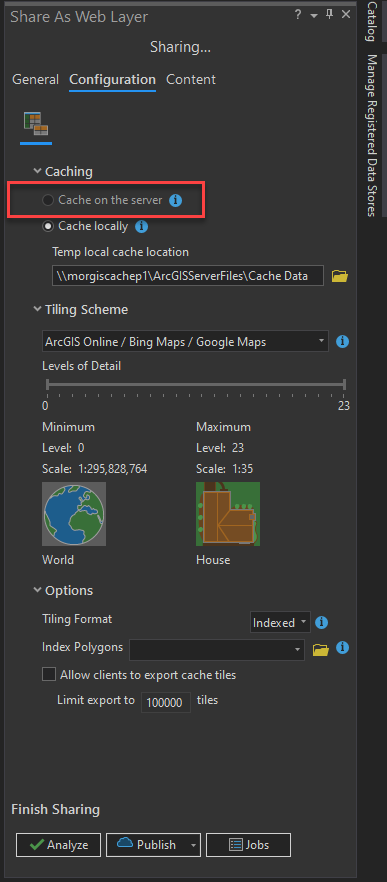
When attempting to publish Vector Tile Caches within Pro 2.8.2 and connected to my portal I am unable to choose the option to “Cache on the server”. I’ve troubleshot a number of suspected issues, including:
- Source data resides only in a fGDB and can't support an associated Feature service. Despite moving this data into SDE I still can’t select this option.
- Settings set on the hosting server so that we can't copy feature data to it. Changed the settings on the hosting server to allow us to copy data to it. Yet I still can’t select this option.
- Manually restarted portal and associated Datastore. Nothing changed.
What may be related to this issue is:
- both federated servers within our portal are throwing a CERT error. However, they do validate and show as healthy so I'm unsure if this would impact attempting to copy data to the hosting server.
- (possibly related to the above) I can not access https://myhostingserver:2443/arcgis/datastoreadmin/ as I just get the error:
{
  "error" : {
    "code" : 403,
    "message" : "Unable to process this request.",
    "details" : null
  }
}I'm wondering is the CERT is somehow different between the portal and datastore? Any advice is gratefully received.
@JakeSkinner ...?


