In my project I am having a dockpanel with two panes inside. All views give me errors, still the project can be built...
Here the structure of my project:
Stepper
|_ Commands
|_ Models
|_ ViewModels
|_ PaneHeaderControlViewModel.cs
|_ PaneHeaderRulesViewModel.cs
|_ Views
|_ PaneHeaderControlView.xaml
|_ PaneHeaderRulesView.xaml
_ StepperDockpane.xaml
_ StepperDockpaneViewModel.cs
Here the content of StepperDockpane.xaml
<UserControl x:Class="Stepper.StepperDockpaneView"
             xmlns="http://schemas.microsoft.com/winfx/2006/xaml/presentation"
             xmlns:x="http://schemas.microsoft.com/winfx/2006/xaml"
             xmlns:mc="http://schemas.openxmlformats.org/markup-compatibility/2006"
             xmlns:d="http://schemas.microsoft.com/expression/blend/2008"
             xmlns:ui="clr-namespace:Stepper"
             xmlns:extensions="clr-namespace:ArcGIS.Desktop.Extensions;assembly=ArcGIS.Desktop.Extensions"
             xmlns:controls="clr-namespace:ArcGIS.Desktop.Framework.Controls;assembly=ArcGIS.Desktop.Framework"
             xmlns:viewModel="clr-namespace:Stepper.ViewModels"
             xmlns:view="clr-namespace:Stepper.Views"
             mc:Ignorable="d"
             d:DesignHeight="600" d:DesignWidth="300"
             d:DataContext="{Binding Path=ui.StepperDockpaneViewModel}">
    <UserControl.Resources>
        <ResourceDictionary>
            <ResourceDictionary.MergedDictionaries>
                <extensions:DesignOnlyResourceDictionary Source="pack://application:,,,/ArcGIS.Desktop.Framework;component\Themes\Default.xaml"/>
            </ResourceDictionary.MergedDictionaries>
            <DataTemplate DataType="{x:Type viewModel:PaneHeaderRulesViewModel}">
                <view:PaneHeaderRulesView />
            </DataTemplate>
            <DataTemplate DataType="{x:Type viewModel:PaneHeaderControlViewModel}">
                <view:PaneHeaderControlView />
            </DataTemplate>
        </ResourceDictionary>
    </UserControl.Resources>
    <Grid>
        <Grid.RowDefinitions>
			<RowDefinition Height="Auto"/>
			<RowDefinition Height="*"/>
        </Grid.RowDefinitions>
        <DockPanel Grid.Row="0" LastChildFill="False" KeyboardNavigation.TabNavigation="Local" Height="30" Margin="5,0">
            <ListBox x:Name="primaryNavigator" DockPanel.Dock="Left"
                     Style="{DynamicResource Esri_ListBoxPanelIndicator}"
                     ItemsSource="{Binding PrimaryMenuList}"
                     SelectedIndex="{Binding SelectedPanelHeaderIndex, Mode=TwoWay}"
                     IsSynchronizedWithCurrentItem="True" />
            <controls:BurgerButton DockPanel.Dock="Right"
                                   ToolTip="{Binding BurgerButtonTooltip}"
                                   PopupMenu="{Binding BurgerButtonMenu}"/>
        </DockPanel>
        <ScrollViewer Grid.Row="1" VerticalScrollBarVisibility="Auto" HorizontalScrollBarVisibility="Disabled">
            <StackPanel>
                <ContentPresenter Content="{Binding CurrentPage}"></ContentPresenter>
            </StackPanel>
        </ScrollViewer>
    </Grid>
</UserControl>
Line 17 returns:
Error: Could not load file or assembly 'ArcGIS.Desktop.Framework, Culture=neutral' or one of its dependencies. The referenced file could not be found.
Line 34 returns:
Warning: The resource "Esri_ListBoxPanelIndicator" could not be resolved.
------------------------------------
Here the relevant content of PaneHeaderRulesView.xaml
<UserControl x:Class="Stepper.Views.PaneHeaderRulesView"
             xmlns="http://schemas.microsoft.com/winfx/2006/xaml/presentation"
             xmlns:x="http://schemas.microsoft.com/winfx/2006/xaml"
             xmlns:mc="http://schemas.openxmlformats.org/markup-compatibility/2006"
             xmlns:d="http://schemas.microsoft.com/expression/blend/2008"
             xmlns:extensions="clr-namespace:ArcGIS.Desktop.Extensions;assembly=ArcGIS.Desktop.Extensions"
             xmlns:ui="clr-namespace:Stepper.Views"
             xmlns:i="http://schemas.microsoft.com/xaml/behaviors"
             xmlns:viewmodels="clr-namespace:Stepper.ViewModels"
             d:DataContext="{d:DesignInstance Type=viewmodels:PaneHeaderRulesViewModel}"
             mc:Ignorable="d"
             d:DesignHeight="520" d:DesignWidth="300">
     <UserControl.Resources>
        <ResourceDictionary>
            <ResourceDictionary.MergedDictionaries>
                <extensions:DesignOnlyResourceDictionary Source="pack://application:,,,/ArcGIS.Desktop.Framework;component\Themes\Default.xaml"/>
            </ResourceDictionary.MergedDictionaries>
        </ResourceDictionary>
    </UserControl.Resources>
Line 16 returns:
Error: Could not load file or assembly 'ArcGIS.Desktop.Framework, Culture=neutral' or one of its dependencies. The referenced file could not be found.
------------------------------------
Here the relevant content of PaneHeaderControlView.xaml
<UserControl x:Class="Stepper.Views.PaneHeaderControlView"
             xmlns="http://schemas.microsoft.com/winfx/2006/xaml/presentation"
             xmlns:x="http://schemas.microsoft.com/winfx/2006/xaml"
             xmlns:mc="http://schemas.openxmlformats.org/markup-compatibility/2006"
             xmlns:d="http://schemas.microsoft.com/expression/blend/2008"
             xmlns:extensions="clr-namespace:ArcGIS.Desktop.Extensions;assembly=ArcGIS.Desktop.Extensions"
             xmlns:editing="clr-namespace:ArcGIS.Desktop.Editing;assembly=ArcGIS.Desktop.Editing"
             xmlns:ui="clr-namespace:Stepper.Views"
             xmlns:i="http://schemas.microsoft.com/xaml/behaviors"
             xmlns:viewmodels="clr-namespace:Stepper.ViewModels"
             d:DataContext="{d:DesignInstance Type=viewmodels:PaneHeaderControlViewModel}"
             mc:Ignorable="d"
             d:DesignHeight="520" d:DesignWidth="300">
.
.
.
                <editing:TableControl Grid.Row="2" x:Name="tableControl"
                                      AutomationProperties.AutomationId="_tableControl"
                                      HorizontalAlignment="Stretch"
                                      TableContent="{Binding Path=TableContent}"
                                      MinHeight="450"
                                      MaxHeight="500"
                                      RowContextMenu="{StaticResource StepperRowContextMenu}"
                                      SelectedRowContextMenu="{StaticResource StepperRowContextMenu}"
                                      ColumnContextMenu="{StaticResource StepperColumnContextMenu}">
                    <i:Interaction.Triggers>
                        <i:EventTrigger EventName="MouseDoubleClick">
                            <i:InvokeCommandAction Command="{Binding ZoomItemCommand}"/>
                        </i:EventTrigger>
                        <i:EventTrigger EventName="SelectedRowsChanged">
                            <i:InvokeCommandAction Command="{Binding GetSelectedRowCommand}"/>
                        </i:EventTrigger>
                    </i:Interaction.Triggers>
                </editing:TableControl>
Line 17 returns:
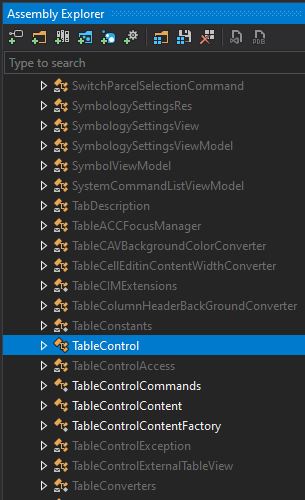
Error: XDG0008 The name "TableControl" does not exist in the namespace "clr-namespace:ArcGIS.Desktop.Editing;assembly=ArcGIS.Desktop.Editing".
I can clearly see in the Assembly Explorer of Visual Studio 2019 that ArcGIS.Desktop.Editing contains TableControl.
------------------------------------
On top of all this is every reference a la Style="{DynamicResource Esri_xyz}" marked with a warning that the resource could not be resolved.
I am using Visual Studio version 16.11.1
.NET Framework version 4.8.03752
ArcGIS Pro SDK for .NET in version 2.8.0.29751
ArcGIS Pro SDK for .NET (Utilities) in version 2.8.0.29751
and the project has x64 as platform target.
Any help is appreciated.


