Hi ArcGIS Enterprise experts,
We are about to start an on-premise multiple-machine deployment (Windows Server). Here is the high-level architecture of the ArcGIS Enterprise part behind the firewall.
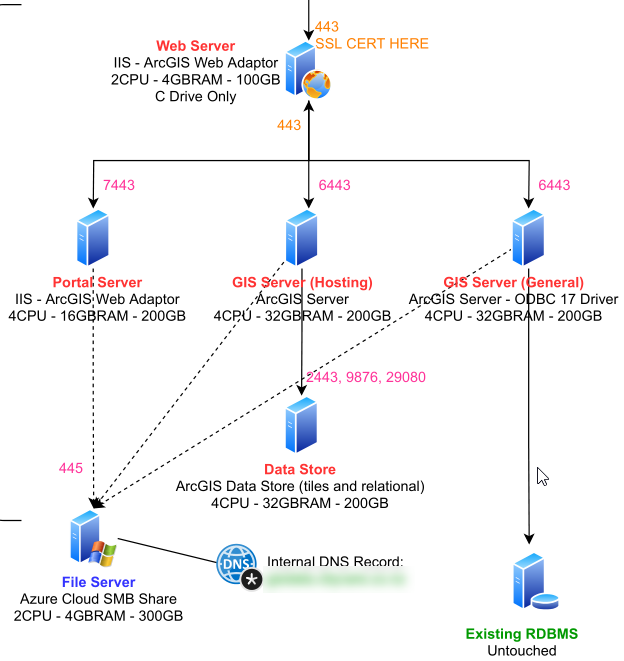
- Web Server (3 x Web Adaptor): 2 CPU - 4GB - C:100GB
- Portal: 4CPU - 16GB - C:100GB - D:100GB
- GIS Hosting: 4CPU - 32GB - C:100GB - D:100GB
- GIS General: 4CPU - 32GB - C:100GB - D:100GB
- Data Store: 4CPU - 32GB - C:100GB - D:100GB
The question is around hardware resource planning. What is the best practice in terms of:
1. Proper disk size for each of the boxes above? e.g. I can find the minimum requirements from documentation say 10GB spare size. But what is the optimal size for such deployment? What's the factor of planning disk size? What contributes to file size growth?
2. Installation location. Installation on the system drive i.e. C drive? Is it recommended to install ArcGIS to a different drive than C Drive? If so, what's the major benefit of putting the ArcGIS installation to a different drive?
Thanks for the help.




