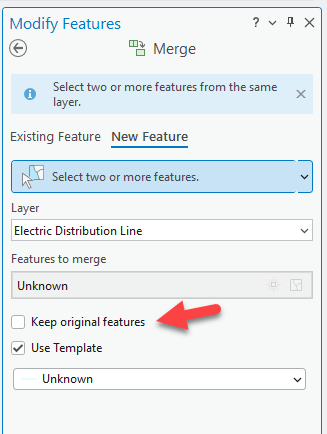
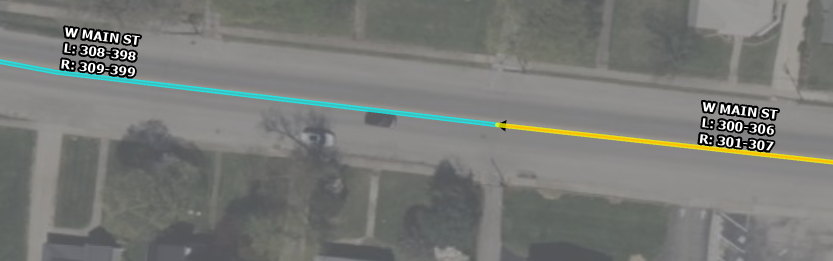
I've created an attribute rule to identify two road segments that have been merged using the Merge (Editing) tool and "merge" the address ranges together. In order for it to work successfully, the user must be sure to select the FIRST segment of the two being merged in terms of line direction to preserve attributes from in the Modify Features pane (the yellow highlighted segment in the screenshot below). The attribute rule fires on Delete, since a merge should consist of a Delete and an Update (when choosing to merge into an existing feature rather than a new feature). The rule successfully identifies another feature in the roads layer that has the same street name and whose end point is equal to the start point of the deleted feature - this should be the feature that is updated during the merge. I recognize this may not work perfectly in all scenarios but for now I'm just testing if possible to get this to work at all.
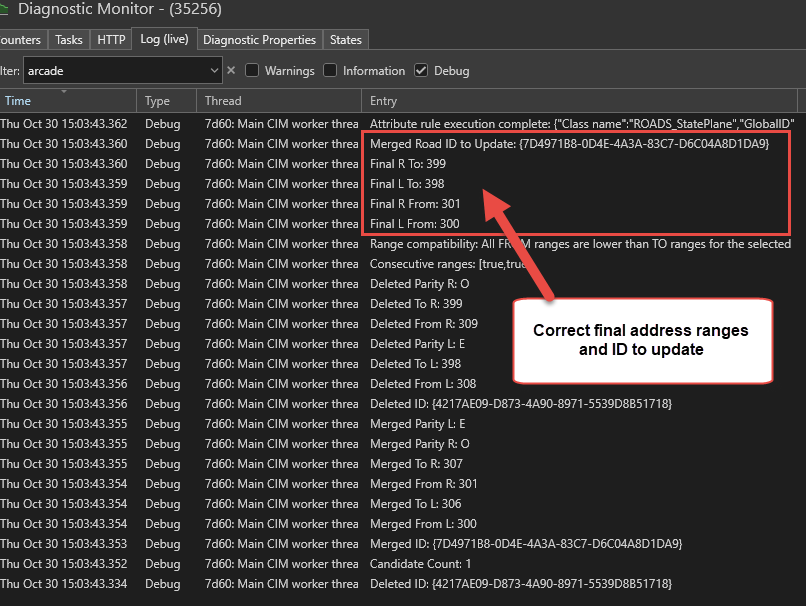
Both the deleted and updated feature from the merge are correctly identified within the attribute rule, and it successfully identifies the address ranges of both and performs calculations to ensure the ranges are compatible for merging and correctly sets the final "merged" range values (keeping the from left and from right ranges from the first/updated segment, and the to left and to right ranges from the second/deleted segment).
I then try to update the range fields in the first/updated segment using the Global ID. The rule runs successfully with no errors, but despite confirming that the final calculated ranges for the merge are correct using Console messages, the updated segment has the same address ranges as it originally did after the rule fires.
I tried to set up a test rule to run on Update to see if I could determine whether the Delete or Update happens first when using the Merge editing tool but couldn't get the Console messages to print in the Diagnostic Monitor log, although that may just be an issue with the content of the Arcade expression. I'm wondering if the Delete happens first so the feature to update as part of the merge is correctly updated, and then the Update happens so it somehow reverts to the original state from the merge.
Does anyone have any deeper insight into the inner workings of the Merge editing tool or suggestions on how this could potentially work?
@HusseinNasser2 I have sat in on a number of your attribute rule presentations at the Esri Dev & Tech Summit 2024 and 2025 as well as Esri UC 2025, as well as sat down with you for a bit at Dev & Tech Summit 2024 to get help with a similar attribute rule that could identify which 2 segments were just split and recalculate the ranges. This rule is sort of the opposite of that but I quickly realized it's a bit more complicated. I'm wondering if you might have any insight into this functionality and if you think it's possible to accomplish this merge functionality? Thanks in advance for any suggestions!
Below is the final portion of the Arcade expression for reference.
// The Arcade code leading up to this correctly identifies the 2 segments
// that are part of the merge, gets their attributes, and calculates
// whether the address ranges are compatible to be merged

// Compute final union ranges (deleted is SECOND, merged is FIRST)
var final_L_from = toNum(mergedFromL);
var final_L_to   = toNum(deletedToL);
var final_R_from = toNum(mergedFromR);
var final_R_to   = toNum(deletedToR);

// These console messages print out the correct final ranges
Console("Final L From: " + Text(final_L_from));
Console("Final L To: "   + Text(final_L_to));
Console("Final R From: " + Text(final_R_from));
Console("Final R To: "   + Text(final_R_to));

// This console message prints out the correct ID to be updated
Console("Merged Road ID to Update: " + Text(mergedRoad.GlobalID));

// Apply updates to the kept (merged) feature
return {
  'edit': [{
    'className': 'ROADS_StatePlane',
    'updates': [{
      'globalID': mergedRoad.GlobalID,
      'attributes': {
        'LFROM_Test': final_L_from,
        'LTO_Test':   final_L_to,
        'RFROM_Test': final_R_from,
        'RTO_Test':   final_R_to
      }
    }]
  }]
};
Here is a screenshot of the Console messages: