Currently, ExB designers have no control over the units of measurement presented in the Measurement widget. There is a predefined list of units for linear and areal measurements. The ExB designer cannot add to, remove from, or sort the list of units. We have many lawyers and surveyors that use our ExB app and they frequently must deal with old Imperial measurement units such as rods (16.5 ft) and chains (66 ft).
My idea:
In the config for the measurement widget, present a list of all the default units in a table with the unit’s name, abbreviation, and conversion factor from metres (or sq metres). Allow the ExB designer to add, remove, and sort the rows of the table. For example, linear units, the current default list of units is:
Name | Abbreviation | Conversion to metres |
Inches | in | 0.0254 |
Feet | ft | 0.3048 |
Yards | yd | 0.9144 |
Miles | mi | 1609.3 |
Nautical miles | NM | 1852.0 |
Feet (US) | ft(US) | 0.3048006096 |
Millimeters | mm | 0.001 |
Centimeters | cm | 0.01 |
Decimeters | dm | 0.1 |
Meters | m | 1 |
Kilometers | km | 1000 |
If I were able to edit this list, I would immediately make the following changes:
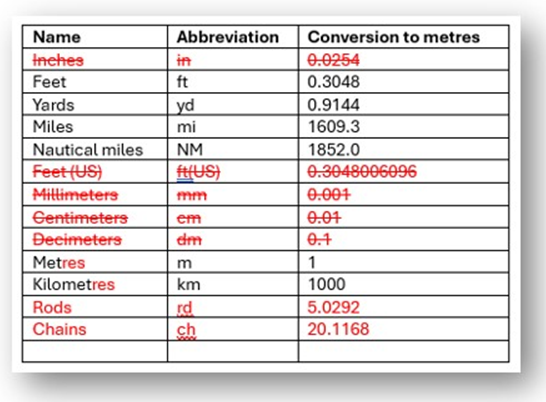
In my opinion, there is no need for units smaller than feet or metres in the mapping apps my organization will publish. Adding the units of rods and chains are useful for users referring to old deeds or survey plans.
There are several other similar "Ideas" proposed by other users - see links below. These have a total of 56 kudos as of 2025-07-09. Many people are asking for improvements to the Measurement widget. Let’s get started!
https://tinyurl.com/ym79ho3u
https://tinyurl.com/ywq9vk5l
https://tinyurl.com/yrjflwka
https://tinyurl.com/yl2fvas5
Thanks,
Bernie.

