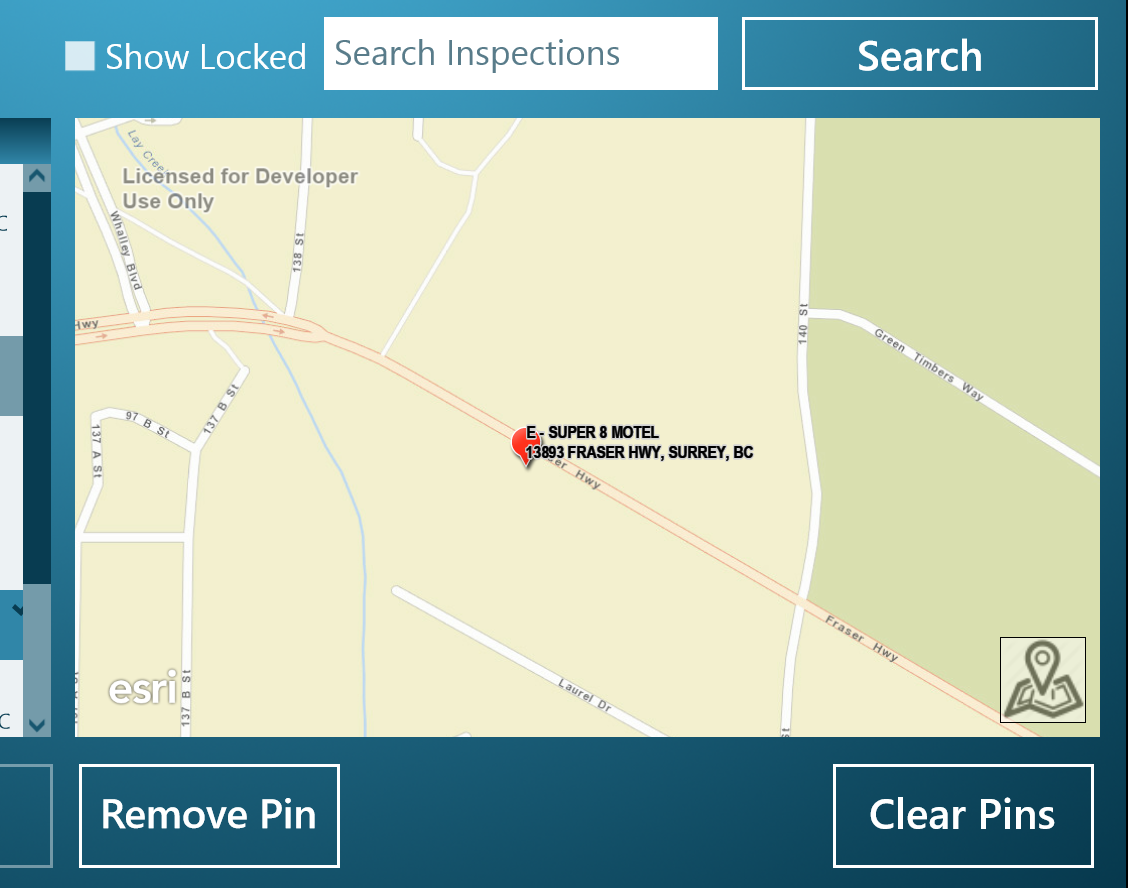
I'm trying to display graphics within a GraphicsOverlay and I can't seem to get my label to appear off of the symbol. I have read that the xoffset doesn't work within an attribute label class; however, how is one to display a multi-line label next to a "pin" symbol. Below is a picture example of how it currently looks and I have added a section of code showing the construction of the layer and label.
**************Code Example**************
var pictureUri = new Uri("http://static.arcgis.com/images/Symbols/Shapes/RedPin1LargeB.png");
await matchSym.SetSourceAsync(pictureUri);
//create a simple top level renderer
var simpleRenderer = new SimpleRenderer { Symbol = matchSym };
_inspectionResultsLayer = new GraphicsOverlay
{
ID = GraphicLayerName,
Labeling = { IsEnabled = true },
Renderer = simpleRenderer
};
// create a new TextSymbol for displaying graphic labels
var labelSym = new TextSymbol
{
Font = new SymbolFont
("Arial",
12.0,
SymbolFontStyle.Normal,
SymbolTextDecoration.None,
SymbolFontWeight.Bold),
Color = Colors.Black,
BorderLineColor = Colors.LightGray,
BorderLineSize = 1,
AngleAlignment = MarkerAngleAlignment.Map,
HorizontalTextAlignment = HorizontalTextAlignment.Left,
};
// create a new LabelClass
var attributeLabelClass = new AttributeLabelClass
{
Symbol = labelSym,
TextExpression = "[Title] CONCAT NEWLINE CONCAT [Address]",
LabelPlacement = LabelPlacement.PointAboveRight,
};
_inspectionResultsLayer.Labeling.LabelClasses.Add(attributeLabelClass);
MainMapMapView.GraphicsOverlays.Add(_inspectionResultsLayer);