Recently I was asked to help create an email link in a pop-up to send information about related records. Building on the example about retrieving the maintenance history posted here, Let's add a button that will send an email with that history.
A mailto link may contain a couple of elements:
- the email or emails to send the mail to
- optionally the CC and/or BCC
- a subject
- and a body
The HTML we will use for the button is rather simple. It consists of an anchor with the mailto link (espression/expr1) and inside that anchor the button (see lines 5 to 7):
<SPAN class="token tag"><SPAN class="token tag"><SPAN class="punctuation token"><</SPAN>b</SPAN><SPAN class="punctuation token">></SPAN></SPAN>Maintenance history:<SPAN class="token tag"><SPAN class="token tag"><SPAN class="punctuation token"></</SPAN>b</SPAN><SPAN class="punctuation token">></SPAN></SPAN><SPAN class="token tag"><SPAN class="token tag"><SPAN class="punctuation token"><</SPAN>br</SPAN> <SPAN class="punctuation token">/></SPAN></SPAN>
{expression/expr0}
<SPAN class="token tag"><SPAN class="token tag"><SPAN class="punctuation token"><</SPAN>br</SPAN> <SPAN class="punctuation token">/></SPAN></SPAN><SPAN class="token tag"><SPAN class="token tag"><SPAN class="punctuation token"><</SPAN>br</SPAN> <SPAN class="punctuation token">/></SPAN></SPAN>
<SPAN class="token tag"><SPAN class="token tag"><SPAN class="punctuation token"><</SPAN>b</SPAN><SPAN class="punctuation token">></SPAN></SPAN>Email History:<SPAN class="token tag"><SPAN class="token tag"><SPAN class="punctuation token"></</SPAN>b</SPAN><SPAN class="punctuation token">></SPAN></SPAN> <SPAN class="token tag"><SPAN class="token tag"><SPAN class="punctuation token"><</SPAN>br</SPAN> <SPAN class="punctuation token">/></SPAN></SPAN>
<SPAN class="token tag"><SPAN class="token tag"><SPAN class="punctuation token"><</SPAN>a</SPAN> <SPAN class="attr-name token">href</SPAN><SPAN class="attr-value token"><SPAN class="punctuation token">=</SPAN><SPAN class="punctuation token">"</SPAN>{expression/expr1}<SPAN class="punctuation token">"</SPAN></SPAN><SPAN class="punctuation token">></SPAN></SPAN>
<SPAN class="token tag"><SPAN class="token tag"><SPAN class="punctuation token"><</SPAN>img</SPAN> <SPAN class="attr-name token">alt</SPAN><SPAN class="attr-value token"><SPAN class="punctuation token">=</SPAN><SPAN class="punctuation token">"</SPAN>Email<SPAN class="punctuation token">"</SPAN></SPAN> <SPAN class="attr-name token">height</SPAN><SPAN class="attr-value token"><SPAN class="punctuation token">=</SPAN><SPAN class="punctuation token">"</SPAN>50<SPAN class="punctuation token">"</SPAN></SPAN> <SPAN class="attr-name token">src</SPAN><SPAN class="attr-value token"><SPAN class="punctuation token">=</SPAN><SPAN class="punctuation token">"</SPAN>http://icons.iconarchive.com/icons/iynque/ios7-style/1024/Mail-icon.png<SPAN class="punctuation token">"</SPAN></SPAN> <SPAN class="attr-name token">width</SPAN><SPAN class="attr-value token"><SPAN class="punctuation token">=</SPAN><SPAN class="punctuation token">"</SPAN>50<SPAN class="punctuation token">"</SPAN></SPAN> <SPAN class="punctuation token">/></SPAN></SPAN>
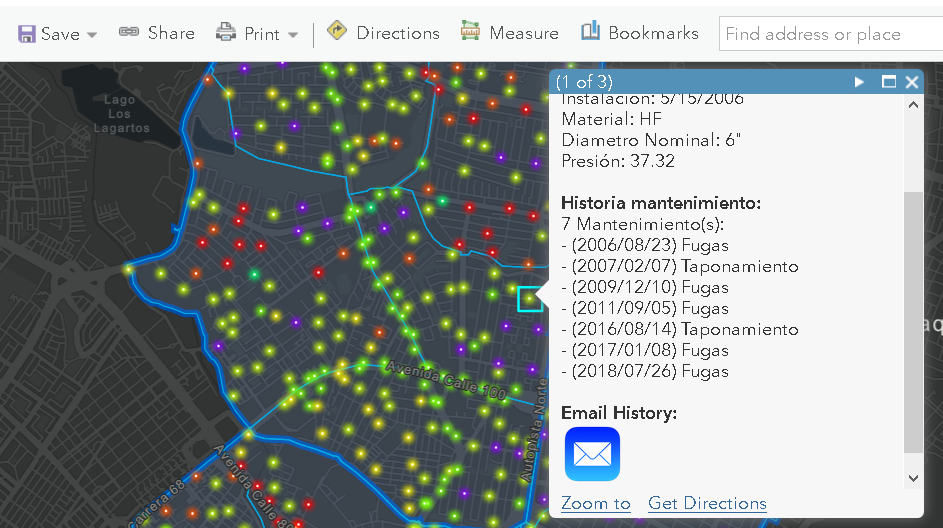
<SPAN class="token tag"><SPAN class="token tag"><SPAN class="punctuation token"></</SPAN>a</SPAN><SPAN class="punctuation token">></SPAN></SPAN><SPAN class="line-numbers-rows"><SPAN></SPAN><SPAN></SPAN><SPAN></SPAN><SPAN></SPAN><SPAN></SPAN><SPAN></SPAN><SPAN></SPAN></SPAN>The pop-up looks like this when the user clicks on a point (sorry for mixing Spanish and English):
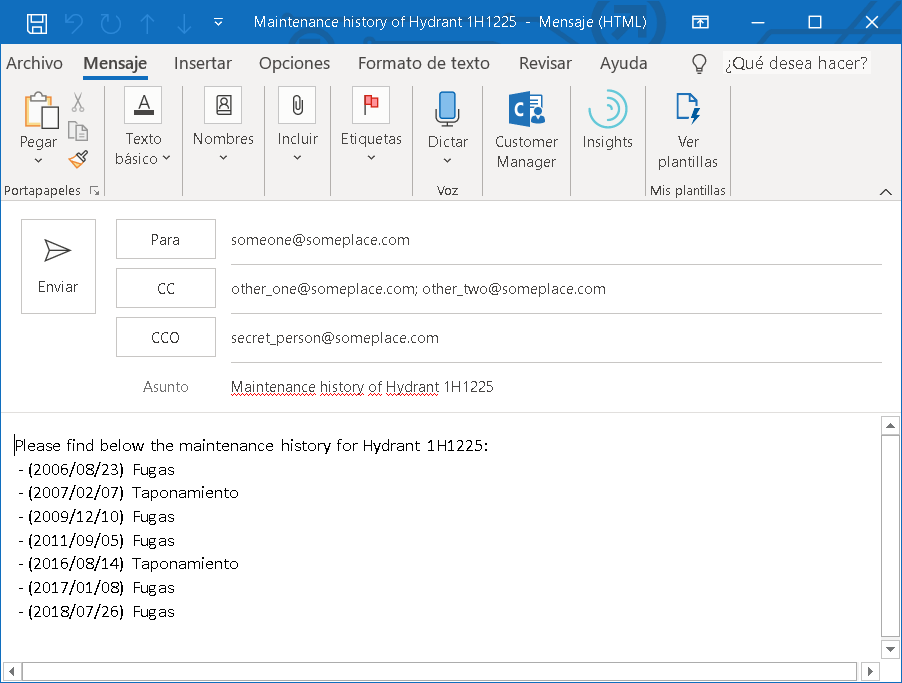
When the user clicks on the button this will create an email if you have an email application setup on your machine:
Let's dive into how to create the Arcade expression to get the information and structure it in such a way that it creates this email. The part of connecting to a related table and filter the table based on the ID of the hydrant has already been explained here: (Using FeatureSetBy functions in Arcade to drill-down to other layers and tables) so I won't go into detail. I used the same GetHistory function, with a small but important change on line 13:
Function <SPAN class="token function">GetHistory</SPAN><SPAN class="punctuation token">(</SPAN>hydrant_id<SPAN class="punctuation token">)</SPAN> <SPAN class="punctuation token">{</SPAN>
<SPAN class="keyword token">var</SPAN> tbl <SPAN class="operator token">=</SPAN> <SPAN class="token function">FeatureSetByName</SPAN><SPAN class="punctuation token">(</SPAN>$map<SPAN class="punctuation token">,</SPAN> <SPAN class="string token">"Maintenance"</SPAN><SPAN class="punctuation token">)</SPAN><SPAN class="punctuation token">;</SPAN>
<SPAN class="token function">Console</SPAN><SPAN class="punctuation token">(</SPAN>tbl<SPAN class="punctuation token">)</SPAN><SPAN class="punctuation token">;</SPAN>
<SPAN class="keyword token">var</SPAN> sql <SPAN class="operator token">=</SPAN> <SPAN class="string token">"COD_HIDRANTE = '"</SPAN> <SPAN class="operator token">+</SPAN> hydrant_id <SPAN class="operator token">+</SPAN> <SPAN class="string token">"'"</SPAN><SPAN class="punctuation token">;</SPAN>
<SPAN class="token function">Console</SPAN><SPAN class="punctuation token">(</SPAN>sql<SPAN class="punctuation token">)</SPAN><SPAN class="punctuation token">;</SPAN>
<SPAN class="keyword token">var</SPAN> tbl_filtered <SPAN class="operator token">=</SPAN> <SPAN class="token function">Filter</SPAN><SPAN class="punctuation token">(</SPAN>tbl<SPAN class="punctuation token">,</SPAN> sql<SPAN class="punctuation token">)</SPAN><SPAN class="punctuation token">;</SPAN>
<SPAN class="token function">Console</SPAN><SPAN class="punctuation token">(</SPAN><SPAN class="token function">Count</SPAN><SPAN class="punctuation token">(</SPAN>tbl_filtered<SPAN class="punctuation token">)</SPAN><SPAN class="punctuation token">)</SPAN><SPAN class="punctuation token">;</SPAN>
<SPAN class="keyword token">if</SPAN> <SPAN class="punctuation token">(</SPAN><SPAN class="token function">Count</SPAN><SPAN class="punctuation token">(</SPAN>tbl_filtered<SPAN class="punctuation token">)</SPAN><SPAN class="operator token">></SPAN> <SPAN class="number token">0</SPAN><SPAN class="punctuation token">)</SPAN> <SPAN class="punctuation token">{</SPAN>
<SPAN class="keyword token">var</SPAN> history <SPAN class="operator token">=</SPAN> <SPAN class="string token">"Please find below the maintenance history for Hydrant "</SPAN> <SPAN class="operator token">+</SPAN> hydrant_id <SPAN class="operator token">+</SPAN> <SPAN class="string token">":"</SPAN><SPAN class="punctuation token">;</SPAN>
<SPAN class="keyword token">for</SPAN> <SPAN class="punctuation token">(</SPAN><SPAN class="keyword token">var</SPAN> maintenance <SPAN class="keyword token">in</SPAN> tbl_filtered<SPAN class="punctuation token">)</SPAN> <SPAN class="punctuation token">{</SPAN>
<SPAN class="keyword token">var</SPAN> txt_date <SPAN class="operator token">=</SPAN> <SPAN class="token function">Text</SPAN><SPAN class="punctuation token">(</SPAN>maintenance<SPAN class="punctuation token">.</SPAN>Fecha_Mantenimiento<SPAN class="punctuation token">,</SPAN> <SPAN class="string token">' - (Y/MM/DD) '</SPAN><SPAN class="punctuation token">)</SPAN><SPAN class="punctuation token">;</SPAN>
<SPAN class="keyword token">var</SPAN> txt_man <SPAN class="operator token">=</SPAN> txt_date <SPAN class="operator token">+</SPAN> maintenance<SPAN class="punctuation token">.</SPAN>Mantenimiento<SPAN class="punctuation token">;</SPAN>
history <SPAN class="operator token">+</SPAN><SPAN class="operator token">=</SPAN> <SPAN class="string token">"TextFormatting.NewLine"</SPAN> <SPAN class="operator token">+</SPAN> txt_man<SPAN class="punctuation token">;</SPAN>
<SPAN class="punctuation token">}</SPAN>
<SPAN class="punctuation token">}</SPAN> <SPAN class="keyword token">else</SPAN> <SPAN class="punctuation token">{</SPAN>
<SPAN class="keyword token">var</SPAN> history <SPAN class="operator token">=</SPAN> <SPAN class="string token">"No history for Hydrant "</SPAN> <SPAN class="operator token">+</SPAN> hydrant_id<SPAN class="punctuation token">;</SPAN>
<SPAN class="punctuation token">}</SPAN>
<SPAN class="keyword token">return</SPAN> history<SPAN class="punctuation token">;</SPAN>
<SPAN class="punctuation token">}</SPAN>
<SPAN class="line-numbers-rows"><SPAN></SPAN><SPAN></SPAN><SPAN></SPAN><SPAN></SPAN><SPAN></SPAN><SPAN></SPAN><SPAN></SPAN><SPAN></SPAN><SPAN></SPAN><SPAN></SPAN><SPAN></SPAN><SPAN></SPAN><SPAN></SPAN><SPAN></SPAN><SPAN></SPAN><SPAN></SPAN><SPAN></SPAN><SPAN></SPAN><SPAN></SPAN></SPAN>I am adding "TextFormatting.NewLine" as string and not as constant. In fact this string could have any unique content, but I chose to do it this way. So the resulting string contains all the history on a single line and the text "TextFormatting.NewLine" will be used later on to replace it by something that can be used in an URL as will work as new line in the mail ("%0D%0A").
The other part of the expression is used to call this function and define the other parts of the email:
<SPAN class="keyword token">var</SPAN> hydrant_id <SPAN class="operator token">=</SPAN> $feature<SPAN class="punctuation token">[</SPAN><SPAN class="string token">"COD_HIDRANTE"</SPAN><SPAN class="punctuation token">]</SPAN><SPAN class="punctuation token">;</SPAN>
<SPAN class="keyword token">var</SPAN> email <SPAN class="operator token">=</SPAN> <SPAN class="string token">"someone@someplace.com"</SPAN><SPAN class="punctuation token">;</SPAN>
<SPAN class="keyword token">var</SPAN> cc <SPAN class="operator token">=</SPAN> <SPAN class="string token">"other_one@someplace.com;other_two@someplace.com"</SPAN><SPAN class="punctuation token">;</SPAN>
<SPAN class="keyword token">var</SPAN> bcc <SPAN class="operator token">=</SPAN> <SPAN class="string token">"secret_person@someplace.com"</SPAN><SPAN class="punctuation token">;</SPAN>
<SPAN class="keyword token">var</SPAN> subject <SPAN class="operator token">=</SPAN> <SPAN class="string token">"Maintenance history of Hydrant "</SPAN> <SPAN class="operator token">+</SPAN> hydrant_id<SPAN class="punctuation token">;</SPAN>
<SPAN class="keyword token">var</SPAN> body <SPAN class="operator token">=</SPAN> <SPAN class="token function">GetHistory</SPAN><SPAN class="punctuation token">(</SPAN>hydrant_id<SPAN class="punctuation token">)</SPAN><SPAN class="punctuation token">;</SPAN>
<SPAN class="keyword token">var</SPAN> params <SPAN class="operator token">=</SPAN> <SPAN class="punctuation token">{</SPAN>cc<SPAN class="punctuation token">:</SPAN> cc<SPAN class="punctuation token">,</SPAN>
bcc<SPAN class="punctuation token">:</SPAN> bcc<SPAN class="punctuation token">,</SPAN>
subject<SPAN class="punctuation token">:</SPAN> subject<SPAN class="punctuation token">,</SPAN>
body<SPAN class="punctuation token">:</SPAN> body<SPAN class="punctuation token">}</SPAN><SPAN class="punctuation token">;</SPAN>
<SPAN class="keyword token">var</SPAN> url <SPAN class="operator token">=</SPAN> <SPAN class="string token">"mailto:"</SPAN> <SPAN class="operator token">+</SPAN> email <SPAN class="operator token">+</SPAN> <SPAN class="string token">"?"</SPAN> <SPAN class="operator token">+</SPAN> <SPAN class="token function">UrlEncode</SPAN><SPAN class="punctuation token">(</SPAN>params<SPAN class="punctuation token">)</SPAN><SPAN class="punctuation token">;</SPAN>
url <SPAN class="operator token">=</SPAN> <SPAN class="token function">Replace</SPAN><SPAN class="punctuation token">(</SPAN>url<SPAN class="punctuation token">,</SPAN> <SPAN class="string token">"TextFormatting.NewLine"</SPAN><SPAN class="punctuation token">,</SPAN> <SPAN class="string token">"%0D%0A"</SPAN><SPAN class="punctuation token">)</SPAN><SPAN class="punctuation token">;</SPAN>
<SPAN class="keyword token">return</SPAN> url<SPAN class="punctuation token">;</SPAN><SPAN class="line-numbers-rows"><SPAN></SPAN><SPAN></SPAN><SPAN></SPAN><SPAN></SPAN><SPAN></SPAN><SPAN></SPAN><SPAN></SPAN><SPAN></SPAN><SPAN></SPAN><SPAN></SPAN><SPAN></SPAN><SPAN></SPAN><SPAN></SPAN><SPAN></SPAN></SPAN>Let's explain what we do in this second part of the Arcade expression:
- We read out the ID of the hydrant on line 1
- Define the emails to send the email to (including 2 CC's and 1 BCC) on lines 2 to 4.
- The subject is basically a text including the variable hydrant ID
- The body is generated using the function GetHistory explained above
- On lines 7 to 10 we create a dictionary called params with the properties cc, bcc, subject and body and we assign the values from the variables cc, bcc, subject and body defined on lines 3 to 6
- On line 12 we use the new Arcade function UrlEncode (released in version 1.7) that will encode the URL parameters correctly
- On line 13 we replace the text "TextFormatting.NewLine" by a text "%0D%0A" which will create the new lines where needed in the body of the email. If we would have done this before using the UrlEncode, this would have converted the text to "%250D%250A" and probably caused the new line not to work.
If you have any questions, please use the "Add a Reply" button to let me know.
Final code used is listed below:
Function <SPAN class="token function">GetHistory</SPAN><SPAN class="punctuation token">(</SPAN>hydrant_id<SPAN class="punctuation token">)</SPAN> <SPAN class="punctuation token">{</SPAN>
<SPAN class="keyword token">var</SPAN> tbl <SPAN class="operator token">=</SPAN> <SPAN class="token function">FeatureSetByName</SPAN><SPAN class="punctuation token">(</SPAN>$map<SPAN class="punctuation token">,</SPAN> <SPAN class="string token">"Maintenance"</SPAN><SPAN class="punctuation token">)</SPAN><SPAN class="punctuation token">;</SPAN>
<SPAN class="token function">Console</SPAN><SPAN class="punctuation token">(</SPAN>tbl<SPAN class="punctuation token">)</SPAN><SPAN class="punctuation token">;</SPAN>
<SPAN class="keyword token">var</SPAN> sql <SPAN class="operator token">=</SPAN> <SPAN class="string token">"COD_HIDRANTE = '"</SPAN> <SPAN class="operator token">+</SPAN> hydrant_id <SPAN class="operator token">+</SPAN> <SPAN class="string token">"'"</SPAN><SPAN class="punctuation token">;</SPAN>
<SPAN class="token function">Console</SPAN><SPAN class="punctuation token">(</SPAN>sql<SPAN class="punctuation token">)</SPAN><SPAN class="punctuation token">;</SPAN>
<SPAN class="keyword token">var</SPAN> tbl_filtered <SPAN class="operator token">=</SPAN> <SPAN class="token function">Filter</SPAN><SPAN class="punctuation token">(</SPAN>tbl<SPAN class="punctuation token">,</SPAN> sql<SPAN class="punctuation token">)</SPAN><SPAN class="punctuation token">;</SPAN>
<SPAN class="token function">Console</SPAN><SPAN class="punctuation token">(</SPAN><SPAN class="token function">Count</SPAN><SPAN class="punctuation token">(</SPAN>tbl_filtered<SPAN class="punctuation token">)</SPAN><SPAN class="punctuation token">)</SPAN><SPAN class="punctuation token">;</SPAN>
<SPAN class="keyword token">if</SPAN> <SPAN class="punctuation token">(</SPAN><SPAN class="token function">Count</SPAN><SPAN class="punctuation token">(</SPAN>tbl_filtered<SPAN class="punctuation token">)</SPAN><SPAN class="operator token">></SPAN> <SPAN class="number token">0</SPAN><SPAN class="punctuation token">)</SPAN> <SPAN class="punctuation token">{</SPAN>
<SPAN class="keyword token">var</SPAN> history <SPAN class="operator token">=</SPAN> <SPAN class="string token">"Please find below the maintenance history for Hydrant "</SPAN> <SPAN class="operator token">+</SPAN> hydrant_id <SPAN class="operator token">+</SPAN> <SPAN class="string token">":"</SPAN><SPAN class="punctuation token">;</SPAN>
<SPAN class="keyword token">for</SPAN> <SPAN class="punctuation token">(</SPAN><SPAN class="keyword token">var</SPAN> maintenance <SPAN class="keyword token">in</SPAN> tbl_filtered<SPAN class="punctuation token">)</SPAN> <SPAN class="punctuation token">{</SPAN>
<SPAN class="keyword token">var</SPAN> txt_date <SPAN class="operator token">=</SPAN> <SPAN class="token function">Text</SPAN><SPAN class="punctuation token">(</SPAN>maintenance<SPAN class="punctuation token">.</SPAN>Fecha_Mantenimiento<SPAN class="punctuation token">,</SPAN> <SPAN class="string token">' - (Y/MM/DD) '</SPAN><SPAN class="punctuation token">)</SPAN><SPAN class="punctuation token">;</SPAN>
<SPAN class="keyword token">var</SPAN> txt_man <SPAN class="operator token">=</SPAN> txt_date <SPAN class="operator token">+</SPAN> maintenance<SPAN class="punctuation token">.</SPAN>Mantenimiento<SPAN class="punctuation token">;</SPAN>
history <SPAN class="operator token">+</SPAN><SPAN class="operator token">=</SPAN> <SPAN class="string token">"TextFormatting.NewLine"</SPAN> <SPAN class="operator token">+</SPAN> txt_man<SPAN class="punctuation token">;</SPAN>
<SPAN class="punctuation token">}</SPAN>
<SPAN class="punctuation token">}</SPAN> <SPAN class="keyword token">else</SPAN> <SPAN class="punctuation token">{</SPAN>
<SPAN class="keyword token">var</SPAN> history <SPAN class="operator token">=</SPAN> <SPAN class="string token">"No history for Hydrant "</SPAN> <SPAN class="operator token">+</SPAN> hydrant_id<SPAN class="punctuation token">;</SPAN>
<SPAN class="punctuation token">}</SPAN>
<SPAN class="keyword token">return</SPAN> history<SPAN class="punctuation token">;</SPAN>
<SPAN class="punctuation token">}</SPAN>
<SPAN class="keyword token">var</SPAN> hydrant_id <SPAN class="operator token">=</SPAN> $feature<SPAN class="punctuation token">[</SPAN><SPAN class="string token">"COD_HIDRANTE"</SPAN><SPAN class="punctuation token">]</SPAN><SPAN class="punctuation token">;</SPAN>
<SPAN class="keyword token">var</SPAN> email <SPAN class="operator token">=</SPAN> <SPAN class="string token">"someone@someplace.com"</SPAN><SPAN class="punctuation token">;</SPAN>
<SPAN class="keyword token">var</SPAN> cc <SPAN class="operator token">=</SPAN> <SPAN class="string token">"other_one@someplace.com;other_two@someplace.com"</SPAN><SPAN class="punctuation token">;</SPAN>
<SPAN class="keyword token">var</SPAN> bcc <SPAN class="operator token">=</SPAN> <SPAN class="string token">"secret_person@someplace.com"</SPAN><SPAN class="punctuation token">;</SPAN>
<SPAN class="keyword token">var</SPAN> subject <SPAN class="operator token">=</SPAN> <SPAN class="string token">"Maintenance history of Hydrant "</SPAN> <SPAN class="operator token">+</SPAN> hydrant_id<SPAN class="punctuation token">;</SPAN>
<SPAN class="keyword token">var</SPAN> body <SPAN class="operator token">=</SPAN> <SPAN class="token function">GetHistory</SPAN><SPAN class="punctuation token">(</SPAN>hydrant_id<SPAN class="punctuation token">)</SPAN><SPAN class="punctuation token">;</SPAN>
<SPAN class="keyword token">var</SPAN> params <SPAN class="operator token">=</SPAN> <SPAN class="punctuation token">{</SPAN>cc<SPAN class="punctuation token">:</SPAN> cc<SPAN class="punctuation token">,</SPAN>
bcc<SPAN class="punctuation token">:</SPAN> bcc<SPAN class="punctuation token">,</SPAN>
subject<SPAN class="punctuation token">:</SPAN> subject<SPAN class="punctuation token">,</SPAN>
body<SPAN class="punctuation token">:</SPAN> body<SPAN class="punctuation token">}</SPAN><SPAN class="punctuation token">;</SPAN>
<SPAN class="keyword token">var</SPAN> url <SPAN class="operator token">=</SPAN> <SPAN class="string token">"mailto:"</SPAN> <SPAN class="operator token">+</SPAN> email <SPAN class="operator token">+</SPAN> <SPAN class="string token">"?"</SPAN> <SPAN class="operator token">+</SPAN> <SPAN class="token function">UrlEncode</SPAN><SPAN class="punctuation token">(</SPAN>params<SPAN class="punctuation token">)</SPAN><SPAN class="punctuation token">;</SPAN>
url <SPAN class="operator token">=</SPAN> <SPAN class="token function">Replace</SPAN><SPAN class="punctuation token">(</SPAN>url<SPAN class="punctuation token">,</SPAN> <SPAN class="string token">"TextFormatting.NewLine"</SPAN><SPAN class="punctuation token">,</SPAN> <SPAN class="string token">"%0D%0A"</SPAN><SPAN class="punctuation token">)</SPAN><SPAN class="punctuation token">;</SPAN>
<SPAN class="keyword token">return</SPAN> url<SPAN class="punctuation token">;</SPAN><SPAN class="line-numbers-rows"><SPAN></SPAN><SPAN></SPAN><SPAN></SPAN><SPAN></SPAN><SPAN></SPAN><SPAN></SPAN><SPAN></SPAN><SPAN></SPAN><SPAN></SPAN><SPAN></SPAN><SPAN></SPAN><SPAN></SPAN><SPAN></SPAN><SPAN></SPAN><SPAN></SPAN><SPAN></SPAN><SPAN></SPAN><SPAN></SPAN><SPAN></SPAN><SPAN></SPAN><SPAN></SPAN><SPAN></SPAN><SPAN></SPAN><SPAN></SPAN><SPAN></SPAN><SPAN></SPAN><SPAN></SPAN><SPAN></SPAN><SPAN></SPAN><SPAN></SPAN><SPAN></SPAN><SPAN></SPAN><SPAN></SPAN><SPAN></SPAN></SPAN>



