I had a project where I needed to publish data at a service provider location, with the publishing to be done by a novice Desktop user. My solution was to make a Python toolbox to simplify the data import and ArcGIS Server service publishing steps, and then I just went ahead and made the export and cleanup steps tools in that same toolbox as well. This was looking like a great solution until network issues at the end-user site caused the data import step to take seven hours (instead of the usual 20 minutes). Since this was an Amazon solution, the utility could have been run on a VM from inside the mission, but there were issues accessing the license server from the VM, and from there, well, let's just say it didn't work out.
Since my ArcGIS Server node was actually on a Linux box, I didn't have the option of running a graphical utility like a toolbox tool, but the code didn't really need graphical access (just a working ArcPy, a path to the source file geodatabase, and an enterprise connection file (.sde)). I could have ported the app to a command-line utility, then invoked the command-line from the toolbox UI, but this additional development would take time and, as I recently discovered, it wasn't strictly necessary, because Python toolbox ( .pyt ) files can be invoked from Python!
For example, lets say we have this trivial toolbox:
<SPAN class="keyword token">import</SPAN> arcpy
<SPAN class="keyword token">class</SPAN> <SPAN class="token class-name">Toolbox</SPAN><SPAN class="punctuation token">(</SPAN>object<SPAN class="punctuation token">)</SPAN><SPAN class="punctuation token">:</SPAN>
<SPAN class="keyword token">def</SPAN> <SPAN class="token function">__init__</SPAN><SPAN class="punctuation token">(</SPAN>self<SPAN class="punctuation token">)</SPAN><SPAN class="punctuation token">:</SPAN>
<SPAN class="string token">"""Define the toolbox (the name of the toolbox is the name of the
.pyt file)."""</SPAN>
self<SPAN class="punctuation token">.</SPAN>label <SPAN class="operator token">=</SPAN> <SPAN class="string token">"Toolbox"</SPAN>
self<SPAN class="punctuation token">.</SPAN>alias <SPAN class="operator token">=</SPAN> <SPAN class="string token">""</SPAN>
<SPAN class="comment token"># List of tool classes associated with this toolbox</SPAN>
self<SPAN class="punctuation token">.</SPAN>tools <SPAN class="operator token">=</SPAN> <SPAN class="punctuation token">[</SPAN>BlogTool<SPAN class="punctuation token">]</SPAN>
<SPAN class="keyword token">class</SPAN> <SPAN class="token class-name">BlogTool</SPAN><SPAN class="punctuation token">(</SPAN>object<SPAN class="punctuation token">)</SPAN><SPAN class="punctuation token">:</SPAN>
<SPAN class="keyword token">def</SPAN> <SPAN class="token function">__init__</SPAN><SPAN class="punctuation token">(</SPAN>self<SPAN class="punctuation token">)</SPAN><SPAN class="punctuation token">:</SPAN>
<SPAN class="string token">"""Define the tool (tool name is the name of the class)."""</SPAN>
self<SPAN class="punctuation token">.</SPAN>label <SPAN class="operator token">=</SPAN> <SPAN class="string token">"BlogTool"</SPAN>
self<SPAN class="punctuation token">.</SPAN>description <SPAN class="operator token">=</SPAN> <SPAN class="string token">"Trivial tool example"</SPAN>
self<SPAN class="punctuation token">.</SPAN>canRunInBackground <SPAN class="operator token">=</SPAN> <SPAN class="token boolean">False</SPAN>
<SPAN class="keyword token">def</SPAN> <SPAN class="token function">getParameterInfo</SPAN><SPAN class="punctuation token">(</SPAN>self<SPAN class="punctuation token">)</SPAN><SPAN class="punctuation token">:</SPAN>
<SPAN class="string token">"""Define parameter definitions"""</SPAN>
param0 <SPAN class="operator token">=</SPAN> arcpy<SPAN class="punctuation token">.</SPAN>Parameter<SPAN class="punctuation token">(</SPAN>
displayName<SPAN class="operator token">=</SPAN><SPAN class="string token">"Options"</SPAN><SPAN class="punctuation token">,</SPAN>
name<SPAN class="operator token">=</SPAN><SPAN class="string token">"in_options"</SPAN><SPAN class="punctuation token">,</SPAN>
datatype<SPAN class="operator token">=</SPAN><SPAN class="string token">"GPString"</SPAN><SPAN class="punctuation token">,</SPAN>
parameterType<SPAN class="operator token">=</SPAN><SPAN class="string token">"Required"</SPAN><SPAN class="punctuation token">,</SPAN>
direction<SPAN class="operator token">=</SPAN><SPAN class="string token">"Input"</SPAN><SPAN class="punctuation token">)</SPAN>
<SPAN class="keyword token">return</SPAN> <SPAN class="punctuation token">[</SPAN>param0<SPAN class="punctuation token">]</SPAN>
<SPAN class="keyword token">def</SPAN> <SPAN class="token function">isLicensed</SPAN><SPAN class="punctuation token">(</SPAN>self<SPAN class="punctuation token">)</SPAN><SPAN class="punctuation token">:</SPAN>
<SPAN class="string token">"""Set whether tool is licensed to execute."""</SPAN>
<SPAN class="keyword token">return</SPAN> <SPAN class="token boolean">True</SPAN>
<SPAN class="keyword token">def</SPAN> <SPAN class="token function">updateParameters</SPAN><SPAN class="punctuation token">(</SPAN>self<SPAN class="punctuation token">,</SPAN> parameters<SPAN class="punctuation token">)</SPAN><SPAN class="punctuation token">:</SPAN>
<SPAN class="string token">"""Modify the values and properties of parameters before internal
validation is performed. This method is called whenever a parameter
has been changed."""</SPAN>
<SPAN class="keyword token">return</SPAN>
<SPAN class="keyword token">def</SPAN> <SPAN class="token function">updateMessages</SPAN><SPAN class="punctuation token">(</SPAN>self<SPAN class="punctuation token">,</SPAN> parameters<SPAN class="punctuation token">)</SPAN><SPAN class="punctuation token">:</SPAN>
<SPAN class="string token">"""Modify the messages created by internal validation for each tool
parameter. This method is called after internal validation."""</SPAN>
<SPAN class="keyword token">return</SPAN>
<SPAN class="keyword token">def</SPAN> <SPAN class="token function">execute</SPAN><SPAN class="punctuation token">(</SPAN>self<SPAN class="punctuation token">,</SPAN> parameters<SPAN class="punctuation token">,</SPAN> messages<SPAN class="punctuation token">)</SPAN><SPAN class="punctuation token">:</SPAN>
<SPAN class="comment token"># invoke helper</SPAN>
<SPAN class="keyword token">return</SPAN> doExecute<SPAN class="punctuation token">(</SPAN>parameters<SPAN class="punctuation token">[</SPAN><SPAN class="number token">0</SPAN><SPAN class="punctuation token">]</SPAN><SPAN class="punctuation token">.</SPAN>valueAsText<SPAN class="punctuation token">,</SPAN>messages<SPAN class="punctuation token">)</SPAN>
<SPAN class="keyword token">def</SPAN> <SPAN class="token function">doExecute</SPAN><SPAN class="punctuation token">(</SPAN>param1<SPAN class="punctuation token">,</SPAN>messages<SPAN class="punctuation token">)</SPAN><SPAN class="punctuation token">:</SPAN>
messages<SPAN class="punctuation token">.</SPAN>addMessage<SPAN class="punctuation token">(</SPAN><SPAN class="string token">"Tool: Executing with parameter '{:s}'"</SPAN><SPAN class="punctuation token">.</SPAN>format<SPAN class="punctuation token">(</SPAN>param1<SPAN class="punctuation token">)</SPAN><SPAN class="punctuation token">)</SPAN>
<SPAN class="keyword token">return</SPAN> None
It works like you'd expect:
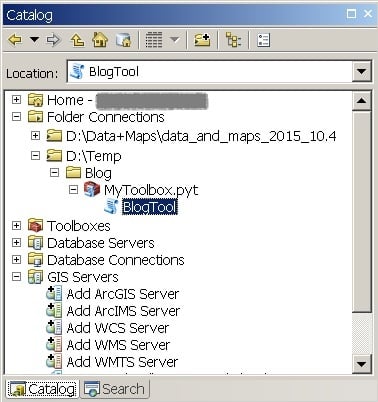
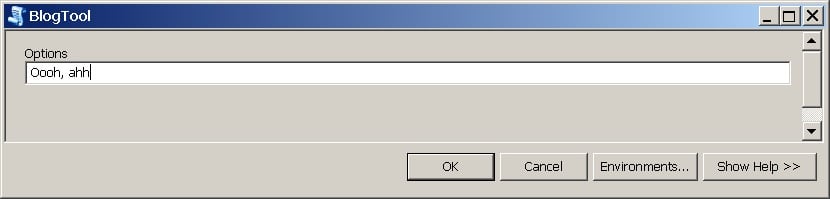
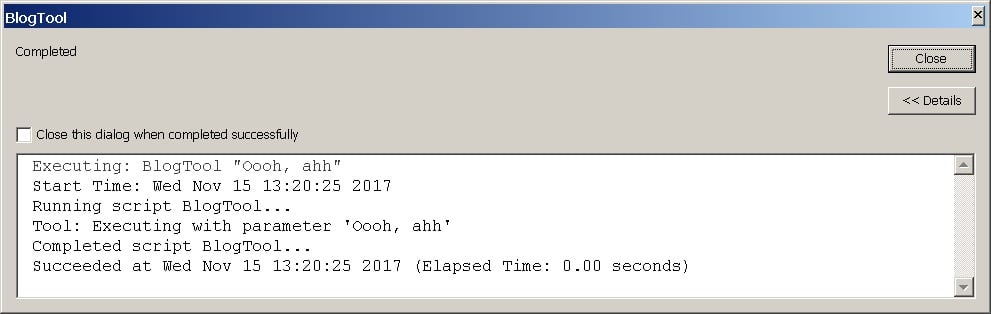
Now, if you run it from the command line, despite it not having a .py suffix, you get no error, but it doesn't do anything either:

Ahh, but if you tweak the toolbox to add an extra two lines of code to the end:
<SPAN class="keyword token">if</SPAN> <SPAN class="punctuation token">(</SPAN>__name__ <SPAN class="operator token">==</SPAN> <SPAN class="string token">'__main__'</SPAN><SPAN class="punctuation token">)</SPAN><SPAN class="punctuation token">:</SPAN>
arcpy<SPAN class="punctuation token">.</SPAN>AddMessage<SPAN class="punctuation token">(</SPAN><SPAN class="string token">"Whoo, hoo! Command-line enabled!"</SPAN><SPAN class="punctuation token">)</SPAN>
Then you can use the toolbox from a console:

"Still, they're not connected, and what about messaging?" you ask. Well, this is pretty cool: You can fake the messages parameter in the tool's execute method with a stub class that does everything you need messages to do, and you can grab parameters from the sys.argv array, which makes for a command-line capable toolbox:
<SPAN class="keyword token">if</SPAN> <SPAN class="punctuation token">(</SPAN>__name__ <SPAN class="operator token">==</SPAN> <SPAN class="string token">'__main__'</SPAN><SPAN class="punctuation token">)</SPAN><SPAN class="punctuation token">:</SPAN>
arcpy<SPAN class="punctuation token">.</SPAN>AddMessage<SPAN class="punctuation token">(</SPAN><SPAN class="string token">"Whoo, hoo! Command-line enabled!"</SPAN><SPAN class="punctuation token">)</SPAN>
<SPAN class="keyword token">class</SPAN> <SPAN class="token class-name">msgStub</SPAN><SPAN class="punctuation token">:</SPAN>
<SPAN class="keyword token">def</SPAN> <SPAN class="token function">addMessage</SPAN><SPAN class="punctuation token">(</SPAN>self<SPAN class="punctuation token">,</SPAN>text<SPAN class="punctuation token">)</SPAN><SPAN class="punctuation token">:</SPAN>
arcpy<SPAN class="punctuation token">.</SPAN>AddMessage<SPAN class="punctuation token">(</SPAN>text<SPAN class="punctuation token">)</SPAN>
<SPAN class="keyword token">def</SPAN> <SPAN class="token function">addErrorMessage</SPAN><SPAN class="punctuation token">(</SPAN>self<SPAN class="punctuation token">,</SPAN>text<SPAN class="punctuation token">)</SPAN><SPAN class="punctuation token">:</SPAN>
arcpy<SPAN class="punctuation token">.</SPAN>AddErrorMessage<SPAN class="punctuation token">(</SPAN>text<SPAN class="punctuation token">)</SPAN>
<SPAN class="keyword token">def</SPAN> <SPAN class="token function">addWarningMessage</SPAN><SPAN class="punctuation token">(</SPAN>self<SPAN class="punctuation token">,</SPAN>text<SPAN class="punctuation token">)</SPAN><SPAN class="punctuation token">:</SPAN>
arcpy<SPAN class="punctuation token">.</SPAN>AddWarningMessage<SPAN class="punctuation token">(</SPAN>text<SPAN class="punctuation token">)</SPAN>
<SPAN class="keyword token">import</SPAN> sys
doExecute<SPAN class="punctuation token">(</SPAN>str<SPAN class="punctuation token">(</SPAN>sys<SPAN class="punctuation token">.</SPAN>argv<SPAN class="punctuation token">[</SPAN><SPAN class="number token">1</SPAN><SPAN class="punctuation token">]</SPAN><SPAN class="punctuation token">)</SPAN><SPAN class="punctuation token">,</SPAN>msgStub<SPAN class="punctuation token">(</SPAN><SPAN class="punctuation token">)</SPAN><SPAN class="punctuation token">)</SPAN>
<SPAN class="line-numbers-rows"><SPAN></SPAN><SPAN></SPAN><SPAN></SPAN><SPAN></SPAN><SPAN></SPAN><SPAN></SPAN><SPAN></SPAN><SPAN></SPAN><SPAN></SPAN><SPAN></SPAN><SPAN></SPAN><SPAN></SPAN><SPAN></SPAN></SPAN>

Obviously, you'd want to do the sort of validation/verification for arguments that Desktop provides before invoking the helper with parameters, but that is, as they say, "A small matter of coding."
- V

