We have received a few questions over the past few months about how to use "Custom ArcGIS API for JavaScript widgets" (like the Custom Recenter Widget) from within an Experience Builder widget. These are the current instructions on how to do that. There may be better or different ways - if you learn of one, please let us know!
Note: Last updated 2020-07 for ArcGIS JS API 4.16 and Experience Builder Developer Edition v1.1.
1. Build the JavaScript API Widget
Follow the instructions in the documentation for the ArcGIS API for JavaScript to Create a Custom Widget and then create the Custom Recenter Widget. These guides do not use webpack to package the files - they are only using the TypeScript compiler (tsc) to convert the *.tsx files to *.js files.
After you've run the tsc command to convert the tsx files to js files one last time, copy the JS file (Recenter.js) and move on - we will copy this into our custom Experience Builder widget in the next step.
2. Create a Custom Experience Builder widget
Create a new custom Experience Builder widget. The easiest way to get going quickly is probably to copy the simple widget.
Since the JS API Widget interacts with a Map View, your Experience Builder widget will need the infrastructure to reference a Map View widget within the same Experience app. The easiest way to do this is to create an Experience, add your widget, then go to the config for your working app (server\src\public\apps\Z\resources\config) and set "useMapWidgetIds": ["widget_ZZ"], in the widget config.
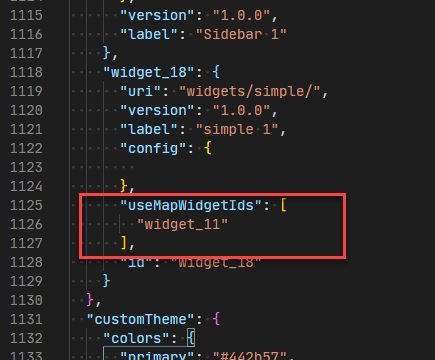
In your widget manifest.json, include the jimu-arcgis dependency by adding:
"dependency": ["jimu-arcgis"],<SPAN class="line-numbers-rows"><SPAN></SPAN></SPAN>
Copy the JS file that you had from step 1 (Recenter.js) into your widget files, at the same level as widget.tsx (within src/runtime).
Within widget.tsx, import the file:
import Recenter = require("./Recenter");<SPAN class="line-numbers-rows"><SPAN></SPAN></SPAN>Then utilize the Recenter widget within the callback of JimuMapViewComponent or anywhere you have an instance of the Map View:
<SPAN class="token function">render</SPAN><SPAN class="punctuation token">(</SPAN><SPAN class="punctuation token">)</SPAN> <SPAN class="punctuation token">{</SPAN>
<SPAN class="keyword token">return</SPAN> <SPAN class="punctuation token">(</SPAN>
<SPAN class="operator token"><</SPAN>div className<SPAN class="operator token">=</SPAN><SPAN class="string token">"widget-demo jimu-widget m-2"</SPAN><SPAN class="operator token">></SPAN>
<SPAN class="punctuation token">{</SPAN><SPAN class="keyword token">this</SPAN><SPAN class="punctuation token">.</SPAN>props<SPAN class="punctuation token">.</SPAN><SPAN class="token function">hasOwnProperty</SPAN><SPAN class="punctuation token">(</SPAN><SPAN class="string token">"useMapWidgetIds"</SPAN><SPAN class="punctuation token">)</SPAN> <SPAN class="operator token">&&</SPAN>
<SPAN class="keyword token">this</SPAN><SPAN class="punctuation token">.</SPAN>props<SPAN class="punctuation token">.</SPAN>useMapWidgetIds <SPAN class="operator token">&&</SPAN>
<SPAN class="keyword token">this</SPAN><SPAN class="punctuation token">.</SPAN>props<SPAN class="punctuation token">.</SPAN>useMapWidgetIds<SPAN class="punctuation token">.</SPAN>length <SPAN class="operator token">===</SPAN> <SPAN class="number token">1</SPAN> <SPAN class="operator token">&&</SPAN> <SPAN class="punctuation token">(</SPAN>
<SPAN class="operator token"><</SPAN>JimuMapViewComponent
useMapWidgetIds<SPAN class="operator token">=</SPAN><SPAN class="punctuation token">{</SPAN><SPAN class="keyword token">this</SPAN><SPAN class="punctuation token">.</SPAN>props<SPAN class="punctuation token">.</SPAN>useMapWidgetIds<SPAN class="punctuation token">}</SPAN>
onActiveViewChange<SPAN class="operator token">=</SPAN><SPAN class="punctuation token">{</SPAN><SPAN class="punctuation token">(</SPAN>jmv<SPAN class="punctuation token">:</SPAN> JimuMapView<SPAN class="punctuation token">)</SPAN> <SPAN class="operator token">=</SPAN><SPAN class="operator token">></SPAN> <SPAN class="punctuation token">{</SPAN>
<SPAN class="keyword token">if</SPAN> <SPAN class="punctuation token">(</SPAN>jmv<SPAN class="punctuation token">)</SPAN> <SPAN class="punctuation token">{</SPAN>
jmv<SPAN class="punctuation token">.</SPAN>view<SPAN class="punctuation token">.</SPAN><SPAN class="token function">when</SPAN><SPAN class="punctuation token">(</SPAN><SPAN class="keyword token">function</SPAN> <SPAN class="punctuation token">(</SPAN><SPAN class="punctuation token">)</SPAN> <SPAN class="punctuation token">{</SPAN>
<SPAN class="keyword token">const</SPAN> recenter <SPAN class="operator token">=</SPAN> <SPAN class="keyword token">new</SPAN> <SPAN class="token class-name">Recenter</SPAN><SPAN class="punctuation token">(</SPAN><SPAN class="punctuation token">{</SPAN>
view<SPAN class="punctuation token">:</SPAN> jmv<SPAN class="punctuation token">.</SPAN>view<SPAN class="punctuation token">,</SPAN>
initialCenter<SPAN class="punctuation token">:</SPAN> <SPAN class="punctuation token">[</SPAN><SPAN class="operator token">-</SPAN><SPAN class="number token">100.33</SPAN><SPAN class="punctuation token">,</SPAN> <SPAN class="number token">43.69</SPAN><SPAN class="punctuation token">]</SPAN><SPAN class="punctuation token">,</SPAN>
<SPAN class="punctuation token">}</SPAN><SPAN class="punctuation token">)</SPAN><SPAN class="punctuation token">;</SPAN>
jmv<SPAN class="punctuation token">.</SPAN>view<SPAN class="punctuation token">.</SPAN>ui<SPAN class="punctuation token">.</SPAN><SPAN class="token function">add</SPAN><SPAN class="punctuation token">(</SPAN>recenter<SPAN class="punctuation token">,</SPAN> <SPAN class="string token">"top-right"</SPAN><SPAN class="punctuation token">)</SPAN><SPAN class="punctuation token">;</SPAN>
<SPAN class="punctuation token">}</SPAN><SPAN class="punctuation token">)</SPAN><SPAN class="punctuation token">;</SPAN>
<SPAN class="punctuation token">}</SPAN>
<SPAN class="punctuation token">}</SPAN><SPAN class="punctuation token">}</SPAN>
<SPAN class="operator token">/</SPAN><SPAN class="operator token">></SPAN>
<SPAN class="punctuation token">)</SPAN><SPAN class="punctuation token">}</SPAN>
<SPAN class="operator token"><</SPAN>p<SPAN class="operator token">></SPAN>Simple Widget<SPAN class="operator token"><</SPAN><SPAN class="operator token">/</SPAN>p<SPAN class="operator token">></SPAN>
<SPAN class="operator token"><</SPAN><SPAN class="operator token">/</SPAN>div<SPAN class="operator token">></SPAN>
<SPAN class="punctuation token">)</SPAN><SPAN class="punctuation token">;</SPAN>
<SPAN class="punctuation token">}</SPAN><SPAN class="line-numbers-rows"><SPAN></SPAN><SPAN></SPAN><SPAN></SPAN><SPAN></SPAN><SPAN></SPAN><SPAN></SPAN><SPAN></SPAN><SPAN></SPAN><SPAN></SPAN><SPAN></SPAN><SPAN></SPAN><SPAN></SPAN><SPAN></SPAN><SPAN></SPAN><SPAN></SPAN><SPAN></SPAN><SPAN></SPAN><SPAN></SPAN><SPAN></SPAN><SPAN></SPAN><SPAN></SPAN><SPAN></SPAN><SPAN></SPAN><SPAN></SPAN><SPAN></SPAN><SPAN></SPAN></SPAN>For the above code to work, you'll need to import JimuMapViewComponent and JimuMapView at the top of your widget like this:
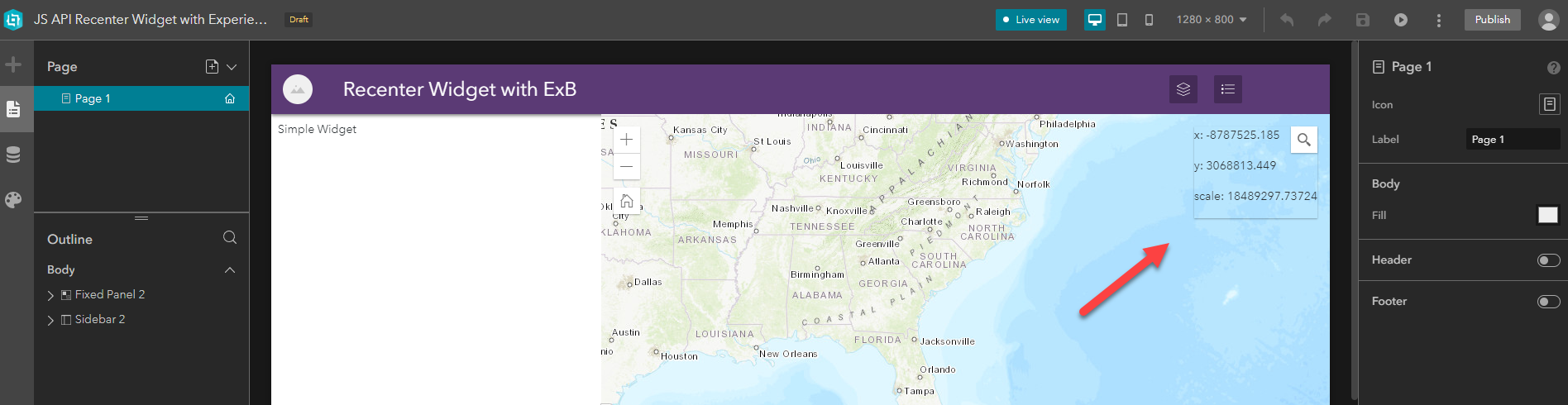
<SPAN class="keyword token">import</SPAN> <SPAN class="punctuation token">{</SPAN> JimuMapViewComponent<SPAN class="punctuation token">,</SPAN> JimuMapView <SPAN class="punctuation token">}</SPAN> <SPAN class="keyword token">from</SPAN> <SPAN class="string token">"jimu-arcgis"</SPAN><SPAN class="punctuation token">;</SPAN><SPAN class="line-numbers-rows"><SPAN></SPAN></SPAN>If successful, you'll see the info box in the top-right corner of the map when you add your widget to an Experience (and configure it manually to reference a map):
Next Steps
The next logical step would probably be to modify the widget to have the text inside the Experience Builder widget instead of on the map. I'll leave that up to you, and also please feel free to post other widgets and widget ideas you are building!


