1. Introduction
This blog talks about implementing your own setTimeout() function in AppStudio.
The blog also highlights ECMAScript 6 and ECMAScript 7 support in Qt 5.12.1 and AppStudio 3.3 features: arrow functions (my favourite), property shorthand, rest parameters and spread syntax.
setTimeout() is a function which executes another function or specified piece of code after waiting for the specified time delay in milliseconds.
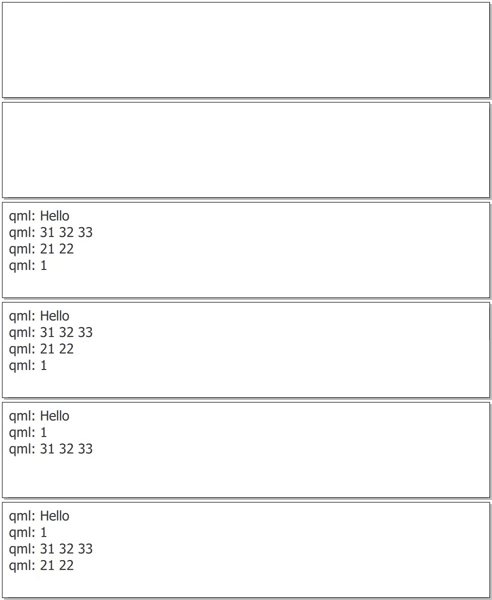
The following will execute the following 4 console.log() after waiting 0 - 1000 milliseconds (determined by a random function). Each timer starts simulatenously but their completion times are random making the 4 console.log() appearing in random jumbled order.
<SPAN class="token function">setTimeout</SPAN><SPAN class="punctuation token">(</SPAN> <SPAN class="punctuation token">(</SPAN><SPAN class="punctuation token">)</SPAN> <SPAN class="operator token">=</SPAN><SPAN class="operator token">></SPAN> console<SPAN class="punctuation token">.</SPAN><SPAN class="token function">log</SPAN><SPAN class="punctuation token">(</SPAN><SPAN class="string token">"Hello"</SPAN><SPAN class="punctuation token">)</SPAN><SPAN class="punctuation token">,</SPAN> <SPAN class="token function">randomDelay</SPAN><SPAN class="punctuation token">(</SPAN><SPAN class="punctuation token">)</SPAN> <SPAN class="punctuation token">)</SPAN>
<SPAN class="token function">setTimeout</SPAN><SPAN class="punctuation token">(</SPAN> <SPAN class="punctuation token">(</SPAN>a<SPAN class="punctuation token">)</SPAN> <SPAN class="operator token">=</SPAN><SPAN class="operator token">></SPAN> console<SPAN class="punctuation token">.</SPAN><SPAN class="token function">log</SPAN><SPAN class="punctuation token">(</SPAN>a<SPAN class="punctuation token">)</SPAN><SPAN class="punctuation token">,</SPAN> <SPAN class="token function">randomDelay</SPAN><SPAN class="punctuation token">(</SPAN><SPAN class="punctuation token">)</SPAN><SPAN class="punctuation token">,</SPAN> <SPAN class="number token">1</SPAN> <SPAN class="punctuation token">)</SPAN>
<SPAN class="token function">setTimeout</SPAN><SPAN class="punctuation token">(</SPAN> <SPAN class="punctuation token">(</SPAN>a<SPAN class="punctuation token">,</SPAN> b<SPAN class="punctuation token">)</SPAN> <SPAN class="operator token">=</SPAN><SPAN class="operator token">></SPAN> console<SPAN class="punctuation token">.</SPAN><SPAN class="token function">log</SPAN><SPAN class="punctuation token">(</SPAN>a<SPAN class="punctuation token">,</SPAN> b<SPAN class="punctuation token">)</SPAN><SPAN class="punctuation token">,</SPAN> <SPAN class="token function">randomDelay</SPAN><SPAN class="punctuation token">(</SPAN><SPAN class="punctuation token">)</SPAN><SPAN class="punctuation token">,</SPAN> <SPAN class="number token">21</SPAN><SPAN class="punctuation token">,</SPAN> <SPAN class="number token">22</SPAN> <SPAN class="punctuation token">)</SPAN>
<SPAN class="token function">setTimeout</SPAN><SPAN class="punctuation token">(</SPAN> <SPAN class="punctuation token">(</SPAN>a<SPAN class="punctuation token">,</SPAN> b<SPAN class="punctuation token">,</SPAN> c<SPAN class="punctuation token">)</SPAN> <SPAN class="operator token">=</SPAN><SPAN class="operator token">></SPAN> console<SPAN class="punctuation token">.</SPAN><SPAN class="token function">log</SPAN><SPAN class="punctuation token">(</SPAN>a<SPAN class="punctuation token">,</SPAN> b<SPAN class="punctuation token">,</SPAN> c<SPAN class="punctuation token">)</SPAN><SPAN class="punctuation token">,</SPAN> <SPAN class="token function">randomDelay</SPAN><SPAN class="punctuation token">(</SPAN><SPAN class="punctuation token">)</SPAN><SPAN class="punctuation token">,</SPAN> <SPAN class="number token">31</SPAN><SPAN class="punctuation token">,</SPAN> <SPAN class="number token">32</SPAN><SPAN class="punctuation token">,</SPAN> <SPAN class="number token">33</SPAN> <SPAN class="punctuation token">)</SPAN><SPAN class="line-numbers-rows"><SPAN></SPAN><SPAN></SPAN><SPAN></SPAN><SPAN></SPAN></SPAN>randomDelay() is a function that computes a random time delay from the range of 0 – 1000 milliseconds:
<SPAN class="keyword token">function</SPAN> <SPAN class="token function">randomDelay</SPAN><SPAN class="punctuation token">(</SPAN><SPAN class="punctuation token">)</SPAN> <SPAN class="punctuation token">{</SPAN>
<SPAN class="keyword token">return</SPAN> Math<SPAN class="punctuation token">.</SPAN><SPAN class="token function">floor</SPAN><SPAN class="punctuation token">(</SPAN><SPAN class="number token">1000</SPAN> <SPAN class="operator token">*</SPAN> Math<SPAN class="punctuation token">.</SPAN><SPAN class="token function">random</SPAN><SPAN class="punctuation token">(</SPAN><SPAN class="punctuation token">)</SPAN><SPAN class="punctuation token">)</SPAN>
<SPAN class="punctuation token">}</SPAN><SPAN class="line-numbers-rows"><SPAN></SPAN><SPAN></SPAN><SPAN></SPAN></SPAN>Here is the console output:
2. AppStudio implementation
setTimeout() is a part of other Javascript development environments, e.g. in Web development and Node.js. It exists globally on the window object.
However, in Qt and AppStudio, there isn’t an equivalent window object or setTimeout() function.
To bring over such a capability you need to implement it yourself.
Here is a sample AppStudio app that includes a simple implementation of setTimeout(). Everytime the button is clicked the 4 setTimeout() functions are triggered with the 4 resulting console.log() appearing in random order.
<SPAN class="keyword token">import</SPAN> QtQuick <SPAN class="number token">2.12</SPAN>
<SPAN class="keyword token">import</SPAN> QtQuick<SPAN class="punctuation token">.</SPAN>Controls <SPAN class="number token">2.5</SPAN>
<SPAN class="keyword token">import</SPAN> ArcGIS<SPAN class="punctuation token">.</SPAN>AppFramework <SPAN class="number token">1.0</SPAN>
App <SPAN class="punctuation token">{</SPAN>
id<SPAN class="punctuation token">:</SPAN> app
width<SPAN class="punctuation token">:</SPAN> <SPAN class="number token">400</SPAN> <SPAN class="operator token">*</SPAN> AppFramework<SPAN class="punctuation token">.</SPAN>displayScaleFactor
height<SPAN class="punctuation token">:</SPAN> <SPAN class="number token">640</SPAN> <SPAN class="operator token">*</SPAN> AppFramework<SPAN class="punctuation token">.</SPAN>displayScaleFactor
StackView <SPAN class="punctuation token">{</SPAN>
id<SPAN class="punctuation token">:</SPAN> stackView
anchors<SPAN class="punctuation token">.</SPAN>fill<SPAN class="punctuation token">:</SPAN> parent
initialItem<SPAN class="punctuation token">:</SPAN> Item <SPAN class="punctuation token">{</SPAN>
Button <SPAN class="punctuation token">{</SPAN>
text<SPAN class="punctuation token">:</SPAN> <SPAN class="token function">qsTr</SPAN><SPAN class="punctuation token">(</SPAN><SPAN class="string token">"Test"</SPAN><SPAN class="punctuation token">)</SPAN>
onClicked<SPAN class="punctuation token">:</SPAN> <SPAN class="punctuation token">{</SPAN>
<SPAN class="token function">setTimeout</SPAN><SPAN class="punctuation token">(</SPAN> <SPAN class="punctuation token">(</SPAN><SPAN class="punctuation token">)</SPAN> <SPAN class="operator token">=</SPAN><SPAN class="operator token">></SPAN> console<SPAN class="punctuation token">.</SPAN><SPAN class="token function">log</SPAN><SPAN class="punctuation token">(</SPAN><SPAN class="string token">"Hello"</SPAN><SPAN class="punctuation token">)</SPAN><SPAN class="punctuation token">,</SPAN> <SPAN class="token function">randomDelay</SPAN><SPAN class="punctuation token">(</SPAN><SPAN class="punctuation token">)</SPAN> <SPAN class="punctuation token">)</SPAN>
<SPAN class="token function">setTimeout</SPAN><SPAN class="punctuation token">(</SPAN> <SPAN class="punctuation token">(</SPAN>a<SPAN class="punctuation token">)</SPAN> <SPAN class="operator token">=</SPAN><SPAN class="operator token">></SPAN> console<SPAN class="punctuation token">.</SPAN><SPAN class="token function">log</SPAN><SPAN class="punctuation token">(</SPAN>a<SPAN class="punctuation token">)</SPAN><SPAN class="punctuation token">,</SPAN> <SPAN class="token function">randomDelay</SPAN><SPAN class="punctuation token">(</SPAN><SPAN class="punctuation token">)</SPAN><SPAN class="punctuation token">,</SPAN> <SPAN class="number token">1</SPAN> <SPAN class="punctuation token">)</SPAN>
<SPAN class="token function">setTimeout</SPAN><SPAN class="punctuation token">(</SPAN> <SPAN class="punctuation token">(</SPAN>a<SPAN class="punctuation token">,</SPAN> b<SPAN class="punctuation token">)</SPAN> <SPAN class="operator token">=</SPAN><SPAN class="operator token">></SPAN> console<SPAN class="punctuation token">.</SPAN><SPAN class="token function">log</SPAN><SPAN class="punctuation token">(</SPAN>a<SPAN class="punctuation token">,</SPAN> b<SPAN class="punctuation token">)</SPAN><SPAN class="punctuation token">,</SPAN> <SPAN class="token function">randomDelay</SPAN><SPAN class="punctuation token">(</SPAN><SPAN class="punctuation token">)</SPAN><SPAN class="punctuation token">,</SPAN> <SPAN class="number token">21</SPAN><SPAN class="punctuation token">,</SPAN> <SPAN class="number token">22</SPAN> <SPAN class="punctuation token">)</SPAN>
<SPAN class="token function">setTimeout</SPAN><SPAN class="punctuation token">(</SPAN> <SPAN class="punctuation token">(</SPAN>a<SPAN class="punctuation token">,</SPAN> b<SPAN class="punctuation token">,</SPAN> c<SPAN class="punctuation token">)</SPAN> <SPAN class="operator token">=</SPAN><SPAN class="operator token">></SPAN> console<SPAN class="punctuation token">.</SPAN><SPAN class="token function">log</SPAN><SPAN class="punctuation token">(</SPAN>a<SPAN class="punctuation token">,</SPAN> b<SPAN class="punctuation token">,</SPAN> c<SPAN class="punctuation token">)</SPAN><SPAN class="punctuation token">,</SPAN> <SPAN class="token function">randomDelay</SPAN><SPAN class="punctuation token">(</SPAN><SPAN class="punctuation token">)</SPAN><SPAN class="punctuation token">,</SPAN> <SPAN class="number token">31</SPAN><SPAN class="punctuation token">,</SPAN> <SPAN class="number token">32</SPAN><SPAN class="punctuation token">,</SPAN> <SPAN class="number token">33</SPAN> <SPAN class="punctuation token">)</SPAN>
<SPAN class="punctuation token">}</SPAN>
<SPAN class="punctuation token">}</SPAN>
<SPAN class="punctuation token">}</SPAN>
<SPAN class="punctuation token">}</SPAN>
<SPAN class="keyword token">function</SPAN> <SPAN class="token function">randomDelay</SPAN><SPAN class="punctuation token">(</SPAN><SPAN class="punctuation token">)</SPAN> <SPAN class="punctuation token">{</SPAN>
<SPAN class="keyword token">return</SPAN> Math<SPAN class="punctuation token">.</SPAN><SPAN class="token function">floor</SPAN><SPAN class="punctuation token">(</SPAN><SPAN class="number token">1000</SPAN> <SPAN class="operator token">*</SPAN> Math<SPAN class="punctuation token">.</SPAN><SPAN class="token function">random</SPAN><SPAN class="punctuation token">(</SPAN><SPAN class="punctuation token">)</SPAN><SPAN class="punctuation token">)</SPAN>
<SPAN class="punctuation token">}</SPAN>
<SPAN class="keyword token">function</SPAN> <SPAN class="token function">setTimeout</SPAN><SPAN class="punctuation token">(</SPAN>func<SPAN class="punctuation token">,</SPAN> interval<SPAN class="punctuation token">,</SPAN> <SPAN class="punctuation token">.</SPAN><SPAN class="punctuation token">.</SPAN><SPAN class="punctuation token">.</SPAN>params<SPAN class="punctuation token">)</SPAN> <SPAN class="punctuation token">{</SPAN>
<SPAN class="keyword token">return</SPAN> setTimeoutComponent<SPAN class="punctuation token">.</SPAN><SPAN class="token function">createObject</SPAN><SPAN class="punctuation token">(</SPAN>app<SPAN class="punctuation token">,</SPAN> <SPAN class="punctuation token">{</SPAN> func<SPAN class="punctuation token">,</SPAN> interval<SPAN class="punctuation token">,</SPAN> params <SPAN class="punctuation token">}</SPAN> <SPAN class="punctuation token">)</SPAN>
<SPAN class="punctuation token">}</SPAN>
<SPAN class="keyword token">function</SPAN> <SPAN class="token function">clearTimeout</SPAN><SPAN class="punctuation token">(</SPAN>timerObj<SPAN class="punctuation token">)</SPAN> <SPAN class="punctuation token">{</SPAN>
timerObj<SPAN class="punctuation token">.</SPAN><SPAN class="token function">stop</SPAN><SPAN class="punctuation token">(</SPAN><SPAN class="punctuation token">)</SPAN>
timerObj<SPAN class="punctuation token">.</SPAN><SPAN class="token function">destroy</SPAN><SPAN class="punctuation token">(</SPAN><SPAN class="punctuation token">)</SPAN>
<SPAN class="punctuation token">}</SPAN>
Component <SPAN class="punctuation token">{</SPAN>
id<SPAN class="punctuation token">:</SPAN> setTimeoutComponent
Timer <SPAN class="punctuation token">{</SPAN>
property <SPAN class="keyword token">var</SPAN> func
property <SPAN class="keyword token">var</SPAN> params
running<SPAN class="punctuation token">:</SPAN> <SPAN class="keyword token">true</SPAN>
repeat<SPAN class="punctuation token">:</SPAN> <SPAN class="keyword token">false</SPAN>
onTriggered<SPAN class="punctuation token">:</SPAN> <SPAN class="punctuation token">{</SPAN>
<SPAN class="token function">func</SPAN><SPAN class="punctuation token">(</SPAN><SPAN class="punctuation token">.</SPAN><SPAN class="punctuation token">.</SPAN><SPAN class="punctuation token">.</SPAN>params<SPAN class="punctuation token">)</SPAN>
<SPAN class="token function">destroy</SPAN><SPAN class="punctuation token">(</SPAN><SPAN class="punctuation token">)</SPAN>
<SPAN class="punctuation token">}</SPAN>
<SPAN class="punctuation token">}</SPAN>
<SPAN class="punctuation token">}</SPAN>
<SPAN class="punctuation token">}</SPAN>
<SPAN class="line-numbers-rows"><SPAN></SPAN><SPAN></SPAN><SPAN></SPAN><SPAN></SPAN><SPAN></SPAN><SPAN></SPAN><SPAN></SPAN><SPAN></SPAN><SPAN></SPAN><SPAN></SPAN><SPAN></SPAN><SPAN></SPAN><SPAN></SPAN><SPAN></SPAN><SPAN></SPAN><SPAN></SPAN><SPAN></SPAN><SPAN></SPAN><SPAN></SPAN><SPAN></SPAN><SPAN></SPAN><SPAN></SPAN><SPAN></SPAN><SPAN></SPAN><SPAN></SPAN><SPAN></SPAN><SPAN></SPAN><SPAN></SPAN><SPAN></SPAN><SPAN></SPAN><SPAN></SPAN><SPAN></SPAN><SPAN></SPAN><SPAN></SPAN><SPAN></SPAN><SPAN></SPAN><SPAN></SPAN><SPAN></SPAN><SPAN></SPAN><SPAN></SPAN><SPAN></SPAN><SPAN></SPAN><SPAN></SPAN><SPAN></SPAN><SPAN></SPAN><SPAN></SPAN><SPAN></SPAN><SPAN></SPAN><SPAN></SPAN><SPAN></SPAN><SPAN></SPAN><SPAN></SPAN><SPAN></SPAN><SPAN></SPAN><SPAN></SPAN><SPAN></SPAN></SPAN>Disclaimer: this is a minimal implementation of setTimeout() not a fully functioning implementation. It is here for the purposes of this blog, specifically to talk about aspects of ECMAScript. If you want to use this implementation you will need to adapt it accordingly.
This implementation of setTimeout() returns a Timer object (instead of a timerId). When the time delay specified in milliseconds has been reached the nominated Javascript function is triggered with the parameters you supplied to setTimeout(). If you wish to abort the action, you can passed the Timer object to the clearTimeout() function.
This implementation will now be deconstructed:
- Global functions in AppStudio
- ECMAScript 6 Arrow Functions
- ECMAScript 6 Property shorthand
- ECMAScript 6 Rest parameter and Spread syntax
3. Global functions in AppStudio
Functions implemented in the top level component (here, it was App) will be seen by all child components. In this example, we have a StackView which means, all pages that are pushed to the StackView will have access to the setTimeout() function.
4. Arrow functions
The first parameter to setTimeout() refers to a function or code. In our examples, we have been using the ECMAScript 6 arrow function syntax for anonymous functions. e.g. the arrow function (a, b, c) => console.log(a, b, c) appears in the following snippet:
<SPAN class="token function">setTimeout</SPAN><SPAN class="punctuation token">(</SPAN> <SPAN class="punctuation token">(</SPAN>a<SPAN class="punctuation token">,</SPAN> b<SPAN class="punctuation token">,</SPAN> c<SPAN class="punctuation token">)</SPAN> <SPAN class="operator token">=</SPAN><SPAN class="operator token">></SPAN> console<SPAN class="punctuation token">.</SPAN><SPAN class="token function">log</SPAN><SPAN class="punctuation token">(</SPAN>a<SPAN class="punctuation token">,</SPAN> b<SPAN class="punctuation token">,</SPAN> c<SPAN class="punctuation token">)</SPAN><SPAN class="punctuation token">,</SPAN> <SPAN class="token function">randomDelay</SPAN><SPAN class="punctuation token">(</SPAN><SPAN class="punctuation token">)</SPAN><SPAN class="punctuation token">,</SPAN> <SPAN class="number token">31</SPAN><SPAN class="punctuation token">,</SPAN> <SPAN class="number token">32</SPAN><SPAN class="punctuation token">,</SPAN> <SPAN class="number token">33</SPAN><SPAN class="punctuation token">)</SPAN><SPAN class="line-numbers-rows"><SPAN></SPAN></SPAN>
When used appropriately, arrow functions can help improve code readablity and maintainability.
For comparison, let's look at equivalent implementation to the above arrow function.
4.1 Original Anonymous functions
Prior to ECMAScript 6, we could always do anonymous functions, but the syntax was somewhat cumbersome with the required use of the function keyword:
<SPAN class="token function">setTimeout</SPAN><SPAN class="punctuation token">(</SPAN> <SPAN class="keyword token">function</SPAN> <SPAN class="punctuation token">(</SPAN>a<SPAN class="punctuation token">,</SPAN> b<SPAN class="punctuation token">,</SPAN> c<SPAN class="punctuation token">)</SPAN> <SPAN class="punctuation token">{</SPAN> console<SPAN class="punctuation token">.</SPAN><SPAN class="token function">log</SPAN><SPAN class="punctuation token">(</SPAN>a<SPAN class="punctuation token">,</SPAN> b<SPAN class="punctuation token">,</SPAN> c<SPAN class="punctuation token">)</SPAN> <SPAN class="punctuation token">}</SPAN><SPAN class="punctuation token">,</SPAN> <SPAN class="token function">randomDelay</SPAN><SPAN class="punctuation token">(</SPAN><SPAN class="punctuation token">)</SPAN><SPAN class="punctuation token">,</SPAN> <SPAN class="number token">31</SPAN><SPAN class="punctuation token">,</SPAN> <SPAN class="number token">32</SPAN><SPAN class="punctuation token">,</SPAN> <SPAN class="number token">33</SPAN> <SPAN class="punctuation token">)</SPAN><SPAN class="line-numbers-rows"><SPAN></SPAN></SPAN>4.2 Using a named function
Sometimes, to avoid the use of the anonymous function syntax, I find it better to name things clearly and space out my code for increase readability and maintainability:
<SPAN class="keyword token">function</SPAN> <SPAN class="token function">testFunction</SPAN><SPAN class="punctuation token">(</SPAN>a<SPAN class="punctuation token">,</SPAN> b<SPAN class="punctuation token">,</SPAN> c<SPAN class="punctuation token">)</SPAN> <SPAN class="punctuation token">{</SPAN>
console<SPAN class="punctuation token">.</SPAN><SPAN class="token function">log</SPAN><SPAN class="punctuation token">(</SPAN>a<SPAN class="punctuation token">,</SPAN> b<SPAN class="punctuation token">,</SPAN> c<SPAN class="punctuation token">)</SPAN>
<SPAN class="punctuation token">}</SPAN>
<SPAN class="token function">setTimeout</SPAN><SPAN class="punctuation token">(</SPAN>testFunction<SPAN class="punctuation token">,</SPAN> <SPAN class="token function">randomDelay</SPAN><SPAN class="punctuation token">(</SPAN><SPAN class="punctuation token">)</SPAN><SPAN class="punctuation token">,</SPAN> <SPAN class="number token">31</SPAN><SPAN class="punctuation token">,</SPAN> <SPAN class="number token">32</SPAN><SPAN class="punctuation token">,</SPAN> <SPAN class="number token">33</SPAN><SPAN class="punctuation token">)</SPAN><SPAN class="line-numbers-rows"><SPAN></SPAN><SPAN></SPAN><SPAN></SPAN><SPAN></SPAN><SPAN></SPAN></SPAN>4.3 Calling console.log directly
For completeness, we recognize that console.log, is, itself, a function reference, so, we can supply this directly to the setTimeout() function.
<SPAN class="token function">setTimeout</SPAN><SPAN class="punctuation token">(</SPAN>console<SPAN class="punctuation token">.</SPAN>log<SPAN class="punctuation token">,</SPAN> <SPAN class="token function">randomDelay</SPAN><SPAN class="punctuation token">(</SPAN><SPAN class="punctuation token">)</SPAN><SPAN class="punctuation token">,</SPAN> <SPAN class="number token">31</SPAN><SPAN class="punctuation token">,</SPAN> <SPAN class="number token">32</SPAN><SPAN class="punctuation token">,</SPAN> <SPAN class="number token">33</SPAN><SPAN class="punctuation token">)</SPAN><SPAN class="line-numbers-rows"><SPAN></SPAN></SPAN>
5. Property shorthand syntax
ECMAScript 6 introduces a property shorthand syntax for object creation.
In the following snippets, compare the code for both obj1 and obj2.
They both yield the same value, but the code for obj2 is much shorter and easier to read.
<SPAN class="keyword token">var</SPAN> x <SPAN class="operator token">=</SPAN> <SPAN class="number token">11</SPAN>
<SPAN class="keyword token">var</SPAN> y <SPAN class="operator token">=</SPAN> <SPAN class="number token">22</SPAN>
<SPAN class="keyword token">var</SPAN> z <SPAN class="operator token">=</SPAN> <SPAN class="number token">33</SPAN>
<SPAN class="keyword token">var</SPAN> obj1 <SPAN class="operator token">=</SPAN> <SPAN class="punctuation token">{</SPAN> x<SPAN class="punctuation token">:</SPAN> x<SPAN class="punctuation token">,</SPAN> y<SPAN class="punctuation token">:</SPAN> y<SPAN class="punctuation token">,</SPAN> z<SPAN class="punctuation token">:</SPAN> z <SPAN class="punctuation token">}</SPAN> <SPAN class="comment token">// obj1 = { x: 11, y: 22, z: 33 }</SPAN>
<SPAN class="keyword token">var</SPAN> obj2 <SPAN class="operator token">=</SPAN> <SPAN class="punctuation token">{</SPAN> x<SPAN class="punctuation token">,</SPAN> y<SPAN class="punctuation token">,</SPAN> z <SPAN class="punctuation token">}</SPAN> <SPAN class="comment token">// obj2 = { x: 11, y: 22, z: 33 }</SPAN><SPAN class="line-numbers-rows"><SPAN></SPAN><SPAN></SPAN><SPAN></SPAN><SPAN></SPAN><SPAN></SPAN></SPAN>We used the shorthand syntax to simplify the following
setTimeoutComponent<SPAN class="punctuation token">.</SPAN><SPAN class="token function">createObject</SPAN><SPAN class="punctuation token">(</SPAN>app<SPAN class="punctuation token">,</SPAN> <SPAN class="punctuation token">{</SPAN> func<SPAN class="punctuation token">:</SPAN>func<SPAN class="punctuation token">,</SPAN> internval<SPAN class="punctuation token">:</SPAN>interval<SPAN class="punctuation token">,</SPAN> args<SPAN class="punctuation token">:</SPAN>args <SPAN class="punctuation token">}</SPAN> <SPAN class="punctuation token">)</SPAN><SPAN class="line-numbers-rows"><SPAN></SPAN></SPAN>into:
setTimeoutComponent<SPAN class="punctuation token">.</SPAN><SPAN class="token function">createObject</SPAN><SPAN class="punctuation token">(</SPAN>app<SPAN class="punctuation token">,</SPAN> <SPAN class="punctuation token">{</SPAN> func<SPAN class="punctuation token">,</SPAN> interval<SPAN class="punctuation token">,</SPAN> args <SPAN class="punctuation token">}</SPAN> <SPAN class="punctuation token">)</SPAN><SPAN class="line-numbers-rows"><SPAN></SPAN></SPAN>6. Rest parameter and Spread syntax
ECMAScript 6 also introduces rest parameters and spread syntax.
We used it in the declaration of the setTimeout function to pick up all remaining parameters as an array.
<SPAN class="keyword token">function</SPAN> <SPAN class="token function">setTimeout</SPAN><SPAN class="punctuation token">(</SPAN>func<SPAN class="punctuation token">,</SPAN> interval<SPAN class="punctuation token">,</SPAN> <SPAN class="punctuation token">.</SPAN><SPAN class="punctuation token">.</SPAN><SPAN class="punctuation token">.</SPAN>params<SPAN class="punctuation token">)</SPAN> <SPAN class="punctuation token">{</SPAN><SPAN class="line-numbers-rows"><SPAN></SPAN></SPAN>when called with:
setTimeout( (a, b, c) => console.log(a, b, c), randomDelay(), 31, 32, 33)<SPAN class="line-numbers-rows"><SPAN></SPAN></SPAN>
results in:
func <SPAN class="operator token">=</SPAN> <SPAN class="punctuation token">(</SPAN>a<SPAN class="punctuation token">,</SPAN> b<SPAN class="punctuation token">,</SPAN> c<SPAN class="punctuation token">)</SPAN> <SPAN class="operator token">=</SPAN><SPAN class="operator token">></SPAN> console<SPAN class="punctuation token">.</SPAN><SPAN class="token function">log</SPAN><SPAN class="punctuation token">(</SPAN>a<SPAN class="punctuation token">,</SPAN> b<SPAN class="punctuation token">,</SPAN> c<SPAN class="punctuation token">)</SPAN>
interval <SPAN class="operator token">=</SPAN> <SPAN class="token function">randomDelay</SPAN><SPAN class="punctuation token">(</SPAN><SPAN class="punctuation token">)</SPAN>
params <SPAN class="operator token">=</SPAN> <SPAN class="punctuation token">[</SPAN> <SPAN class="number token">31</SPAN><SPAN class="punctuation token">,</SPAN> <SPAN class="number token">32</SPAN><SPAN class="punctuation token">,</SPAN> <SPAN class="number token">33</SPAN> <SPAN class="punctuation token">]</SPAN><SPAN class="line-numbers-rows"><SPAN></SPAN><SPAN></SPAN><SPAN></SPAN></SPAN>
When calling func we passed the parameters using the spread syntax, i.e.
<SPAN class="token function">func</SPAN><SPAN class="punctuation token">(</SPAN><SPAN class="punctuation token">.</SPAN><SPAN class="punctuation token">.</SPAN><SPAN class="punctuation token">.</SPAN>params<SPAN class="punctuation token">)</SPAN><SPAN class="line-numbers-rows"><SPAN></SPAN></SPAN>
which passes the parameter array as individual parameters to the function, i.e.
<SPAN class="token function">func</SPAN><SPAN class="punctuation token">(</SPAN><SPAN class="number token">31</SPAN><SPAN class="punctuation token">,</SPAN> <SPAN class="number token">32</SPAN><SPAN class="punctuation token">,</SPAN> <SPAN class="number token">33</SPAN><SPAN class="punctuation token">)</SPAN><SPAN class="line-numbers-rows"><SPAN></SPAN></SPAN>
which ultimate calls
console<SPAN class="punctuation token">.</SPAN><SPAN class="token function">log</SPAN><SPAN class="punctuation token">(</SPAN><SPAN class="number token">31</SPAN><SPAN class="punctuation token">,</SPAN> <SPAN class="number token">32</SPAN><SPAN class="punctuation token">,</SPAN> <SPAN class="number token">33</SPAN><SPAN class="punctuation token">)</SPAN><SPAN class="line-numbers-rows"><SPAN></SPAN></SPAN>
Closing Remarks
This blog discusses an AppStudio implementation of setTimeout(). It was used as a way to give you a glimpse of some of the new ECMAScript 6 features, i.e. arrow functions, property shorthand and rest parameters and spread syntax which you can utilize in your AppStudio apps.
I plan to talk about Promises in ECMAScript 6 and AppStudio in a future blog. That blog will reuse the setTimeout() function and arrow functions introduced here.
In the meantime, please help us improve Promises in AppStudio by voting on fixing Promise chains bug https://bugreports.qt.io/browse/QTBUG-71329 and by voting on implementing async/await support in https://bugreports.qt.io/browse/QTBUG-58620
References
Send us your feedback to appstudiofeedback@esri.com
Become an AppStudio for ArcGIS developer! Watch this video on how to sign up for a free trial.
Follow us on Twitter @AppStudioArcGIS to keep up-to-date on the latest information and let us know about your creations built using AppStudio to be featured in the AppStudio Showcase.
The AppStudio team periodically hosts workshops and webinars; please click on this link to leave your email if you are interested in information regarding AppStudio events.

