I have built a survey using S123 Connect and published it. It looks and works fine as a web app and on the windows field app on my PC but on my iPhone the field app GeoPoint component (‘INCIDENT LOCATION’ below) will not show the map interface. It looks like the screen grab on the left below when loading and then the screen grab on the right once my location has been found. There is no little map icon and no way to activate the map to change or refine my location. Strangely if I submit the survey anyway then the map does appear for the GeoPoint component for the next survey I want to submit. It was just the first field app survey of a brand new form that this happened for.
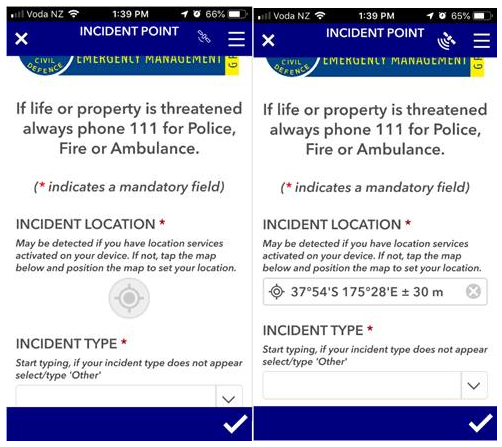
My suspicions are that the GeoPoint map interface will not show on devices with screens below a certain size (my iPhone is a 5S) but I do not have a larger mobile phone to test this and I did a search online about this possible limitation but could not find anything. Further, this does not explain why the map interface is now showing. I do not think I have applied a field or setting type in the Connect xlsform applied that would cause this but am open to suggestions.
Has anyone else experience behaviour like this before and figured out why?
- S123 Connect v3.5.166
- S123 Field app v3.7.56
- iPhone 5S iOS 12.4.1

