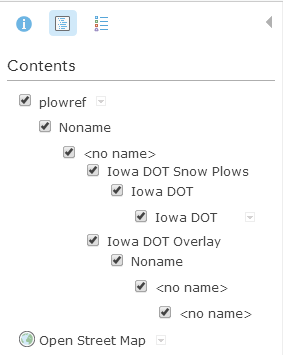
I have a KML (see attached) and when I link to it in ArcGIS Online, It likes to display a lot of drop down headers that you have to expand to get to the content. How do I go about cleaning up the stack so it would be plowref > Iowa DOT (second)? Any help as to how I can remove a few of the headings would be appreciated.
I've moved your post into the Arcgis Online Developers space. You will get a much better answer here as the GeoNet Help is intended for community help and feedback. You can see more on the community structure, and what topics are under each space from thefollowing documents:
GeoNet Community Structure
ArcGIS Discussion Forums Migration Strategy
Thanks!
Don
If you have google earth, take the kml into google earth, make a new folder in google earth called plowref, then within that, open all the subfolders of your original kmz, and find your kmls, and move the kmls over you need(also you can make subfolders as needed), and change the names accordingly. Once done, have it export the plowref folder as a kmz, then load into arcgis online(there could be a way in AGOL, but I don't know what it is.)
I think you can edit the KML file in Google Earth then Save KML and Update your map.
Signed in members can post, follow updates, and more. New here? Register a free account.
Find useful guides, FAQs, and documents to help you navigate and make the most of Esri Community.