Hi,
We have an issue with latest release of Survey connect (3.7) and fields with calculations and decimals.
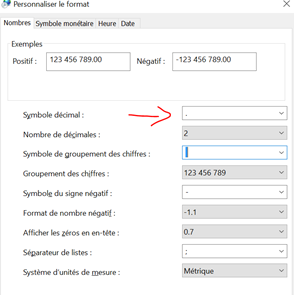
We are working on Windows 10 computers, with French as system language, but with dot as a decimal symbol instead of comma by default:
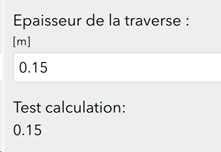
The example below shows a very simple calculation where the second field (type = note) just takes the first field (type = decimal) value.
The expected behavior is the following:
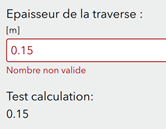
But with our system configuration, this is what we get:
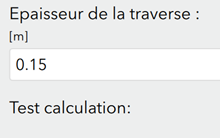
No calculation done = whoops.
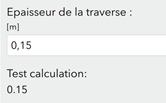
If we change back to the default settings (with comma instead of dot), the input in the first field needs to be with a comma, but the calculation works and gives a value with a dot.
Fun fact: when using pull-data from a csv file with dots, the input is not valid as it expects a comma but the calculation works anyway…
The thing is that we don’t want to change this setting only for Survey123 connect, as it is necessary for other software.
After publishing, there is no issues with the calculation in Survey App (although there is one with our Samsung tablets and default keyboard, as mentioned here).
Is that a bug or is there a way to solve this without changing the system settings? It was working well with previous versions of connect.
Léo

