I am writing output data to the scratch geodatabase in a script - it was working great before but now it is no longer working and I'm trying to figure out if it's an IDE problem or something else. When I write data to the scratch geodatabase, it is treating it as a folder and appending ".shp" to the end of the output data instead of treating it as a file geodatabase and writing the output data as a feature class like it's supposed to. Additionally, it will run through the first tool call and write the output, but then the second tool call results in an error because it's trying to append ".shp.shp" to the output data name which is obviously invalid... I'm leaning towards this being an IDE problem because the script works great if I add the toolbox to ArcMap and run it inside there. Has anybody else seen this fishy behavior using PyCharm?
The problem script:
scratchGDB <SPAN class="operator token">=</SPAN> arcpy<SPAN class="punctuation token">.</SPAN>env<SPAN class="punctuation token">.</SPAN>scratchGDB
<SPAN class="comment token">#First tool call appends .shp to singlepart</SPAN>
<SPAN class="comment token">#output looks like this: C:\Users\xyz\AppData\Local\Temp\scratch.gdb\singlepart.shp</SPAN>
svyPtFC <SPAN class="operator token">=</SPAN> arcpy<SPAN class="punctuation token">.</SPAN>MultipartToSinglepart_management<SPAN class="punctuation token">(</SPAN>multipartFL<SPAN class="punctuation token">,</SPAN> os<SPAN class="punctuation token">.</SPAN>path<SPAN class="punctuation token">.</SPAN>join<SPAN class="punctuation token">(</SPAN>scratchGDB<SPAN class="punctuation token">,</SPAN> <SPAN class="string token">'singlepart'</SPAN><SPAN class="punctuation token">)</SPAN><SPAN class="punctuation token">)</SPAN>
<SPAN class="comment token">#Second tool call tries to append .shp.shp to FinalOutput</SPAN>
<SPAN class="comment token">#Error says: ExecuteError: ERROR 000210: Cannot create output </SPAN>
<SPAN class="comment token">#C:\Users\xyz\AppData\Local\Temp\scratch.gdb\FinalOutput.shp.shp</SPAN>
<SPAN class="comment token">#ERROR 000354: The name contains invalid characters</SPAN>
filename <SPAN class="operator token">=</SPAN> os<SPAN class="punctuation token">.</SPAN>path<SPAN class="punctuation token">.</SPAN>join<SPAN class="punctuation token">(</SPAN>scratchGDB<SPAN class="punctuation token">,</SPAN> <SPAN class="string token">"FinalOutput"</SPAN><SPAN class="punctuation token">)</SPAN>
svyPtFC <SPAN class="operator token">=</SPAN> arcpy<SPAN class="punctuation token">.</SPAN>Eliminate_management<SPAN class="punctuation token">(</SPAN>sliverFL<SPAN class="punctuation token">,</SPAN> filename<SPAN class="punctuation token">)</SPAN><SPAN class="line-numbers-rows"><SPAN></SPAN><SPAN></SPAN><SPAN></SPAN><SPAN></SPAN><SPAN></SPAN><SPAN></SPAN><SPAN></SPAN><SPAN></SPAN><SPAN></SPAN><SPAN></SPAN><SPAN></SPAN><SPAN></SPAN></SPAN>
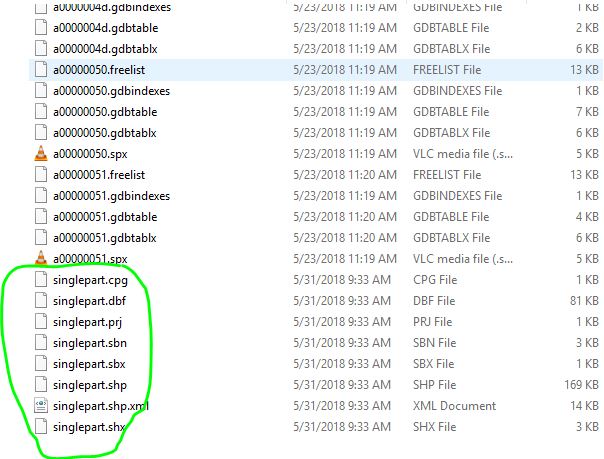
It truly does write the shapefile out into the geodatabase folder:
If I run this code to check if it's a geodatabase I get this:
scratchGDB <SPAN class="operator token">=</SPAN> arcpy<SPAN class="punctuation token">.</SPAN>env<SPAN class="punctuation token">.</SPAN>scratchGDB
desc <SPAN class="operator token">=</SPAN> arcpy<SPAN class="punctuation token">.</SPAN>Describe<SPAN class="punctuation token">(</SPAN>scratchGDB<SPAN class="punctuation token">)</SPAN>
<SPAN class="keyword token">print</SPAN> desc<SPAN class="punctuation token">.</SPAN>workspaceType
<SPAN class="comment token">#Prints "FileSystem"</SPAN><SPAN class="line-numbers-rows"><SPAN></SPAN><SPAN></SPAN><SPAN></SPAN><SPAN></SPAN><SPAN></SPAN><SPAN></SPAN></SPAN>
How do I get it to be seen as a file geodatabase when running in an IDE?

