I've been trying to create a checkbox tree in my settings for a widget.
The checkbox tree docs are here: http://thejekels.com/dojo/cbtree_AMD.html
To get the data into the tree I'm using the code below. The data array is not what I'll be using in the end product. The problem I'm having is that the data property of the store is always null. The _jsonData property of the store object has the array in it though. Can anyone see what I'm doing wrong?
var data = [{ id: "earth", name: "The earth", type: "planet", population: "7 billion" }];
//var data = result;
var store = new ItemFileWriteStore({ data: data });
var model = new ForestStoreModel({
store: store,
query: { id: "earth" },
rootLabel: "Layers",
checkedRoot: true
});
var tree = new Tree({
model: model,
id: "MenuTree",
branchIcons: true,
branchReadOnly: false,
checkBoxes: true,
nodeIcons: true
});
Message was edited by: Andrew Terwiel
I think I need to call fetch() on the store before using it in the model.
Message was edited by: Andrew Terwiel
I've made some progress. The following code will display a rudimentary tree, as shown. The checkboxes don't show for some reason and I can't get the parent-child hierarchy to display.
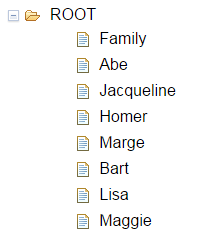
var layers = {};
layers.label = 'name';
layers.identifier = 'name';
layers.items = [
{ name: "Family", type: "root" },
{ name: "Abe", type: "parent", parent: ["root"], hair: "Brown" },
{ name: "Jacqueline", type: "parent", parent: ["root"], hair: "Brown" },
{ name: "Homer", type: "parent", parent: ["Abe"], hair: "none" },
{ name: "Marge", type: "parent", parent: ["Jacqueline"], hair: "blue" },
{ name: "Bart", type: "child", parent: ["Homer", "Marge"], hair: "blond" },
{ name: "Lisa", type: "child", parent: ["Homer", "Marge"], hair: "blond" },
{ name: "Maggie", type: "child", parent: ["Homer", "Marge"], hair: "blond" }
];
var store = new ItemFileWriteStore({ data: layers });
var model = new ForestStoreModel({
store: store
});
var tree = new Tree({
model: model,
id: "MenuTree"
});
connect.connect(tree, "onCheckBoxClick", model, that._checkBoxClicked);
tree.placeAt(that.checkboxTreeDiv);

