I have a simple map with polygons on graphics layer, i need to fade map outside that polygon and show polygon as a hole in the map. I get some relative answer in older version, but it is not helpful.
I want to show like this image
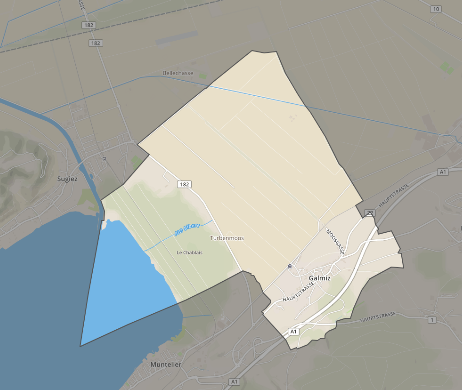
My code is below
<script>
require(["esri/views/MapView",
"esri/WebMap",
"esri/Graphic",
"esri/layers/GraphicsLayer",
"esri/geometry/Polygon",
"esri/geometry/SpatialReference"
], function (MapView, WebMap, Graphic, GraphicsLayer, Polygon, SpatialReference) {
let validSymbol,
newDevelopmentGraphic;
/************************************************************
* Creates a new WebMap instance. A WebMap must reference
* a PortalItem ID that represents a WebMap saved to
* arcgis.com or an on-premise portal.
*
* To load a WebMap from an on-premise portal, set the portal
* url with esriConfig.portalUrl.
************************************************************/
var webmap = new WebMap({
portalItem: {
// autocasts as new PortalItem()
id: ""
}
});
/************************************************************
* Set the WebMap instance to the map property in a MapView.
************************************************************/
var view = new MapView({
map: webmap,
container: "viewDiv",
center: ['<?=$map_xy_coordinate['x']?>', '<?=$map_xy_coordinate['y']?>'],
zoom: 15
});
var graphicsLayer = new GraphicsLayer();
webmap.add(graphicsLayer);
view.when(function() {
// Add the boundary polygon and new lot polygon graphics
addGraphics();
});
function addGraphics() {
//pass geographic vertices
const vertices = <?php echo json_encode($map_ring_coordinate);?>;
const polygon = createGeometry(vertices);
//console.log(polygon);
validSymbol = createSymbol([0, 170, 255, 0.2], "solid", 2, [
255,
255,
255
]);
newDevelopmentGraphic = new Graphic({
geometry: polygon,
symbol: validSymbol,
attributes: {
newDevelopment: "new store"
}
});
graphicsLayer.addMany([newDevelopmentGraphic]);
}
function createGeometry(vertices) {
return new Polygon({
rings: vertices,
spatialReference: new SpatialReference({wkid:4326})
});
}
function createSymbol(color, style, width, outlineColor) {
return {
type: "simple-fill",
style: style,
color: color,
outline: {
color: outlineColor,
width: width
}
};
}
});
</script>


