I have Custom Text Elements in my print template that works great when using WAB. The Custom fields show up when you click the print widget and gives you a chance to fill them out and it prints out correctly. When I click the print widget using JavaScript 4.13 it doesn't show the text boxes to fill out. Should it? If not, how do I go about making this happen? Is there an an example that I could use? Thanks!
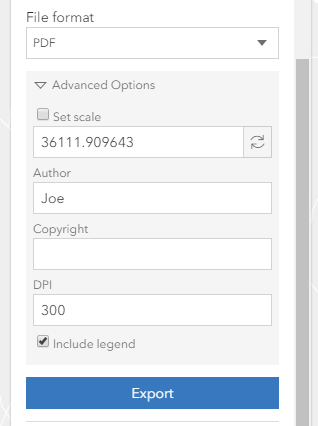
JavaScript snapshot:
WAB snapshot:
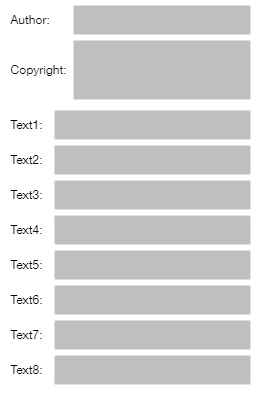
Here is my code that I'm using for the print widget:
var print = new Print({
container: document.createElement("div"),
view: view,
printServiceUrl: "https://gisportal.abc.com/server/rest/services/PrintService/GPServer/Export Web Map",
templateOptions: {
title: "Corporation",
author: "Joe",
format:"pdf",
layout: "1. 8.5x11 Portrait",
copyright: "",
legendEnabled: true,
dpi: 300,
customTextElements: [
{"Text1": ""},
{"Text2": ""},
{"Text3": ""},
{"Text4": ""},
{"Text5": ""},
{"Text6": ""},
{"Text7": ""},
{"Text8": ""}
]
}
})

