I'm using the LayerList for a small project. It basically meets my needs despite its limited functionality. Anyways, I added a labelLayer to my project to label the features of another feature layer in the project and I wanted to have the ability to turn the labels on/off. I added the labelLayer as one of the layers to the LayerList widget but I cannot figure out where it's getting the label text for the checkbox in the LayerList.
My simple code for the labelLayer:
        var renderer = new SimpleRenderer(symbol);
        var labelLayer = new LabelLayer("label1", {
            id: "Milepost Labels",
            mode: "dynamic",
            visible:true
        });
        labelLayer.addFeatureLayer(fsMpLayer, renderer, "M.P. {milepost}", { pointPriorities: "AboveRight" });
        labelLayer.setAlgorithmType("DYNAMIC");
labelLayer.setMinScale(24000);and for the LayerList...
        layerWidget = new LayerList({
           map: app.map,
           subLayers: false,
           layers: [
                // {layer: ortho2013Layer,
                // visibility: false
                // },
                {layer: geolMapLayer,
                subLayers: false,
                visbility: false
                },
                {layer:memoSegmentLayer,
                visibility:false
                },
                {layer: soilsLayer,
                visibility:false
                },
                {layer: streamLayer,
                visibility:false
                },
                {layer:roadsLayer,
                visbility:true
                },
                {layer:mlhLayer,
                visibility:true
                },
                {layer:fsMpLayer,
                visibility:true
                },
                {layer:streamCrossingLayer,
                visibility:true
                },
                {layer:maintConcernLayer,
                visibility:true
                },
                {layer:labelLayer,
                visibility:true
                }
           ]},"layerList");
layerWidget.startup();And inside the app, it just states "labels" as the text for the labelLayer checkbox:
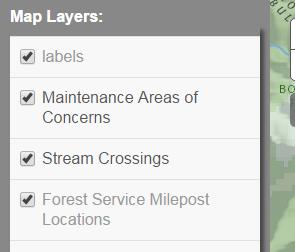
Is there anyway to change that??
Steve

