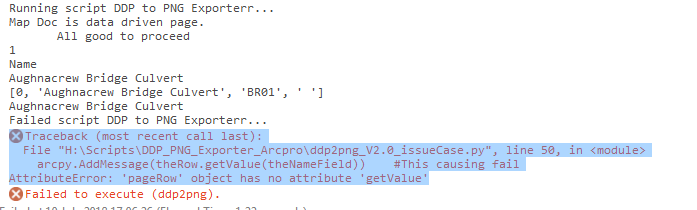
The key issue to me seems to be:
arcpy<SPAN class="punctuation token">.</SPAN>AddMessage<SPAN class="punctuation token">(</SPAN>theRow<SPAN class="punctuation token">.</SPAN>getValue<SPAN class="punctuation token">(</SPAN>theNameField<SPAN class="punctuation token">)</SPAN><SPAN class="punctuation token">)</SPAN><SPAN class="line-numbers-rows"><SPAN></SPAN></SPAN>
Is not working in arcpro in respect to a row object from a layout mapseries, this worked just fine in ArcGIS (10.3)
Details
I am trying to automate the export of a data driven page into .png in arcpro. The issue I am running into working out how to automate the naming of the output .png's.
The naming pattern I want to use is
theOutput = outDir + '\\' + theBase + '_'+str(theNameValue) + ".png"
Where
outDir is an output directory which is passed into the job as a parameter.
theBase is the base file name of the arcpro project and is defined thus
theBase = os.path.splitext(os.path.basename(aprx.filePath))[0]
The issue is arising in setting theNameValue.
I want to use the value of mapsSeries.pageNameField for the current page the script is iterating through.
A sample script is attached and requires the following parameters.
outDir = arcpy.GetParameterAsText(0) # Create or use an output directory variable
outRes = arcpy.GetParameterAsText(1) # Resolution of PNG in dpi.
theLayout = arcpy.GetParameterAsText(2) #The layout we want to push out DDPs on.
Now on my test data I happen to have set the map series name field to be a field named: Name (the use case is bridges, but that's not really relevant...) but it is successfully used in line 23
arcpy.AddMessage(theRow.Name)
Now according to the help on map series line 20 on the snippet below, theRow should be returning a row object.
Checking what theRow is via line24 returns: [0, 'Aughnacrew Bridge Culvert', 'BR01', ' ']
on the test data I was using this is expected. According to the help on row objects this should have a method
getValue (field_name)
that Gets the field value....
However when I try to use it like in line 26:
arcpy.AddMessage(theRow.getValue(theNameField))
It will cause the code to fail like the image below and as far as I can tell this should work.
Can anyone help me understand why this is not working?
I have managed to get this script to sort of work by calling
theRow.__getattribute__(theNameField)
But this does not strike me as good form.
I am using ArcPRO 2.2.0
<SPAN class="keyword token">for</SPAN> lyt <SPAN class="keyword token">in</SPAN> aprx<SPAN class="punctuation token">.</SPAN>listLayouts<SPAN class="punctuation token">(</SPAN>theLayout<SPAN class="punctuation token">)</SPAN><SPAN class="punctuation token">:</SPAN>
<SPAN class="keyword token">if</SPAN> lyt<SPAN class="punctuation token">.</SPAN>name <SPAN class="operator token">==</SPAN> theLayout<SPAN class="punctuation token">:</SPAN>
<SPAN class="comment token">#we check we are hitting on our desired </SPAN>
<SPAN class="keyword token">if</SPAN> lyt<SPAN class="punctuation token">.</SPAN>mapSeries <SPAN class="keyword token">is</SPAN> <SPAN class="operator token">not</SPAN> None<SPAN class="punctuation token">:</SPAN>
ms <SPAN class="operator token">=</SPAN> lyt<SPAN class="punctuation token">.</SPAN>mapSeries
idxLyer <SPAN class="operator token">=</SPAN> ms<SPAN class="punctuation token">.</SPAN>indexLayer
idxLyerName <SPAN class="operator token">=</SPAN> ms<SPAN class="punctuation token">.</SPAN>indexLayer<SPAN class="punctuation token">.</SPAN>name
<SPAN class="keyword token">if</SPAN> ms<SPAN class="punctuation token">.</SPAN>enabled<SPAN class="punctuation token">:</SPAN>
arcpy<SPAN class="punctuation token">.</SPAN>AddMessage<SPAN class="punctuation token">(</SPAN><SPAN class="string token">"\n\tMap Doc is data driven page.\n\tAll good to proceed"</SPAN><SPAN class="punctuation token">)</SPAN>
<SPAN class="comment token">#get the name field.</SPAN>
theNameField <SPAN class="operator token">=</SPAN> ms<SPAN class="punctuation token">.</SPAN>pageNameField<SPAN class="punctuation token">.</SPAN>name
test <SPAN class="operator token">=</SPAN> ms<SPAN class="punctuation token">.</SPAN>pageNameField
<SPAN class="comment token">#get the number of pages to use for push out</SPAN>
<SPAN class="keyword token">for</SPAN> pageNum <SPAN class="keyword token">in</SPAN> range<SPAN class="punctuation token">(</SPAN><SPAN class="number token">1</SPAN><SPAN class="punctuation token">,</SPAN>ms<SPAN class="punctuation token">.</SPAN>pageCount <SPAN class="operator token">+</SPAN> <SPAN class="number token">1</SPAN><SPAN class="punctuation token">)</SPAN><SPAN class="punctuation token">:</SPAN>
<SPAN class="comment token">#make the page the current page number..</SPAN>
ms<SPAN class="punctuation token">.</SPAN>currentPageNumber <SPAN class="operator token">=</SPAN> pageNum
arcpy<SPAN class="punctuation token">.</SPAN>AddMessage<SPAN class="punctuation token">(</SPAN>pageNum<SPAN class="punctuation token">)</SPAN>
theRow <SPAN class="operator token">=</SPAN> ms<SPAN class="punctuation token">.</SPAN>pageRow
fields <SPAN class="operator token">=</SPAN> arcpy<SPAN class="punctuation token">.</SPAN>ListFields<SPAN class="punctuation token">(</SPAN>idxLyerName<SPAN class="punctuation token">)</SPAN>
arcpy<SPAN class="punctuation token">.</SPAN>AddMessage<SPAN class="punctuation token">(</SPAN>theNameField<SPAN class="punctuation token">)</SPAN>
arcpy<SPAN class="punctuation token">.</SPAN>AddMessage<SPAN class="punctuation token">(</SPAN>theRow<SPAN class="punctuation token">.</SPAN>Name<SPAN class="punctuation token">)</SPAN>
arcpy<SPAN class="punctuation token">.</SPAN>AddMessage<SPAN class="punctuation token">(</SPAN>theRow<SPAN class="punctuation token">)</SPAN> <SPAN class="comment token">#seeing what row contains</SPAN>
arcpy<SPAN class="punctuation token">.</SPAN>AddMessage<SPAN class="punctuation token">(</SPAN>theRow<SPAN class="punctuation token">[</SPAN><SPAN class="number token">1</SPAN><SPAN class="punctuation token">]</SPAN><SPAN class="punctuation token">)</SPAN> <SPAN class="comment token">#access row by index</SPAN>
<SPAN class="comment token">#arcpy.AddMessage(theRow.getValue(theNameField)) #This causing fail</SPAN>
arcpy<SPAN class="punctuation token">.</SPAN>AddMessage<SPAN class="punctuation token">(</SPAN>dir<SPAN class="punctuation token">(</SPAN>theRow<SPAN class="punctuation token">)</SPAN><SPAN class="punctuation token">)</SPAN> <SPAN class="comment token">#find out what methods and attributes theRow has.</SPAN>
arcpy<SPAN class="punctuation token">.</SPAN>AddMessage<SPAN class="punctuation token">(</SPAN>theRow<SPAN class="punctuation token">.</SPAN>__getattribute__<SPAN class="punctuation token">(</SPAN>theNameField<SPAN class="punctuation token">)</SPAN><SPAN class="punctuation token">)</SPAN> <SPAN class="comment token">#This works?</SPAN>
arcpy<SPAN class="punctuation token">.</SPAN>AddMessage<SPAN class="punctuation token">(</SPAN><SPAN class="string token">"where is this going wrong?"</SPAN><SPAN class="punctuation token">)</SPAN>
theOutput <SPAN class="operator token">=</SPAN> outDir <SPAN class="operator token">+</SPAN> <SPAN class="string token">'\\'</SPAN> <SPAN class="operator token">+</SPAN> theBase <SPAN class="operator token">+</SPAN> <SPAN class="string token">'_'</SPAN><SPAN class="operator token">+</SPAN>str<SPAN class="punctuation token">(</SPAN>theRow<SPAN class="punctuation token">.</SPAN>__getattribute__<SPAN class="punctuation token">(</SPAN>theNameField<SPAN class="punctuation token">)</SPAN><SPAN class="punctuation token">)</SPAN> <SPAN class="operator token">+</SPAN> <SPAN class="string token">".png"</SPAN>
arcpy<SPAN class="punctuation token">.</SPAN>AddMessage<SPAN class="punctuation token">(</SPAN>theOutput<SPAN class="punctuation token">)</SPAN><SPAN class="line-numbers-rows"><SPAN></SPAN><SPAN></SPAN><SPAN></SPAN><SPAN></SPAN><SPAN></SPAN><SPAN></SPAN><SPAN></SPAN><SPAN></SPAN><SPAN></SPAN><SPAN></SPAN><SPAN></SPAN><SPAN></SPAN><SPAN></SPAN><SPAN></SPAN><SPAN></SPAN><SPAN></SPAN><SPAN></SPAN><SPAN></SPAN><SPAN></SPAN><SPAN></SPAN><SPAN></SPAN><SPAN></SPAN><SPAN></SPAN><SPAN></SPAN><SPAN></SPAN><SPAN></SPAN><SPAN></SPAN><SPAN></SPAN><SPAN></SPAN><SPAN></SPAN><SPAN></SPAN><SPAN></SPAN><SPAN></SPAN></SPAN>