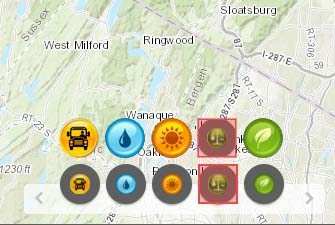
I was wondering if someone else figured out how to avoid the resizing of the image (jpg/png) for the widget icons, I have read the threads change on-screen icon size and Increase Icon Size but none of those changes affect the size at all for the launchpad theme third style. I attached a picture of the look we are trying to achieve, we don't necessarily want to increase the size of the area just take over the grey area, any guidance is welcome. thank you!
Daniel,
So I wonder if some of your previous changes are affecting this then. When I make that on css rule change to a new app it looks like the attached image.
In the [install dir]\server\apps\[app#]\themes\LaunchpadTheme\styles\style3\css\launchpad.css make this rule change (the rule already exists so you are changing it):
<SPAN class="selector token">.claro .jimu-anchorbar-iconitem .icon-item .icon</SPAN> <SPAN class="punctuation token">{</SPAN> <SPAN class="property token">width</SPAN><SPAN class="punctuation token">:</SPAN> 40px <SPAN class="important token">!important</SPAN><SPAN class="punctuation token">;</SPAN> <SPAN class="property token">height</SPAN><SPAN class="punctuation token">:</SPAN> 40px <SPAN class="important token">!important</SPAN><SPAN class="punctuation token">;</SPAN> <SPAN class="property token">margin-top</SPAN><SPAN class="punctuation token">:</SPAN> 0 <SPAN class="important token">!important</SPAN><SPAN class="punctuation token">;</SPAN> <SPAN class="punctuation token">}</SPAN><SPAN class="line-numbers-rows"><SPAN></SPAN><SPAN></SPAN><SPAN></SPAN><SPAN></SPAN><SPAN></SPAN></SPAN>
Now if you are using 40x40 px icons that are round you should be good to go.
Robert. I modified those lines - this is the first time the icons move (I have tried at least 12 dozens others settings with change), so I'm closer, the icons are 40 pixels but they still being resized, is there another area where i should look. thanks Daniel
Robert, thank you very much for looking into it, you're probably right, I will look into it for a bit, if not i will start from scratch. Daniel
Signed in members can post, follow updates, and more. New here? Register a free account.
Find useful guides, FAQs, and documents to help you navigate and make the most of Esri Community.