I have a attribute table that contains the results of a SpatialJoin giving me multiple records for each of my target polygon.
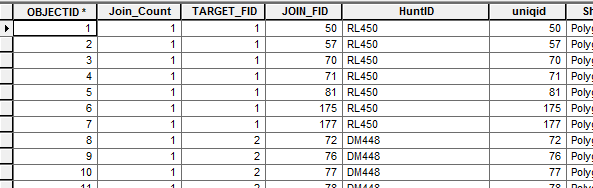
I'm trying to convert the above to a one-to-many table; one record for each unique HuntID w/a field listing all the uniqid.e.g.
'RL450', '50, 57, 70, 71, 81, 175, 177'
'DM448, '72, 76, ...'
etc.
Actual formatting (i.e. comma or space separated, quotes, etc, ) is yet tbd and not important at this point
I've done quite a bit of searching and have found two different simple functions to give me unique values for one field, and and other method using collections for giving me the 1-to-many "collection", but I haven't been able to figure out a simple way to get this back into a table.
I think I am missing something obvious, and although I have done quite a few searchs and looked thru many of the /blogs/dan_patterson/2016/05/09/the-links?sr=search&searchId=ceb1d9a4-61d3-4411-b4b9-2e06544edf3c&searchIndex=0 I haven't figure it out.
<SPAN class="comment token"># the various snippets I've narrowed it down to so far</SPAN>
<SPAN class="keyword token">import</SPAN> arcpy
<SPAN class="keyword token">import</SPAN> os
<SPAN class="keyword token">import</SPAN> numpy
inDS <SPAN class="operator token">=</SPAN> r<SPAN class="string token">'Database Connections\__me@wcgis_test2.sde\sde_wcgis_test2.DBO.FandA'</SPAN>
inDB <SPAN class="operator token">=</SPAN> r<SPAN class="string token">'Database Connections\__me@wcgis_test2.sde'</SPAN>
inFC <SPAN class="operator token">=</SPAN> r<SPAN class="string token">'Database Connections\__me@wcgis_test2.sde\sde_wcgis_test2.DBO.FandA\sde_wcgis_test2.DBO.SJ_hunt2flat'</SPAN>
outTable <SPAN class="operator token">=</SPAN> r<SPAN class="string token">'Database Connections\__me@wcgis_test2.sde\testtable'</SPAN>
huntFld <SPAN class="operator token">=</SPAN> <SPAN class="string token">'HuntID'</SPAN>
uniqfld <SPAN class="operator token">=</SPAN> <SPAN class="string token">'uniqid'</SPAN>
<SPAN class="comment token"># Function to output a list of of unique values for a field</SPAN>
<SPAN class="keyword token">def</SPAN> <SPAN class="token function">unique_values</SPAN><SPAN class="punctuation token">(</SPAN>table<SPAN class="punctuation token">,</SPAN> field<SPAN class="punctuation token">)</SPAN><SPAN class="punctuation token">:</SPAN>
<SPAN class="keyword token">with</SPAN> arcpy<SPAN class="punctuation token">.</SPAN>da<SPAN class="punctuation token">.</SPAN>SearchCursor<SPAN class="punctuation token">(</SPAN>table<SPAN class="punctuation token">,</SPAN> <SPAN class="punctuation token">[</SPAN>field<SPAN class="punctuation token">]</SPAN><SPAN class="punctuation token">)</SPAN> <SPAN class="keyword token">as</SPAN> cursor<SPAN class="punctuation token">:</SPAN>
<SPAN class="keyword token">return</SPAN> sorted<SPAN class="punctuation token">(</SPAN><SPAN class="punctuation token">{</SPAN>row<SPAN class="punctuation token">[</SPAN><SPAN class="number token">0</SPAN><SPAN class="punctuation token">]</SPAN> <SPAN class="keyword token">for</SPAN> row <SPAN class="keyword token">in</SPAN> cursor<SPAN class="punctuation token">}</SPAN><SPAN class="punctuation token">)</SPAN>
<SPAN class="comment token"># Function to output a array of unique values for a field</SPAN>
<SPAN class="keyword token">def</SPAN> <SPAN class="token function">unique_values_2</SPAN><SPAN class="punctuation token">(</SPAN>table<SPAN class="punctuation token">,</SPAN> field<SPAN class="punctuation token">)</SPAN><SPAN class="punctuation token">:</SPAN>
data <SPAN class="operator token">=</SPAN> arcpy<SPAN class="punctuation token">.</SPAN>da<SPAN class="punctuation token">.</SPAN>TableToNumPyArray<SPAN class="punctuation token">(</SPAN>table<SPAN class="punctuation token">,</SPAN> <SPAN class="punctuation token">[</SPAN>field<SPAN class="punctuation token">]</SPAN><SPAN class="punctuation token">)</SPAN>
<SPAN class="keyword token">return</SPAN> numpy<SPAN class="punctuation token">.</SPAN>unique<SPAN class="punctuation token">(</SPAN>data<SPAN class="punctuation token">[</SPAN>field<SPAN class="punctuation token">]</SPAN><SPAN class="punctuation token">)</SPAN>
huntList <SPAN class="operator token">=</SPAN> unique_values<SPAN class="punctuation token">(</SPAN>inFC<SPAN class="punctuation token">,</SPAN> huntFld<SPAN class="punctuation token">)</SPAN>
huntList2 <SPAN class="operator token">=</SPAN> unique_values_2<SPAN class="punctuation token">(</SPAN>inFC<SPAN class="punctuation token">,</SPAN> huntFld<SPAN class="punctuation token">)</SPAN>
<SPAN class="comment token"># ### Collection portion</SPAN>
<SPAN class="keyword token">import</SPAN> collections
uniqvals <SPAN class="operator token">=</SPAN> collections<SPAN class="punctuation token">.</SPAN>defaultdict<SPAN class="punctuation token">(</SPAN>list<SPAN class="punctuation token">)</SPAN>
<SPAN class="comment token"># output a collection of unique Field1 and the its unique Field2 values</SPAN>
<SPAN class="keyword token">for</SPAN> field1<SPAN class="punctuation token">,</SPAN> field2 <SPAN class="keyword token">in</SPAN> arcpy<SPAN class="punctuation token">.</SPAN>da<SPAN class="punctuation token">.</SPAN>SearchCursor<SPAN class="punctuation token">(</SPAN>inFC<SPAN class="punctuation token">,</SPAN> <SPAN class="punctuation token">(</SPAN>huntFld<SPAN class="punctuation token">,</SPAN> uniqfld<SPAN class="punctuation token">)</SPAN><SPAN class="punctuation token">)</SPAN><SPAN class="punctuation token">:</SPAN>
uniqvals<SPAN class="punctuation token">[</SPAN>field1<SPAN class="punctuation token">]</SPAN><SPAN class="punctuation token">.</SPAN>append<SPAN class="punctuation token">(</SPAN>field2<SPAN class="punctuation token">)</SPAN>
<SPAN class="comment token"># sample output</SPAN>
test <SPAN class="operator token">=</SPAN> uniqvals<SPAN class="punctuation token">.</SPAN>items<SPAN class="punctuation token">(</SPAN><SPAN class="punctuation token">)</SPAN><SPAN class="punctuation token">[</SPAN><SPAN class="number token">95</SPAN><SPAN class="punctuation token">]</SPAN>
test
<SPAN class="comment token"># (u'DM448', [72, 76, 77, 78, 79, 80, 81, 83, 86, 87, 88, 89, 90, 91, 92, 93, 105, 112, 116, 122])</SPAN>
<SPAN class="line-numbers-rows"><SPAN></SPAN><SPAN></SPAN><SPAN></SPAN><SPAN></SPAN><SPAN></SPAN><SPAN></SPAN><SPAN></SPAN><SPAN></SPAN><SPAN></SPAN><SPAN></SPAN><SPAN></SPAN><SPAN></SPAN><SPAN></SPAN><SPAN></SPAN><SPAN></SPAN><SPAN></SPAN><SPAN></SPAN><SPAN></SPAN><SPAN></SPAN><SPAN></SPAN><SPAN></SPAN><SPAN></SPAN><SPAN></SPAN><SPAN></SPAN><SPAN></SPAN><SPAN></SPAN><SPAN></SPAN><SPAN></SPAN><SPAN></SPAN><SPAN></SPAN><SPAN></SPAN><SPAN></SPAN><SPAN></SPAN><SPAN></SPAN><SPAN></SPAN><SPAN></SPAN><SPAN></SPAN><SPAN></SPAN><SPAN></SPAN><SPAN></SPAN></SPAN>BTW - I have tried various combinations of arcpy summary, frequency, pivot tables, Pro's (yes Pro) "summarize within" -- instead of SpatialJoin, but open to other suggestions (although this python solution will be fast enough, I believe).
Thanks
This seems right up your alley Dan Patterson 



