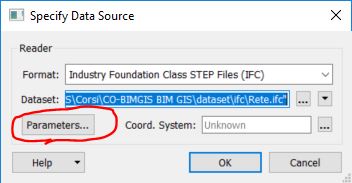
I've always used the Data Interoperability Quick Import to convert IFC into fGDB feature classeses without problems.
I used to follow the settings described in a Esri post and visible at this link: https://www.esri.com/arcgis-blog/wp-content/uploads/2016/09/QUICK-IMPORT.png?rmedium=bulk-arcgis-files&rsource=https://b… .
After upgrading to 2.3 however the Quick Import stopped working as it did, throwing a generic error.
In the logs (comerrors-log-20190325.log), I see something like:
20190325-095325: HRESULT fail in file FMEArcToolboxUtil.cpp at line 552
20190325-095325: HRESULT fail in file FMEArcToolboxUtil.cpp at line 588
I really need help to understand how to solve this issue as it is blocking my BIM-GIS workflow.
I attach an IFC which used to work with the previous versions with the aforementioned settings (Rete.ifc).
I tried to restore the Data Interoperability installation but that did not sove the problem.
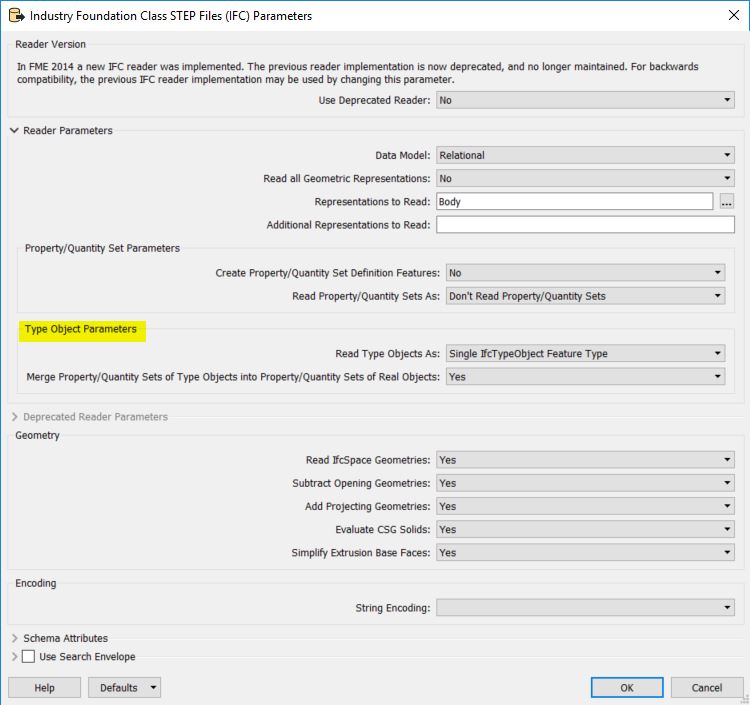
I noticed that in the IFC Parameters there's a new set of parameters that previously was missing (highlighted in yelow), maybe this could be of help...