I have a geprocessing service that returns JSON that I am attempting to put into a datagrid.
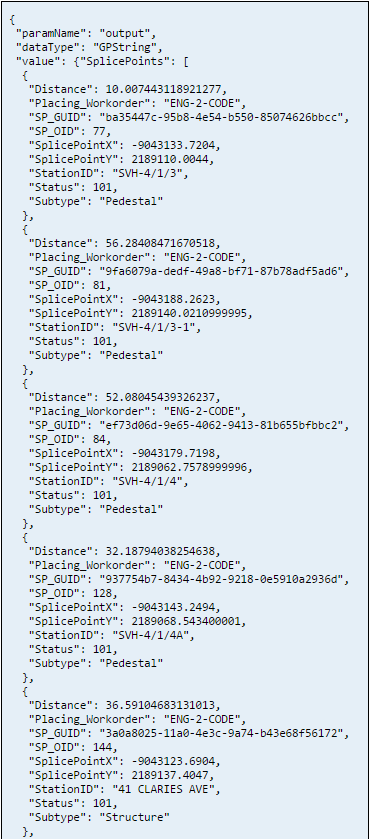
Snippet of JSON from GP service:
Here is the relevant code:
 map.on("load", initSelectionToolbar);


            registry.byId("point").on("click", function() {
                activateTool(this.id);
            });


            function initSelectionToolbar() {
                map.graphics.clear();
                selectionToolbar = new Draw(map);
                selectionToolbar.on("draw-end", function(e) {
                    selectionToolbar.deactivate();
                    var symbol = new SimpleMarkerSymbol(
                        SimpleMarkerSymbol.STYLE_CIRCLE,
                        16,
                        new SimpleLineSymbol(
                            SimpleLineSymbol.STYLE_SOLID,
                            new Color([89, 95, 35]), 2
                        ),
                        new Color([130, 159, 83, 0.40])
                    );
                    var graphic = new Graphic(e.geometry, symbol);
                    map.graphics.add(graphic);
                    map.infoWindow.hide();
                });
            };


            function activateTool(tool) {
                map.graphics.clear();
                map.infoWindow.hide();
                // The draw.activate expects a string like "polygon" or "freehand_polygon".
                selectionToolbar.activate(tool);
            }


            registry.byId("searchSPs").on("click", searchSPs);


            function searchSPs() {

                var geom = map.graphics
                var dist = dom.byId("distance").value
                var distUnit = dom.byId("distanceUnits").value
                var params = {
                        pointX: geom.graphics[0].geometry.x,
                        pointY: geom.graphics[0].geometry.y,
                        buffer: dist,
                        unitType: distUnit
                    }
                gp.submitJob(params, completeCallback, statusCallback);


            };


            function statusCallback(jobInfo) {
                console.log(jobInfo.jobStatus);
            };


            function completeCallback(jobInfo) {
                var id = jobInfo.jobId
                var data = gp.getResultData.id
                var stuff = gp.getResultData(id, "output", displaySPs);
            };


            function displaySPs(outputFile) {

                var searchS = outputFile.value.SPs;


                searchS.sort(function(a, b) {
                    return a.Distance - b.Distance
                });


  //tried this, does not work.
                // var items = arrayUtils.map(searchS, function(result) {
                //   return result;
                // });


                var items = []


                items = searchS;
                var data = {
                    idProperty: "output", //This field needs to have unique values
                    label: "StationID", //Name field for display. Not pertinent to a grid but may be used elsewhere.
                    items: items
                };


                store = new ItemFileReadStore({
  //either way behaves the same way.
                    //data: {identifier: 'StationID', items: items}
                    data: data
                });


                var grid = registry.byId("grid");


                //identifier present in the store.
                grid.store = store

                //no identifier in the store, even though it is present.
                //window.grid.set("store", items);


  //this does not work.
                //grid.setStore(store);
};and the HTML:
<div id="rightPane" class="shadow roundedCorners" data-dojo-type="dijit/layout/ContentPane" data-dojo-props="region:'right'">


            <button id="point" data-dojo-type="dijit/form/Button">Select Point</button>
            <br> Search Distance:
            <input type="text" id="distance" size="5" value="200" />


            <select data-dojo-type="dijit/form/Select" id="distanceUnits">
                <option value="feet">Feet</option>
                <option value="meters">Meters</option>
            </select>
            <br>


            <button id="searchSPs" data-dojo-type="dijit/form/Button" value="searchSPs">Search Splice Points</button>
            <br>


            <table data-dojo-type="dojox/grid/DataGrid" data-dojo-id="grid" id="grid" style="width:100%;height:100%; data-dojo-props=" rowsPerPage: '10', rowSelector: '20px' " class="roundedCorners shadow ">
                        <thead>
                            <tr>
                                <th field="StationID ">Station ID</th>
                                <th field="Subtype ">Subtype</th>
                                <th field="Distance ">Distance (meters)</th>


                            </tr>
                        </thead>
                    </table>
        </div>
When I check the datastore in the console here is what I see
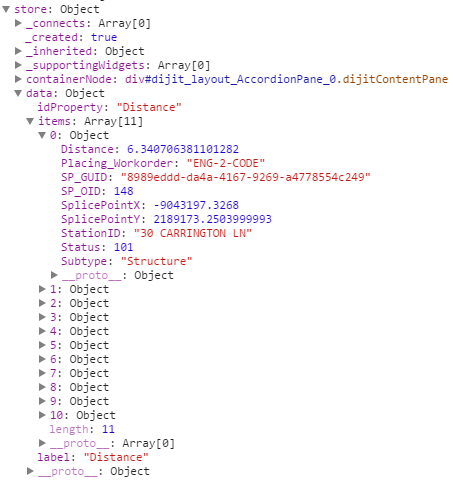
No matter what I do though the datagrid is not updated with the values I am looking for. Any thoughts?
Jim



