New look coming to Nearby: Important changes in the June update
The update is planned for the evening of Thursday, June 25, 2026
We’re introducing updates to improve usability, consistency, and flexibility in Nearby. While these improvements enhance the overall experience, a few changes may impact existing apps and require reconfiguration.
Below is a summary of updates to be aware of.
1. Introduction experience: More flexibility and options
What’s new
You can now use both an Introduction window and an Information panel. Previously, apps supported only one or the other.
Impact
- Apps currently using the Introduction window will have that content moved to the Information panel
- The Introduction window will still appear, but it will display default content
Next steps
- Reconfigure the introduction experience if you previously relied on the window layout
- In the Nearby app configuration:
- Go to About
- Copy content from the Information panel into the Introduction window
2. Header styling update
What’s new
The header now includes additional styling options, including:
- Subtitle support
- Expanded alignment options
The default light-mode header is also being updated to align with other Instant Apps.
Impact
- Light mode header changes from black → white
Next steps
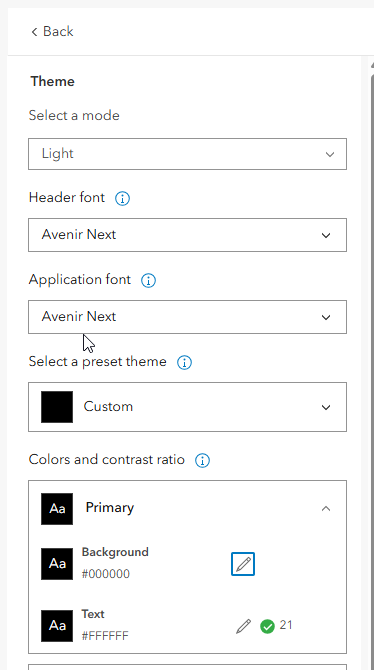
If you want to maintain the previous appearance:
- Open Theme & Layout (disable Express Mode)
- Select Custom under preset themes
- Update colors:
- Background: #000000 (black)
- Text: #FFFFFF (white)
3. Related records behavior
What’s new
Related records now match the appearance and behavior of Map Viewer for a more consistent experience across ArcGIS Online.
Impact
- The “expand related records” option has been removed
Next steps
- No action required
- To change how related records appear, update the pop-up in Map Viewer
4. Custom CSS considerations
What’s new
Updates to the app’s structure may affect existing custom CSS.
Impact
- Existing custom CSS may no longer work as expected
Next steps
- Review and test any custom styling after updating your app
5. New unified toolbar
What’s new
All tools are now part of a unified toolbar, making it easy to find the right tool. In addition, there is a new option to control if the tool opens on mobile.
Impact
- Existing tools set to open at start will need to be reset to open at start
Next steps
- In the Theme & Layout section > Position manager - choose the tool you'd like to be opened at start.
What you should do next
After the update:
- Review your introduction setup (panel vs. window)
- Check header appearance in light themes
- Retest any custom CSS
- Configure any tools you'd like open at start
Summary
These changes are part of a broader effort to improve consistency, usability, and flexibility in Nearby. While some updates require reconfiguration, they also unlock improved layout options and simplify the user experience.


