UPDATE:
I have determined that my original assumptions that functions were causing this issue was incorrect. I have added updated info at the bottom of the post.
Original:
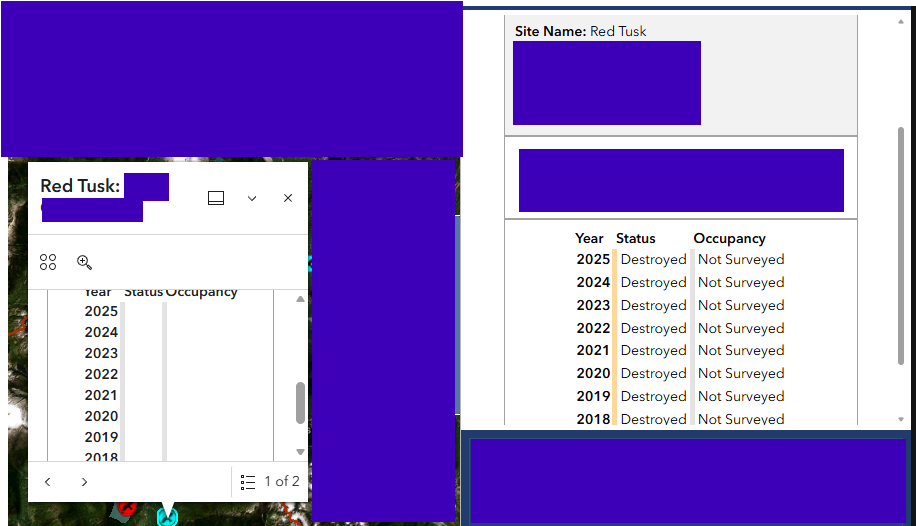
On the left-hand side is the pop-up in the Map Widget. On the right-hand side is the Feature Info widget, showing the pop-up as expected. All of the missing data/styling on the map widget pop-up was generated by functions within Arcade (in the pop-up in MapViewer), which is why I suspect them to be the culprit.
Here is an example of one of my functions:
function label (status) {
	if (status == "No Survey Data") {
		return "Not Surveyed"
	}
	else if (status == "No Nest Assessment Data") {
		return "Not Surveyed"
	}
	else if (status == "NA") {
		return "N/A"
	}
	else if (Find("Unknown",status,0) > 0) {
		return "Unknown"
	}
	else {
		return status
	}

}
Here is how I am bringing these values into the HTML:
var nest_row=`<tr><td style="padding:2px;"><b>${yr}</b></td><td style="padding:3px;border-left:5px solid ${bgcolor($feature[nestfield_name])}"><i>Discovered</i> - ${label($feature[nestfield_name])}</td><td style="padding:3px;border-left:5px solid ${bgcolor($feature[occfield_name])}">${label($feature[occfield_name])}</td></tr>`
Update:
When I reference a field using a variable, as below, the value will not show up in the MapViewer pop-up:
var fldname = "NestStatus_2016"
return $feature[nestfield_name]
if the field name is called directly, as below, the value appears in the pop-up:
return $feature.NestStatus_2016
If I reference the field directly at all in the script, even as a variable that doesn't get used, it will then show up in the pop-up where $feature[nestfield_name] is used. Which is to say that I have a workaround and my pop-up is functional, but I have to list every field I want to reference so that it can show up (this is a simplified version of what my script is doing):
// referencing list of fields i need directly
var flds = [$feature.NestStatus_2024,$feature.NestStatus_2025,$feature.NestStatus_2026]

// calculating # of years between today and the year of nest detection
var yrs = Year(Now()) - $feature.Year_Detected
year_range = Array(yrs)
tbl_rows = ``

for (n in array) {
  yr = $feature.Year_Detected+n
  fld = `NestStatus_${yr}`
  tbl_rows = `<tr><td>yr</td><td>$feature[fld]</td></tr>`+tbl_rows
}

return tbl_rows
I know that 'year' fields are not great data management, and I hope to improve that in the future, but I suppose this is what I'm dealing with for now. Either way, this seems like it could be some kind of bug related to how the browser is loading pop-ups... interested to know if anyone else has run into this.


