After having a call with Esri Support, I found out that it not possible to adjust the colors of disabled buttons in ExB. By disabled buttons, I mean buttons that cannot be clicked until a condition is met such as:
In a splash screen, I was told that this OK button is not 508 compliant.

I am only able to change the color of the OK button after clicking the check box, purple is my theme color in this example:

This can be mitigated with a custom button in the splash screen, but some widgets have no work around, like in the filter widget. I was told by a federal client that the Cancel button is not 508 compliant and was told by Esri Support that I cannot change it. Again, the Cancel button only becomes adequately contrasted after applying a filter.
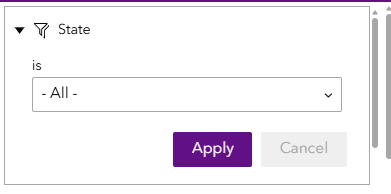
Due to Section 508 accessibility requirements for U.S. federal agencies, I request for an ability to customize these disabled buttons OR change ExB to make these buttons have more contrast to be in alignment with those requirements.



