I’m working in Survey123 Connect and I want to capture survey start and end times automatically using the start and end question types. My goal is to have 4 key columns in my dataset:
StartTime – human-readable start time in hh:mm AM/PM format (example- 07:30 AM)
EndTime – human-readable end time in hh:mm AM/PM format (example- 09:15 AM)
DurationMin – duration of the survey in minutes (example- 105)
DurationHour – decimal hours so I can calculate averages (example- 1.75)
When I use time type questions, my formulas (see attached XLSForm) work perfectly. I can calculate duration and format the times without any issues.
However, when I switch to start and end fields to capture timestamps automatically, my calculations break, and I get type mismatch errors. It seems the datetime values behave differently from simple time/date fields, and I’m unsure how to adjust my formulas to work correctly .
Any examples of formulas or tips to handle start/end data type in Survey123 would be greatly appreciated!
Thank you in advance for any guidance.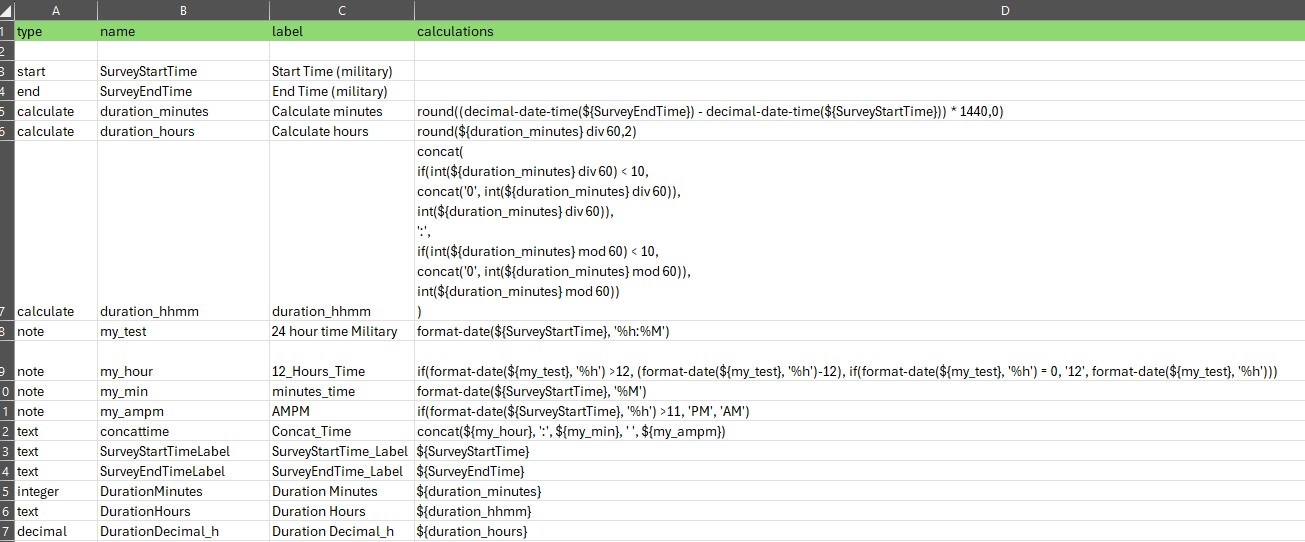
JB


