I'm trying to create a 1:M database view of land parcels to owners. My goal is to publish the result as a registered feature layer in Portal. I am running Pro 3.6, accessing data from a SQL database, and publishing to Enterprise 11.5. In short, here was my original workflow.
1. Run the Create Database Tool. Here's a truncated version of my View Definition:
SELECT
    t.OBJECTID,
    t.SHAPE,
    t.gistractnum,
    t.datasource,
    t.<some other fields...>,
    r.TRACTNUMBER,
    r.<some other fields...>
FROM DBA.Tracts_evw t
LEFT JOIN DBA.TRACTSDB r ON t.gistractnum = r.TRACTNUMBER
2. After this runs, I ran the Register With Geodatabase tool. For the OID & Shape parameters, I used the first two fields from the above query. Geometry type is polygon, and the coordinate system matches the Tracts dataset.
3. Publish new polygon feature class to Portal as a registered feature layer.
Currently, I am running into two issues (unsure if they're related, so I'm posting the two together)
1. At step 2, the GUI won't allow me to enter a Coordinate system. As you can see below, the spatial reference quickly disappears as soon as I select.  GIF of projection parameter issue
I also tried copying the python command & injecting the projection as an arcpy spatial reference object.
albers = arcpy.SpatialReference(102003)
arcpy.management.RegisterWithGeodatabase(
    in_dataset=r"C:\Users\p\a\t\h.sde\dba.SpatialROWDB",
    in_object_id_field="OBJECTID",
    in_shape_field="SHAPE",
    in_geometry_type="POLYGON",
    in_spatial_reference=albers,
    in_extent=None
)Successful run, but the newly registered FC does not have a spatial reference. The coordinate system is a custom reference, as I've read in another post that custom projections for views can be problematic.
2. After registering the view, the data published to Portal without issues. I can see all the data in the web map, and the fields/attributes appear to be correctly joined in the table (despite the fact that the parcels appear at the origin point of my PCS).
However, when I open the table in Pro, I get the following error "Failed to load data - invalid partition".
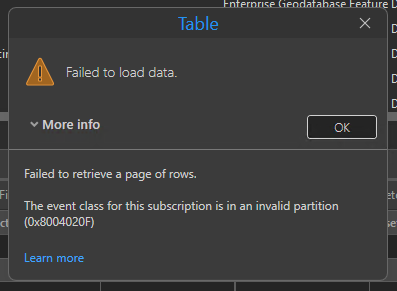
Again - unsure if the two are related, but figured I'd include.
Hoping that OP & contributor @Thomas_Puthusserry & @VenkataKondepati from the linked post above might see this and could potentially provide some insight...
Cheers
-Mike

