I'm following this steps within Power Automate to ArcGIS Online to set up email notifications on the Citizen Reporter Solution and I'm running into 2 issues.
https://doc.arcgis.com/en/arcgis-solutions/latest/reference/configure-citizen-problem-reporter.htm#:~:text=Send%20emails%20with%20Microsoft%20Power%20Automate
If I follow the steps exactly as outlined the flow completes and an email notification is sent out. However, I need to go to different emails based on one of the field values. So if the field Department = x then it needs to go to x email and if department=y then it needs to go to y email and if Department = z then it needs to go to z email.
I have tried to add multiple conditions on a parallel branch at step 37 of the above instructions and it fails on the Apply to Each 1 saying there was no input. I then tried a Switch and got the same result.
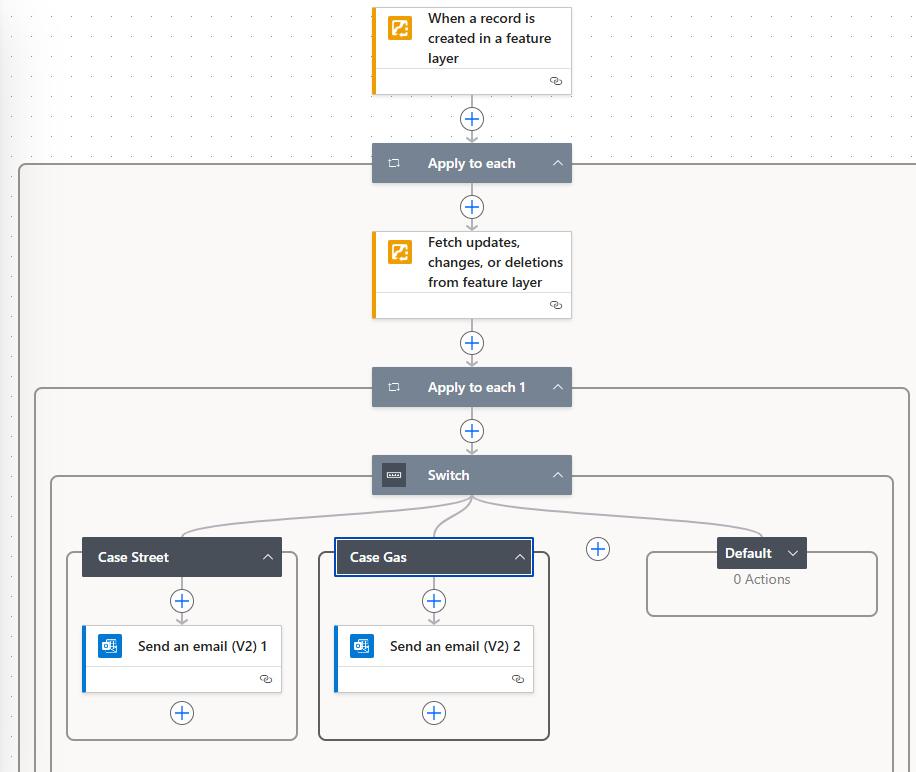
How can I define the emails based on an attribute of a field?
The second issue I'm running into is, I add the feature in the data, and power automate doesn't trigger for like 10-15 minutes. Is this normal on this type of trigger? I'm use to Survey123 where it triggers pretty quickly.


