Hi everyone,
I developed a Python script to automate the generation of maps in ArcGIS Pro based on various parameters.
In my layout, I want to be able to modify the LEGEND_Item, but all my attempts have failed so far...
In fact, in my legend, I only want one layer to appear, while the others should be hidden (in the legend only).
My code does allow me to hide the layers I don’t want in the legend, but the one I do want appears 3 times in the legend. I should mention that it is inserted only once in the map. Its symbology is based on unique values, and there are 3 unique values. I suspect this is related.
Here's my code and the result:
try:
legend = "LEGENDE_" + NOMCARTE
lyt_legend = lyt.listElements("LEGEND_ELEMENT", legend)[0]
lyt_legend.title = "" # Met le titre à vide
logging.info("Titre de la légende effacé.")
except IndexError:
logging.error(f"Légende introuvable dans le layout : {legend_name}")
except Exception as e:
logging.error(f"Erreur inattendue : {str(e)}")
try:
couches_a_masquer = [DEPT_lyr.name, COMM_lyr.name, DEPT_mask_lyr.name, "COMMUNES_TRONCONS_SpatJoin"]
for item in lyt_legend.items:
if item.name in couches_a_masquer:
item.visible = False
logging.info(f"Élément de légende masqué : {item.name}")
except IndexError:
logging.error(f"Légende introuvable dans le layout : {legend}")
except Exception as e:
logging.error(f"Erreur inattendue lors de la mise à jour de la légende : {str(e)}")
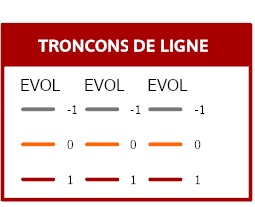
Also want to get rid of the label "EVOL" and change the text for each value (ex. 0 should be replaced by "Unchanged value".
Any idea on how to do it if possible?
Thanks in advance


