Hi all,
We have a workflow manager item deployed on our Enterprise 11.3 environment back in May and it has been running fine. Starting on 11/4, we have had 2 jobs stucked in running mode on 2 different steps. The job has a spinning icon right next to it, and there is no button listed under Actions that are clickable. Since it is running, I can't do anything to it.

Has anyone experienced similar issue? Is there a way to get a job out of a running state?
I have also noticed some error messages in our server log that might or might not be related to this issue.
On our WFM server, I can see errors like this -
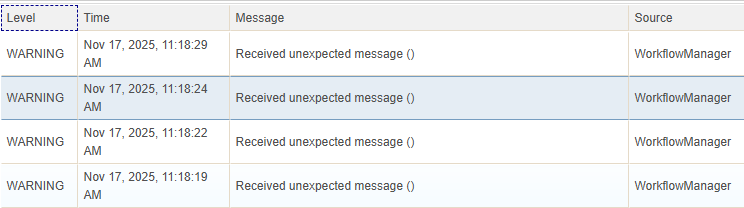
And at the same time, on our ArcGIS Server Manager, it fires dozens of warnings like these within a second -
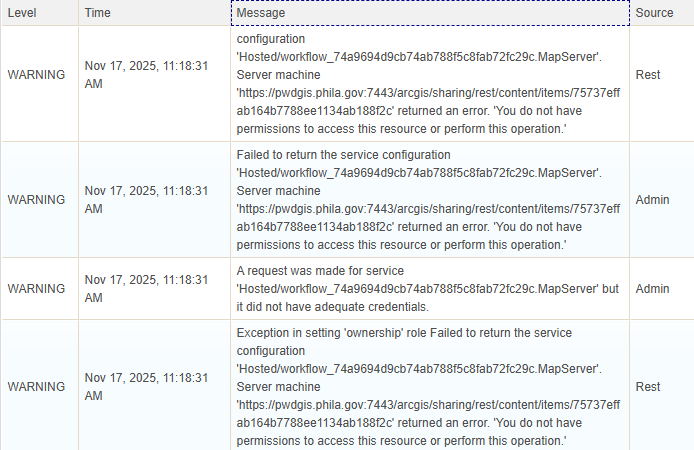
I saw these warnings when a person clicked on 'proceed' and it got stuck. But most of the time, the operation runs through even though these warnings are genereated.
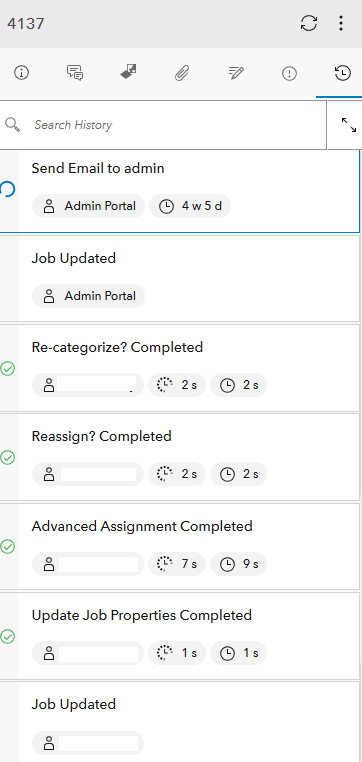
Another thing I noticed is - when I check on History in the Detail pane for a specific job, there are steps that say running even though they ran successfully. This happens in our closed jobs as well.
Any insights are appreciated.
Thanks!
Margo



