ArcGIS Pro 3.5.3
In unique values, if I change the color scheme, only one of the map features adopts the new scheme:
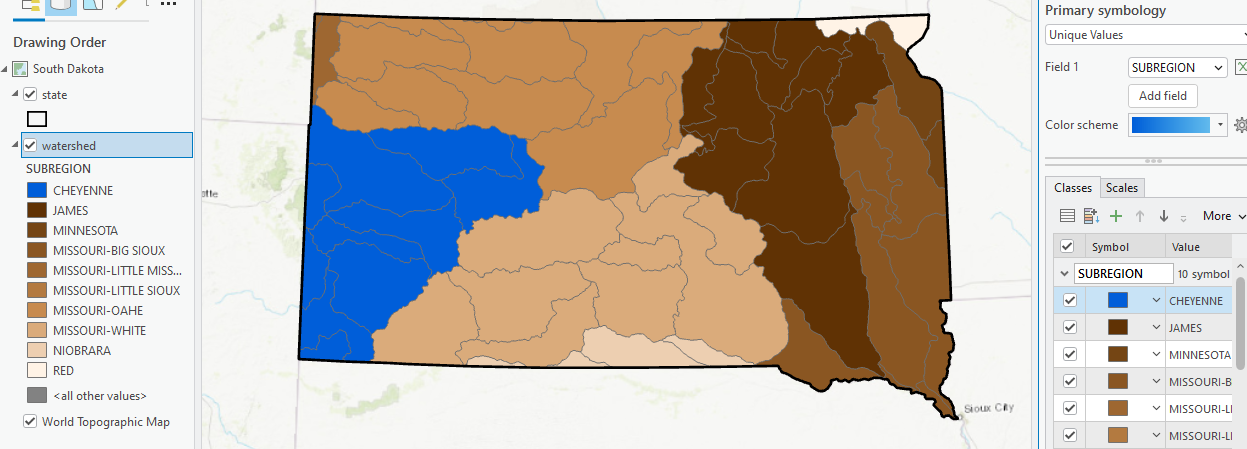
Here you can see I changed from a brown color ramp to a blue one, but only the Cheyenne Subregion took the new ramp. It's happening to all of the students who are running updated Pro, most of them 3.5.3 I believe.
My workaround is:
1. Choose new color scheme.
2. Watch only one map feature adopt the new scheme.
3. Switch fields.
4. Switch back to original field, which is now correctly mapped using the new color scheme (SUBREGION in this case but have tried it with several other layers).
Any ideas? In all previous versions this workaround was unnecessary. This is a lot of extra clicks for first time users (we're finishing Week 2, have met 4x now) who might already be overwhelmed.
Thanks!


