Note: I am working in a disconnected environment running ArcGIS Enterprise 11.3. As such, I am unable to share a link to my story. I tried to include as many screenshots as would suffice to get the point across.
I believe I discovered a bug in the ArcGIS StoryMaps ExpressMap / Map Tour editor. Specifically, when creating a new ExpressMap using a basemap that’s driven by a Hosted Tile Layer generated from a Vector Tile Package, certain vector / icon features are not rendered in the editor, despite appearing correctly in Map Viewer, and sometimes, after the StoryMap is published.
Steps to reproduce:
Add a Vector Tile Package (.vtpk) to Portal and publish it as a Hosted Tile Layer.
Create a new basemap in Portal that uses the hosted tile layer.
 The map renders correctly in MapViewer
Create a new StoryMap in ArcGIS StoryMaps.
In the story editor:
In ExpressMap edit mode, certain areas of the map render incorrectly:
Oceans appear completely black.
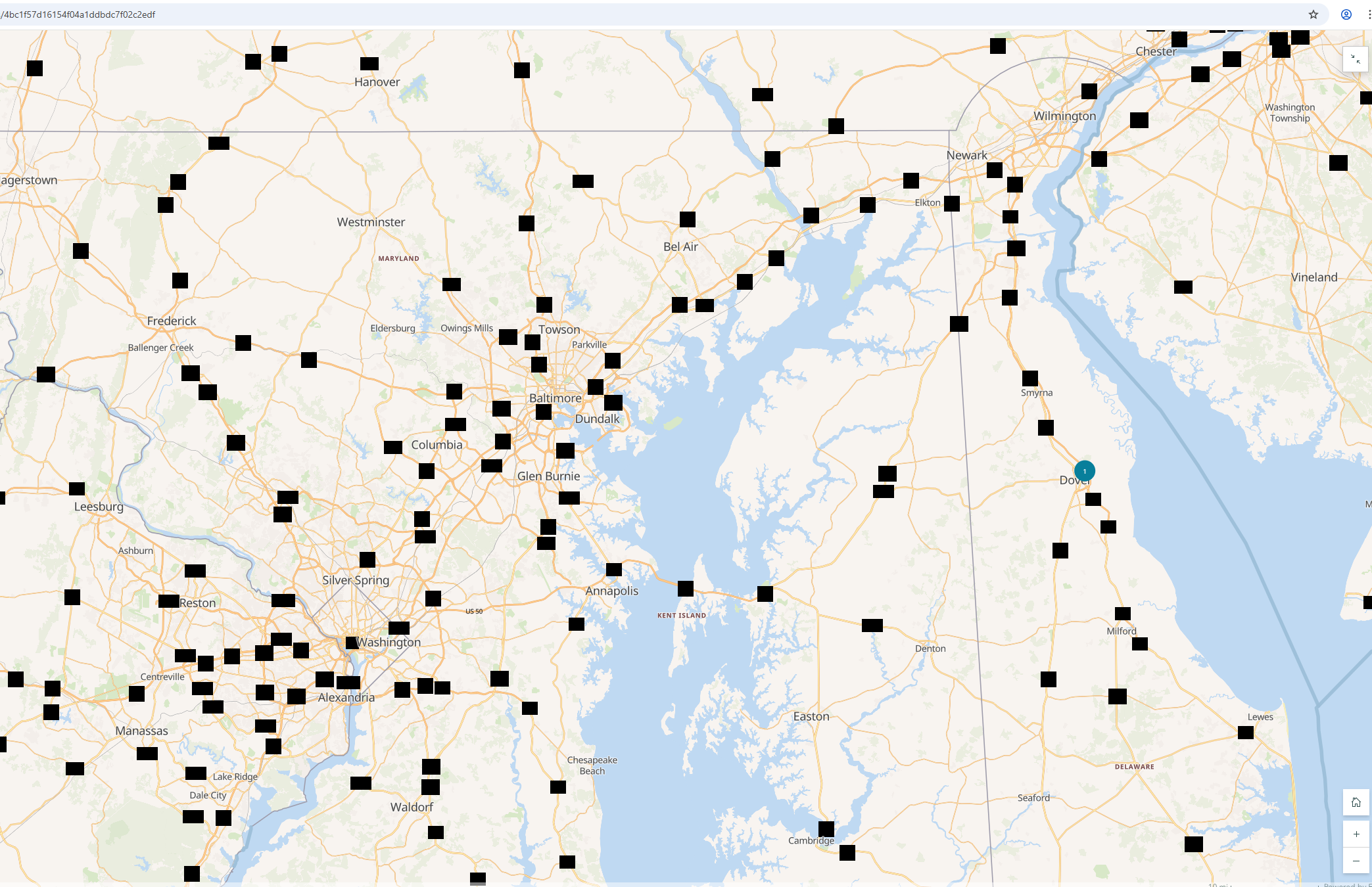
Icons (such as highway shields or capital city stars) display as solid black squares.
 Adding the Vector Tile Basemap as the ExpressMap basemap
 It also displays poorly in the Story editor
Publish the StoryMap. Once in view mode, sometimes the basemap renders correctly again — matching Map Viewer, other times, the rendering errors persist. Below is a screenshot of the map rendering correctly after publishing and in "view mode".
 Same basemap, rendering correctly
Investigation:
While troubleshooting, I examined the p12/styles/root.json style file for my Vector Tile Package.
{
	"id": "water-pattern",
	"layout": {
		"visibility": "visible"
	},
	"metadata": {
		"mapbox:group": "1444849382550.77"
	},
	"paint": {
		"fill-pattern": "wave",
		"fill-translate": [ 0, 2.5 ]
	}
	"source": "esri",
	"source-layer": "water",
	"type": "fill",
	"filter": [ "all" ]
}Removing this layer from the style eliminated the black ocean issue in ExpressMap edit mode:
 Removing the wave fill makes the ocean render correctly
The Ocean no longer has the "wave" fill, which is a bummer but it's not too big of a deal because it doesn't decrease the informational value of the basemap. Not the case with the icons (see below):
{
	"filter": [
		"all",
		[ "==", "$type", "Point" ],
		[ ">=", "rank", 25 ],
		[
			"any",
			[ "!has", "level" ],
			[ "==", "level", 0 ]
		]
	],
	"id": "poi-level-3",
	"layout": {
		"icon-image": "{class}_11",
		"text-anchor": "top",
		"text-field": "{name_en}",
		"text-font": [ "Noto Sans Regular" ],
		"text-max-width": 9,
		"text-offset": [ 0, 0.6 ],
		"text-padding": 2,
		"text-size": 12,
		"visibility": "visible"
	},
	"minzoom": 16,
	"paint": {
		"text-color": "#666"
		"text-halo-blur": 0.5,
		"text-halo-color": "#ffffff",
		"text-halo-width": 1
	},
	"source": "esri",
	"source-layer": "poi",
	"type": "symbol"
}

{
	"filter": [
		"all",
		[ "<=", "ref_length", 6 ],
		[ "==", "$type", "LineString" ],
		[ "!in", "network", "us-interstate", "us-highway", "us-state" ]
	],
	"id": "highway-shield",
	"layout": {
		"icon-image": "road_{ref_length}",
		"icon-rotation-alignment": "viewport",
		"icon-size": 1,
		"symbol-placement": {
			"base": 1,
			"stops": [
				[ 10, "point" ],
				[ 11, "line" ]
			]
		},
		"symbol-spacing": 200,
		"text-field": "{ref}",
		"text-font": [ "Noto Sans Regular" ],
		"text-rotation-alignment": "viewport",
		"text-size": 10
	},
	"minzoom": 8,
	"paint": {}
	"source": "esri",
	"source-layer": "transportation_name",
	"type": "symbol"
}
In Map Viewer and some published StoryMaps, these correctly resolve to sprites.
In ExpressMap edit mode, however, they appear as black squares — suggesting that tokenized sprite names or dynamic substitution are not supported by the ExpressMap editor’s rendering engine.
Unfortunately, the black squares where the Icons are supposed to be does affect the amount of information that a user can derive from the basemap, so I can't simply delete them without losing information. If I remove those layers, the basemap loses value, however it's visually jarring to keep them in:
Observations
- The web map always renders properly in Map Viewer
The issue is always present in edit mode; published maps sometimes render normally.
It seems ExpressMap edit mode uses a reduced or older renderer that does not fully support:
This causes unsupported features to be rendered as solid black fills or black squares.
- EDIT: I noticed this morning that the image-icons have a different behavior in the Experience Builder Map Widget. The icon image doesn't appear, but instead of black squares, it just displays a the label without any icon.
To me, it seems like the engine that renders basemaps in the Express Map editor is different from the one that is used in Map Viewer, since this is only a problem in StoryMaps. Is this the case? Is this a bug in the Express Map renderer? If so, is there any immediate workaround, or will I have to upgrade my ArcGIS Enterprise Deployment to see any meaningful difference?
Thanks!

