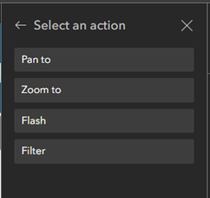
Currently, the List Widget - Action trigger "Data filtering changes" does not include "Filter or Flash". I am highly recommending that both be added, as it is an option in the "Record selection changes" trigger.
I built an application through Experience Builder that uses the Map, Search, Near me, Feature Info, and List widgets. The goal of the application is to search for comparable sales from a given address or pin dropped within a specific radius. I have been able to connect all the widgets and get them to function as they should, EXCEPT the Filter Tool in the List widget. When I use the custom filters (SQL) I have set up, the List changes, but the Map does not.
I believe the solution to displaying filtered records on the map would be to add "Filter" to the "Data filtering changes" > "Map" > options.
Here are screenshots of the Action items for the List widget currently:
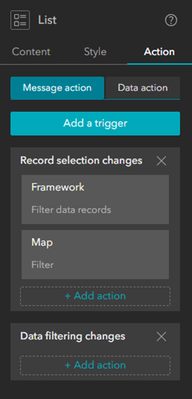
The "Data filtering changes" action only allows you to choose Map and either Pan to or Zoom to.

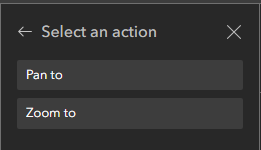
This is what I would like to see be the options for "Data filtering changes" > "Map" >