After the recent update from Enterprise 11.3 to 11.5, I'm once again attempting to reproduce trial copies of a couple of our WAB apps in Experience Builder. I noticed today that when I open the 'Select' widget, the configured layer names are simply not showing up, but the check boxes and "clear selection" and "Actions" icons do show up for those layers. If I make a selection, a faint gray box with a white number displaying selected record count will show up next to where the layer names should be, and selecting the statistics from the "Actions" menu opens that window. Once there, when I select the desired field (in my case Gross Area:) the resulting statistics window is simply *blank. (See below).
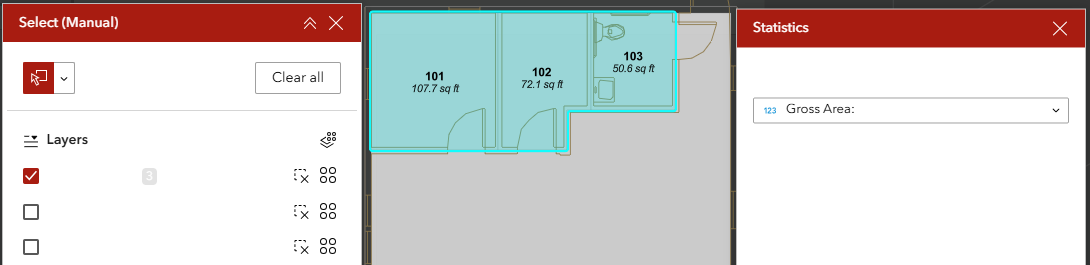
I've just now confirmed my suspicion that the text is present but is simply white text on a white backgorund. By clicking and dragging the curser over the area, I can highlight the invisible text and see the results in the statistics window. There are no "Style" options available while configuring the widget, so it doesn't appear that this is within my control to fix.
Hovering over the layer list gives me a pop-up of the invisible layer title below the curser as well, confirming that this issue is affecting both windows.
It is behaving this way in both Microsoft Edge and Firefox. This renders the app unusable since these quick stats are one of the most frequently used tools in our WAB apps. I've cleared the browser cache, and restarted the computer, neither of which has helped with this issue.
-Jeremy




