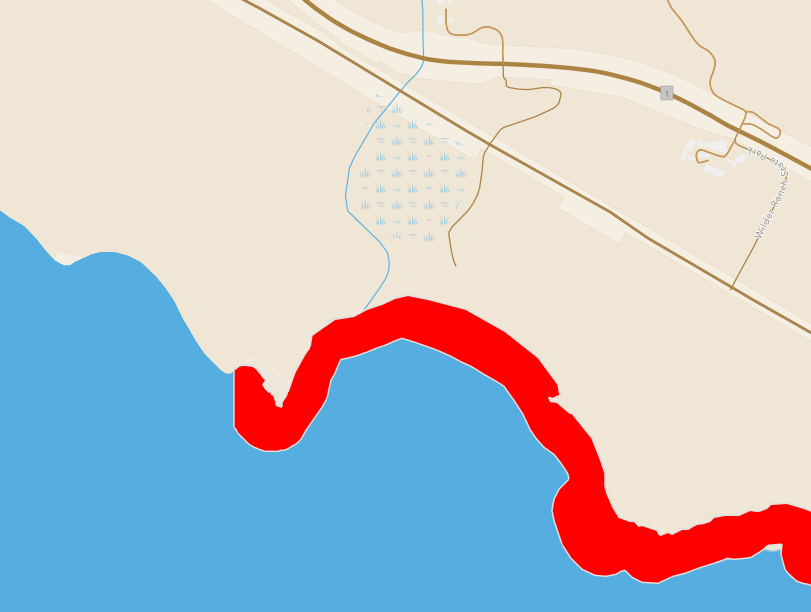
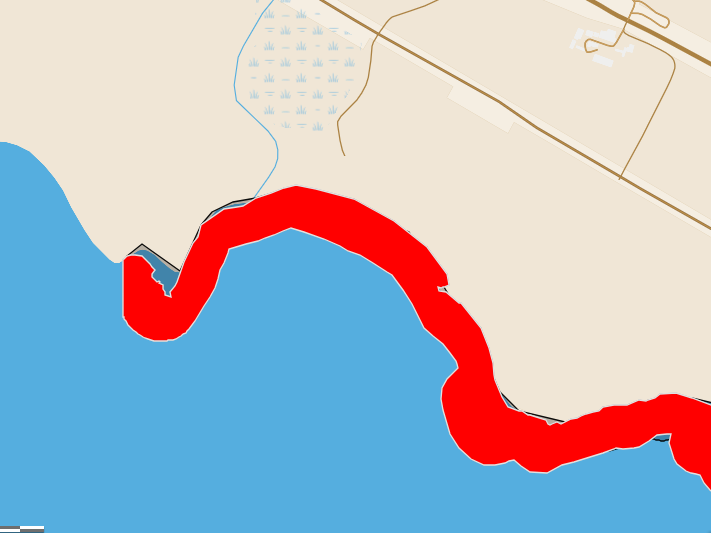
I have a web map that I have customized to look the way I want. I have this web map embedded on a webpage using an iframe. One of the layers on the embedded map does not look the way it does on the web map on AGOL. I've tried removing the layer and adding it, double checked the layer styling, ensured that effects are not on, etc. (although one odd thing is that every time I toggle off the feature-specific effects, it is back on after I save the web map; not sure if that is making any difference). I can't figure out why this one layer looks different. Any help much appreciated.
Here is how it looks in the web map:
And here is how it looks embedded:
And here is the code within the iframe:
<iframe frameborder="0" height="600" marginheight="0" marginwidth="0" rel="border: 1px solid #cccccc;" scrolling="no" src="//cdfw.maps.arcgis.com/apps/Embed/index.html?webmap=1e6386e0c3cb458e847455336b9be9a0&extent=-127.3743,34.5563,-114.4214,39.8127&zoom=true&previewImage=false&scale=true&legend=true&disable_scroll=true&popup_sidepanel=true" style="border: 1px solid #cccccc;" title="Sportfish and MPA Summary Regulations - 2022-2023 Season-220401- Copy For MPA Project_2 - STATEWIDE" width="100%"></iframe>



