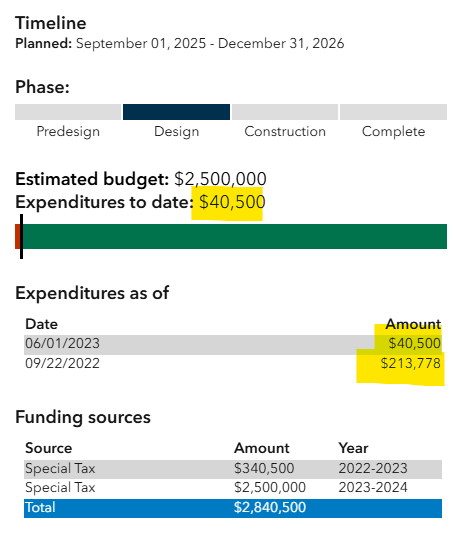
I was wondering if something was broken in our solution setup or if we are using the "Spending" related table in the way the application is configured.
The arcade expression built does not total the expenditures in the pop-up, from what I can tell... The bar representing "Expenditures to date:" does not represent the total of all expenditures (Spending related table). I've copied the arcade expression I believe needs to be adjusted, but I'm not confident enough in my Arcade to edit and risk reconfiguring the solution.
If this ISN'T intended to be used with multiple entries for expenditure, are there ways to configure to support? We would like to use this related table to note contract pay outs categorized by design phase (category field) / vendor (description).
Thanks in advance!
//colors
var estCostColor ='#00734C'

//budget values
var expendituresFS = FeatureSetByRelationshipName($feature, 'Spending');
var mostRecentExpend = first(OrderBy(expendituresFS, 'datespent DESC'));
var actcost = IIF(IsEmpty(mostRecentExpend), 0, mostRecentExpend.costamount);

var estCost = $feature.estcost;
var totalSpending = 0+ actcost
var budgetRemaining = estcost-actcost

//labels
var formattedCost = text(estCost, '$#,###')
var formattedBudgetRemaining = text(budgetRemaining, '$#,###');
var formattedSpent = Text(totalSpending, "$#,###")

//bar width % values
var fullwidth = estCost;
var costWidth = (estCost / fullwidth)*100;
var spentWidth = (totalSpending/fullwidth) *100
var remainingwidth = (budgetRemaining/fullwidth)*100


var b1
var b2
var b3
var spentDisplay

if(totalSpending > estCost){
  //Money Spent over budget
  if(totalSpending > fullwidth){
    spentDisplay = `<td style="background-color:#C12E00;width:${costWidth}%; border-right: 3px solid black"  title="Spent: ${formattedCost}"></td>`

    b1 = `${costWidth}%;border-right:3px solid black`


  }else{
    //Money Spent Over budget

    spentDisplay = `<td style="background-color:${estCostColor};width:${costWidth}%"  title="Spent: ${formattedCost}"></td>`

    b1 = `${costWidth}%`
  }

}else{
    if(totalSpending == 0 || IsEmpty(totalSpending)){
    //No Money spent
      spentDisplay = `<td style="background-color:${estCostColor};width:${costWidth}%;"  title="Remaining: ${formattedCost}"></td>`
    }else{
    //Money Spent, not over budget
      spentDisplay = `<td style="background-color:#C12E00;width:${spentWidth}%;border-right: 3px solid black"  title="Spent: ${formattedSpent}"></td>
            <td style="background-color:${estCostColor};width:${remainingwidth}%;"  title="Remaining: ${formattedBudgetRemaining}"></td>`
      b1 = `${spentWidth}%;border-right: 3px solid black`
      b2 = `${remainingwidth}%`
    }
}


var final = {type : 'text',
text :`<font style="font-size:18px;color:#000000"><b>Estimated budget:</b> ${formattedCost}</font></br>
<font style="font-size:18px;"><b>Expenditures to date:</b> ${formattedSpent}</font></br>
<table style="width:100%;border-collapse:collapse">
  <tr style="height:10px">
    <td style="background-color:white;width:${b1}"></td>
    <td style="background-color:white;width:${b2}"></td>
    <td style="background-color:white;width:${b3}"></td>
  </tr>
  <tr style="height:25px">
    ${spentDisplay}
  </tr>
  <tr style="height:10px">
    <td style="background-color:white;width:${b1}"></td>
    <td style="background-color:white;width:${b2}"></td>
    <td style="background-color:white;width:${b3}"></td>

  </tr>
</table>`
}

return final



