I'm programmatically creating a map series layout in ArcGIS Pro using CIM. I can enable the map series, set the map frame, layer, name & sort fields and set the extent options any way I choose via code. However, I cannot find a property to set the Scale under Center and Maintain Scale. See image.
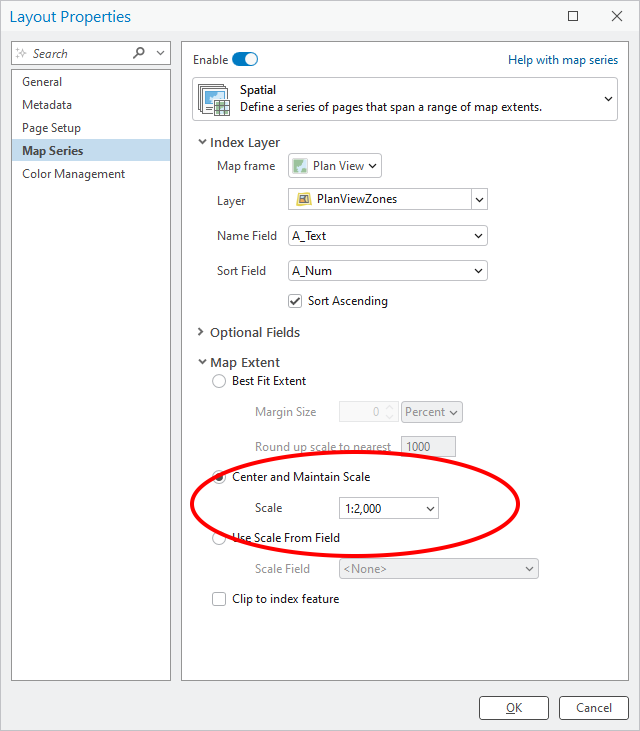
I can't find 'Scale' in the documentation. There is 'scaleRounding', but that only affects 'Round up scale to nearest ##' under Best Fit Extent.
This is my code. It works. I just can't change the Scale...
def enable_plan_view_map_series(aprx, map_name, layer_name, layout_name, map_frame_name, start_page):
    layer_URI, layout, layout_cim = get_layer_cim_definition(aprx, map_name, layer_name, layout_name)

    #Create CIM Spatial Map Series Object and populate its properties
    ms = arcpy.cim.CreateCIMObjectFromClassName('CIMSpatialMapSeries', 'V3')
    ms.enabled = True
    ms.mapFrameName = map_frame_name
    ms.startingPageNumber = start_page
    ms.currentPageID = start_page
    ms.indexLayerURI = layer_URI                    #Index layer URI from Layer's CIM
    ms.nameField = "Sheet_Name"
    ms.sortField = "Sheet_Num"
    ms.sortAscending = True
    ms.extentOptions = "ExtentCenter"

    layout_cim.mapSeries = ms                       #Set new map series to layout
    layout.setDefinition(layout_cim)                #Set the Layout's CIM definition

    #Force a refresh of the layout and its associated panes
    layout_cim = layout.getDefinition('V3')
    layout.setDefinition(layout_cim)
Thanks, any help would be greatly appreciated.

