I'm wondering what's the best practice is 4 selecting features of a feature class that was just created in the same tool.
This code works perfectly fine when I am running it in a notebook in pro. I get the expected amount of features in my output feature class. I presume this works because it adds the feature to my map and is able to select the desired features.
    arcpy.conversion.ExportFeatures(
        in_features=in_features,
        out_features= output_path,
        where_clause="Status = 'Confirmed'",
        use_field_alias_as_name="NOT_USE_ALIAS",
        field_mapping= field_mapping
    )
    arcpy.AddMessage('Exported routes')

    arcpy.management.SelectLayerByLocation(
        in_layer= f"{output_file_name}",
        overlap_type="INTERSECT",
        select_features=f"{feature1}",
        search_distance="5 Meters",
        selection_type="NEW_SELECTION",
        invert_spatial_relationship="NOT_INVERT"
    )
    arcpy.management.DeleteRows(output_file_name)

    arcpy.management.SelectLayerByLocation(
        in_layer= f"{output_file_name}",
        overlap_type="INTERSECT",
        select_features=f"{feature2}",
        search_distance="5 Meters",
        selection_type="NEW_SELECTION",
        invert_spatial_relationship="INVERT"
    )
arcpy.management.DeleteRows(output_file_name) but when I turn this into a tool the output feature class has 0 features in it. I'm guessing this does not work because it cannot select features of a feature class that is not in my map.
I have tried to add the newly created feature class to my map using a couple different methods: 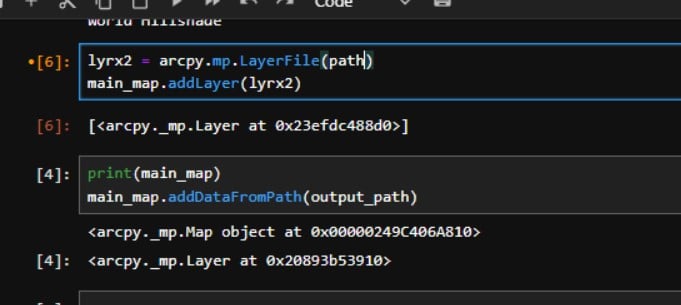
These return a layer object but the layer is not added to my map.
I guess the overall question is: what is the best way to approach making a selection from a feature class that has just been created?


