I use ArcGIS Pro for my daily work, but we're currently stuck with one legacy system on a runtime that requires an ArcMap 10.x .mxd, and I'm having trouble with a specific layer that's drawing really slowly.
I've used the PerfQA Analyzer tool and it's singling-out my 'Lakes' layer...showing that it's taking roughly 1 to 2 full seconds to draw.
What I don't understand is: what is the "Selection" portion of the rendering? The "Geography" and "Annotation" portions are fast, but it's the "Selection" that takes so long. Why?
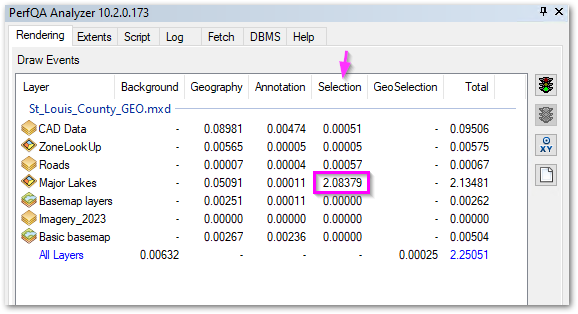
There is no definition query on the layer, the labeling doesn't use any SQL expression, and the layer isn't even 'selectable' in the table of contents.
I have tried re-creating spatial index and other attribute indexes. I am trying to determine what I might be able to change in order to speed-up this portion of the rendering.


