Hi all,
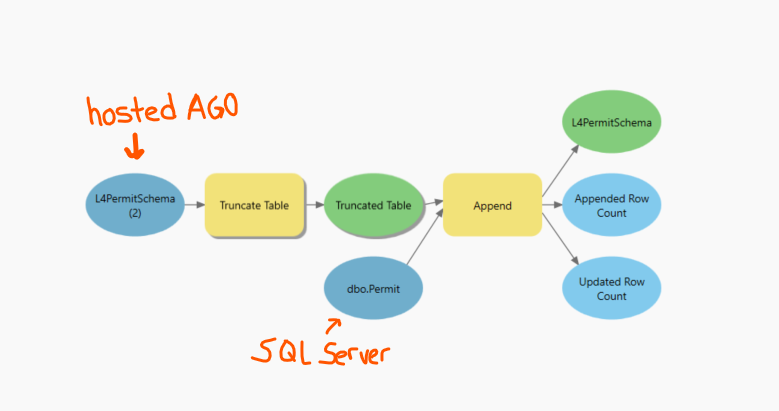
I have a simple model that replaces the data in a hosted feature service with data from a SQL server database. I would like this to run every night. When I run the model in my pro project, it works great, but I have yet to have a successful run overnight using Windows Task Scheduler. After some research and talking briefly with tech support (they are able to give me limited support as they don't really deal with WTS), here is everything that I have tried:
- Making sure "run whether user is logged on or not" and "run with highest privileges" settings are turned on in Windows Task Scheduler.
- Creating another task to run a batch file to open ArcGIS Pro before running the model
- Here's my batch file that I got from Esri support, only thing I changed is that I increased the timeout time to give the model plenty of time to run before closing Pro:
echo Opening up ArcGIS Pro
start /b C:\Program Files\ArcGIS\Pro\bin\ArcGISPro.exe
echo waiting 7000 seconds
timeout 7000
echo closing ArcGIS Pro
Taskkill /IM ArcGISPro.exe /T /F
echo Closing ArcGIS Pro and ending the batch file
- Making sure my computer's settings enable wake timers, increasing the amount of time before my computer goes to sleep, and making sure WTS is set to "wake the computer to run this task" under conditions.
Another weird thing is that even after changing all of these settings, my tasks are set to run at 12:00AM (batch file to open pro) and 12:30AM (scheduled model builder), but they are actually running at varying times just after 6AM. I feel I am close with the idea that I need Pro open in order to run the model, since I'm needing to connect to my SQL database connection and AGO credentials, but I'm hitting a wall since the batch file I tried is not doing the trick.
This is my first time trying to schedule a model like this so any help is appreciated.
Here is the model:
Here's what I see when I check if it has run in the morning, there are no helpful messages along with it: