I am investigating the arcgis-map-components and I am trying to put a group of components in the bottom left of the map, but I am unable to change the order in which the components can be seen on the map. This is my code snippet for the components:
<arcgis-map>
<arcgis-zoom position="bottom-left" layout="horizontal" />
<arcgis-expand
position="bottom-left"
expandIcon="esri-icon-layers"
expandTooltip="Layers"
collapseIcon="chevrons-down"
collapseTooltip="Layers"
label="Layers"
placement="top-leading"
closeOnEsc
>
<arcgis-layer-list label="Current layers" show-heading />
</arcgis-expand>
<arcgis-expand
position="bottom-left"
expandIcon="measure"
expandTooltip="Measure distance"
collapseIcon="chevrons-down"
collapseTooltip="Measure distance"
label="Measure distance"
placement="top-leading"
closeOnEsc
>
<arcgis-distance-measurement-2d unit="meters" />
</arcgis-expand>
<arcgis-scale-bar position="bottom-left" bar-style="ruler" unit="metric" />
</arcgis-map>
It does not matter which order I enter the components in my code they are displayed in the following order
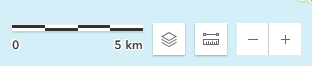
How can I get the components in the order in the code i.e. zoom, layer list, measure, scale bar?

