I thought I had this figured out but it came back again.
In Pro if you try to set symbology outside the layer values it gets mad. This is actually highly annoying because then we can never set consistent colors.
In code it seems to let me do it unless the scale is really small. Like -0.0003 to 0.0003 the classify values below with fail. Again highly annoying.
So here I try to set 10 breaks. If that fails I default to generic symbols. Again I really do not want to do that as then the user cannot compare anything.
        sym = rasterLayer.symbology
        sym.updateColorizer('RasterClassifyColorizer')
        # was Condition Number
        sym.colorizer.colorRamp = project.listColorRamps('Prediction')[0]
        sym.colorizer.classificationField = "Value"
        sym.colorizer.breakCount = 10
        #sym.colorizer.noDataColor = {'RGB': [255, 255, 255, 100]}

        # manual breaks
        # this will fail on small time periods
        if len(sym.colorizer.classBreaks) == 10:
            sym.colorizer.classBreaks[0].upperBound = -100
            sym.colorizer.classBreaks[0].label = "Over -40%"
            sym.colorizer.classBreaks[1].upperBound = -40
            sym.colorizer.classBreaks[1].label = "-30% to -40%"
            sym.colorizer.classBreaks[2].upperBound = -30
            sym.colorizer.classBreaks[2].label = "-20% to -30%"
            sym.colorizer.classBreaks[3].upperBound = -20
            sym.colorizer.classBreaks[3].label = "-10% to -20%"
            sym.colorizer.classBreaks[4].upperBound = -10
            sym.colorizer.classBreaks[4].label = "0% to -10%"
            sym.colorizer.classBreaks[5].upperBound = 10
            sym.colorizer.classBreaks[5].label = "0% to 10%"
            sym.colorizer.classBreaks[6].upperBound = 20
            sym.colorizer.classBreaks[6].label = "10% to 20%"
            sym.colorizer.classBreaks[7].upperBound = 30
            sym.colorizer.classBreaks[7].label = "20% to 30%"
            sym.colorizer.classBreaks[8].upperBound = 40
            sym.colorizer.classBreaks[8].label = "30% to 40%"
            sym.colorizer.classBreaks[9].upperBound = 100
            sym.colorizer.classBreaks[9].label = "Over 40%"
        else:
            arcpy.AddMessage("Warning Trend Rasters may not work with short time frames. Trying reduced symbols.")
            sym.updateColorizer('RasterStretchColorizer')
            sym.colorizer.colorRamp = project.listColorRamps('Condition Number')[0]
            sym.colorizer.stretchType = "StandardDeviation"
        rasterLayer.name = "Total Change"
        rasterLayer.symbology = sym
But today we had a case where the value range was -7 to 8 and the breaks did set to -40 to 40 like I want BUT the entire map all draws at a single color. So my check to look for not 10 breaks fix fails. If I ask it how many breaks it does say 10. And my bounds are correct. Worse it sets the color to the first blue - so now the user thinks its all in the >-40% category.
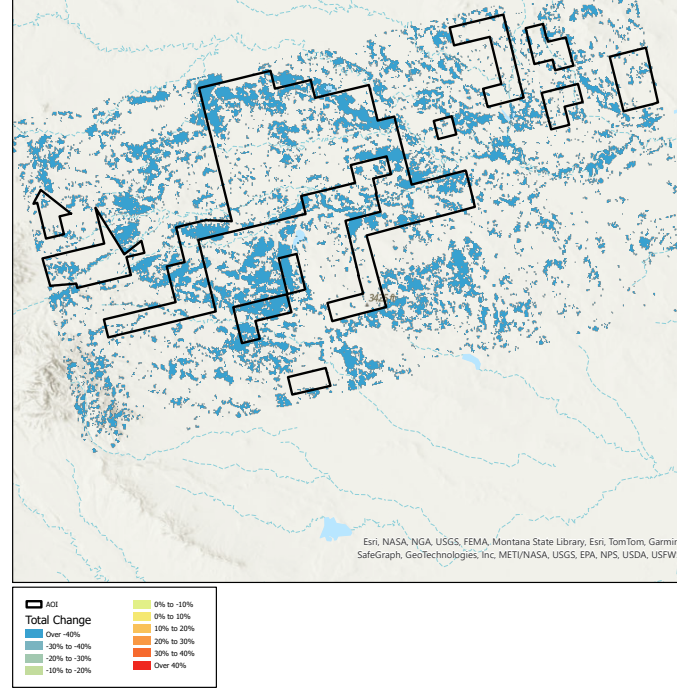
Any ideas on how to fix this? I am pretty confused why symbology will not let me set anything I want. We cannot have all the maps using a different color scale. That is weird.
thanks


