I am starting to use the @arcgis/core library instead of the old esriLoader pattern for some ESRI ArcGIS Maps SDK apps I have. Its nice to have some typing support in my IDE this way. However, I am often getting errors that properties and methods do not exist on my types even though I know that they do.
For example, in typescript apps I can do:
import Point from "@arcgis/core/geometry/Point";
import Polyline from "@arcgis/core/geometry/Polyline";
import FeatureLayer from "@arcgis/core/layers/FeatureLayer";
import GraphicsLayer from "@arcgis/core/layers/GraphicsLayer";
import Layer from "@arcgis/core/layers/Layer";

export function graphicsLayerFn(ptGraphicsLayer: GraphicsLayer) {
  // huh a GraphicsLayer does not have graphics property?
  ptGraphicsLayer.graphics.items.array.forEach((element: any) => {
    return element.id; // do something
  });
}

export function reprojectPoint(startPt: Point, endPt: Point) {
  const myPolyline = new Polyline();
  myPolyline.addPath([startPt, endPt]);
}

export function getLayerId(layer: Layer | FeatureLayer) {
  return layer.id;
}

export async function fetchExtent(layer: FeatureLayer) {
  //https://developers.arcgis.com/javascript/latest/api-reference/esri-layers-FeatureLayer.html#queryExtent
  const response = await layer.queryExtent();
  return response.extent.toJSON();
}

export function addEventToLayer(layer: Layer) {
  layer.on("layerview-create", () => {
    console.log("Success");
  });

  layer.on("layerview-create-error", (e) => {
    console.warn("error");
  });
}
And all typings are good there.
But if I try to do this in javascript using JsDoc approach there are all sorts of issues:
import Polyline from '@arcgis/core/geometry/Polyline';

/**
 *
 * @param {import("@arcgis/core/layers/GraphicsLayer")} ptGraphicsLayer
 */
function graphicsLayerFn(ptGraphicsLayer) {
  // huh a GraphicsLayer does not have graphics property?
  ptGraphicsLayer.graphics.items.array.forEach((element) => {
    return true; // do something
  });
}

/**
 *
 * @param {import("@arcgis/core/geometry/Point")} startPt
 * @param {import("@arcgis/core/geometry/Point")} endPt
 */
function reprojectPoint(startPt, endPt) {
  const myPolyline = new Polyline();

  // huh, the docs say that add path can take an array of Point or number but the
  // typing check says a geometry is needed???
  // https://developers.arcgis.com/javascript/latest/api-reference/esri-geometry-Polyline.html#addPath
  myPolyline.addPath([startPt, endPt]);
}

/**
 *
 * @param {import("@arcgis/core/layers/Layer")} layer
 * @returns
 */
function getLayerId(layer) {
  // the base layer type has a property of id? Not sure why this is
  // an error:
  return layer.id;
}

// how do we use the <a href="https://community.esri.com/t5/user/viewprofilepage/user-id/642472">@ArcGIS</a>/core types when we are not actually
// importing the library in the file itself? /// triple-slash directive?
// Or why are they sometimes not found

/**
 *  @param {import("@arcgis/core/layers/FeatureLayer")} layer footprint/stack layer
 *  @returns {Promise<{spatialReference: object, xmin: number, ymin: number, ymax: number, xmax: number} | {error: string}>} extent or error?
 */
async function fetchExtent(layer) {
  //https://developers.arcgis.com/javascript/latest/api-reference/esri-layers-FeatureLayer.html#queryExtent
  let response = await layer.queryExtent();
  return response.extent.toJSON();
}

/**
 * @param {import("@arcgis/core/layers/FeatureLayer")} layer
 */
function addEventToLayer(layer) {
  layer.on("layerview-create", () => {
    console.log("Success");
  });

  layer.on("layerview-create-error", (e) => {
    console.warn("error");
  });
}
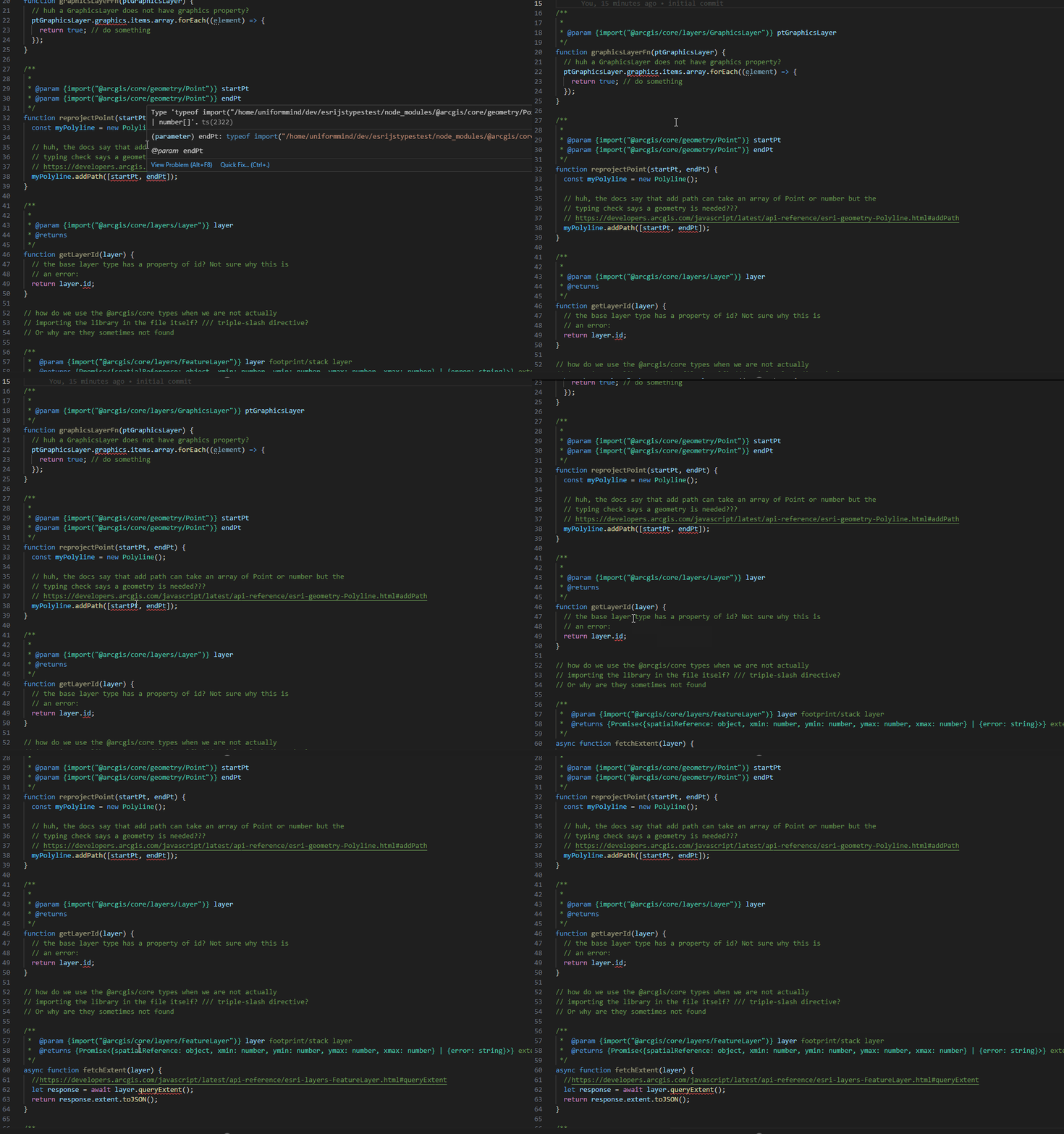
I suspect I'm doing something wrong here with how I import these types. Does anyone know what the trick or proper pattern is-- specifically for JavaScript and JSDoc based type hints?
Here is a gitlab repo with the code so you can see what I mean in an IDE like Visual Studio Code.


