I am attempting to build the Run Analysis Task With Python Tutorial.
https://developers.arcgis.com/documentation/arcgis-pro-sdk/tutorials/analysis-with-python/
I have built the Add-In as instructed but I keep hitting this cannot open file error when running the Python script. The Python script does exist at the specified file path. I have tried moving the script to other file locations and building the file path string in different ways. Each attempt has either lead back to this same error or broken the build entirely. The error in Pro suggests it is adding an extra \ to the file path.
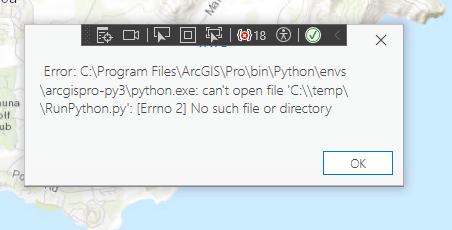
This is the value of myCommand in Visual Studio: /c ""C:\Program Files\ArcGIS\Pro\bin\Python\envs\arcgispro-py3\python.exe" "C:\temp\RunPython.py""
The Run GP Tool button works as expected.
Second Question: On a fundamental level, how do geoprocessing tasks get resolved in the Pro SDK?
I am trying to replace a script written in ArcObjects. I was able to make an arcpy script that got the job done, but it runs in ~4 hours compared to the ~20 minutes the ArcObjects script takes. I am looking into the Pro SDK as an alternative to arcpy, but from what I see geoprocessing is ultimately handled in arcpy anyway. Is there a C# based geoprocessing option in the Pro SDK?


