Hi all,
I’m currently working on a BIM-to-GIS integration task, and I’ve encountered an issue or misunderstanding that I need help understanding, also I am not a BIM engineer. Here's the situation:
- I exported a RVT file from Revit to IFC (IFC_4X3_Experimental), so I now have the same BIM file in two formats: RVT and IFC.
- I converted these two BIM files into feature datasets in ArcGIS Pro, then merged all the feature classes into a single feature class for each format.
The issue I’m facing is:
- The merged feature class from the IFC file contains 21,269 features, while the merged feature class from the RVT file has only 16,408 features. Since the IFC was exported from the RVT, I expected the number of features to be the same or even less, but not more.
I’ve tried different methods in ArcGIS Pro, like Select by Location, to find and compare the 4,861 additional features, but I haven’t had success.
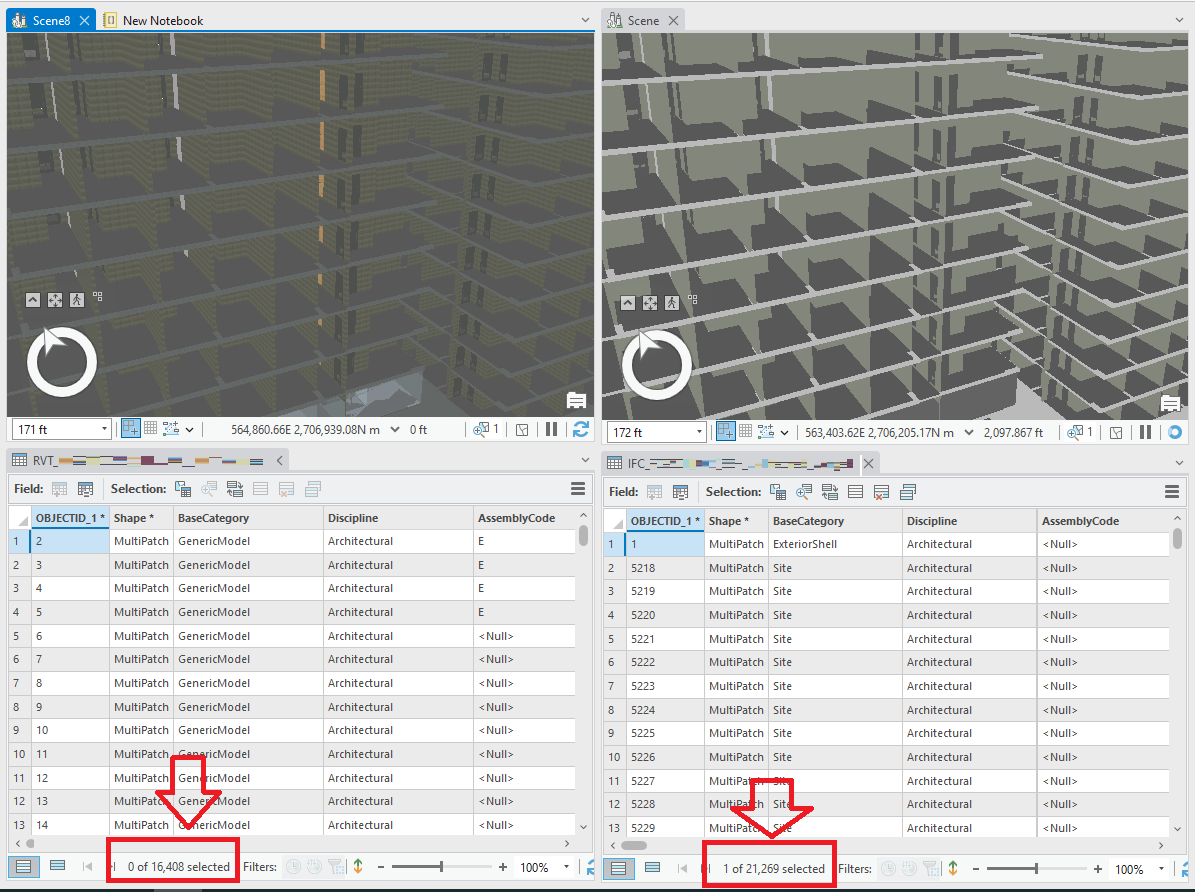
My questions are:
- What could be causing this increase in the number of features after converting the IFC file?
- How can I identify and select the additional features that exist in the IFC but not in the RVT?
Any advice or guidance would be greatly appreciated!
NOTE:
I have read some Esri's documentations about ArcGIS Pro BIM supported geometry.

