How can I make the callout background color change with an attribute value, like the screenshot below? The marker icons use a unique values renderer and I want the callout background color to match the icon color. I created this screenshot with SQL-based label classes for each value, but I don't like this solution. I will have 16 unique values, so any small tweak to the label appearance would have to be done 16 times! Is there a way to make the callout background color change based on an attribute? I am comfortable with ArcPy and Arcade if scripting is needed.
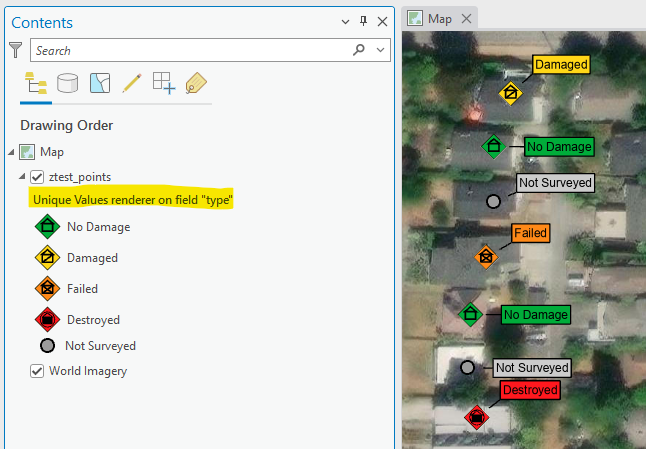
I tried Composite Labels, but gave up. It just seemed too complicated, but maybe this is the way to go.
Another idea was to use ArcPy to create label classes. I said above that I don't want SQL-based label classes, but if I can automate it, that takes the pain out of maintaining them. Something like this:
- Set up one class of labels the way I want it. Save to .stylx files for the text symbol and label placement. [manual - I may update these over time]
- Create 16 label classes, each with a SQL clause matching a marker icon. [manual or ArcPy - only need to do this once]
- Apply the .stylx files (text symbol and label placement) to every class [ArcPy]
- Set the callout background color specific to each class. [ArcPy]
This doesn't seem super hard, but I have no experience using ArcPy to modify label classes, so any tips there would be great. Thanks!


