I'm trying to create a link/button a user can click in the popup to generate a VCF (vCard) with data from the layer attributes, like:
data%0Atext/vcard;charset=UTF-8,{expression/expr4}
When I tried using Text content in the popup, it didn't work because it turns the link into
"#text/vcard;charset=UTF-8,{expression/expr4}"
which just brings the user back to the same page.
So I got creative and tried using the Image Content with this image:

And that works. I can set the link to
data%0Atext/vcard;charset=UTF-8,{expression/expr4}
and Map Viewer nor ExB doesn't change it. Now when I click the image, which was made to look like a regular link, it downloads the VCF.
But the image is taking up too much space in the pop-up. The image itself is very short (height) and slim, but for some reason the space allocated to it is huge. It's pushing all of my other attributes down. I want the download button/link to just look like another line attribute in the pop up.
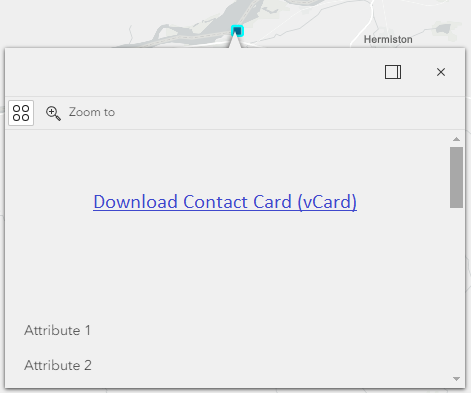
Maybe I'm an idiot, but I can't figure out how to control the image properties. How can I shrink the space taken up by the image and left justify it so it looks like any other line item?

