Hello @DanielWickens & @BrandiRank22 ,
I'm currently configuring our new GIS Request Management Solution on ArcGIS Online and have run into an issue that I could use some help with.
Specifically, I'm trying to add a column to the pre-configured Table within the My GIS Activities and GIS Activities Dashboards to display the "Requested By" and "Name" fields. These fields are crucial for us as they significantly influence the prioritization and assignment of tasks.
Here's what I've done so far:
- I added the "Requested By" and "Name" fields under Table -> Data -> Value Fields.
- Although these fields appear in the minimized data table at the bottom of the page during the configuration process and are not blank, they show up as blank in the actual Activities table on the dashboard.
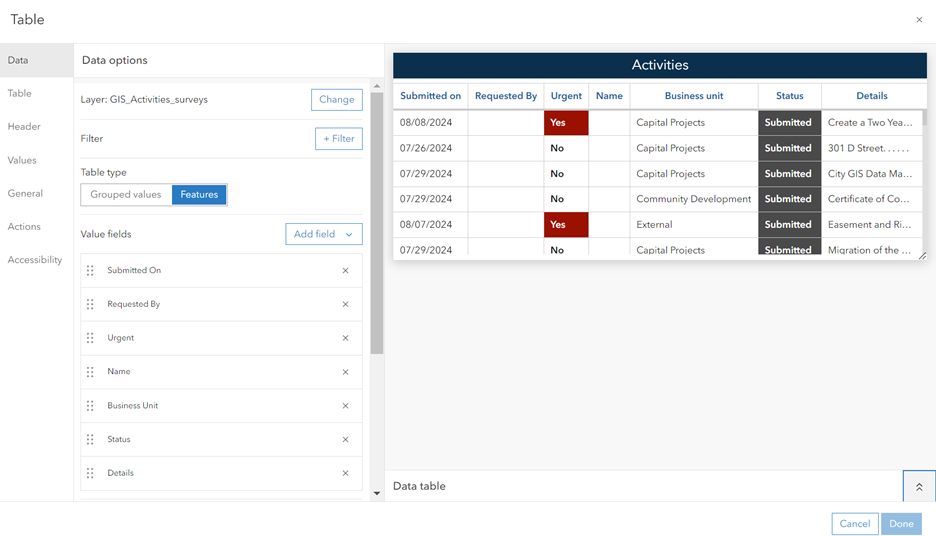
I’ve double-checked that the data is present and correctly formatted, but for some reason, it’s not displaying in the table as expected.
Has anyone encountered this issue before or found a solution? Any guidance would be greatly appreciated!
Thanks in advance for your help.


