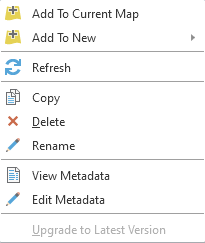
I am a new user of ArcGIS Pro, so I hope to explain my problem clearly. When trying to import an IFC file into ArcGIS Pro, I would like to assign it a proper coordinate system. After adding a folder from which I am going to import the file in the Catalog pane, I cannot access its 'properties' as there is no such option. In every tutorial video I have watched, people can access the properties of their layer while still in the Catalog pane and not in the Contents pane. In the screenshot, you can see my available options.